

 Posted by
 In an era where security cameras are a must-have for homes and businesses, the biggest risk isn’t just break-ins—it’s cyber intrusions. Many people unknowingly expose their CCTV cameras to the internet, making them easy targets for hackers.
In this guide, we’ll cover:
✅ How hackers find exposed cameras using Shodan, Google Dorking, and other tools
✅ How to check if your own camera is vulnerable
✅ What happens if a hacker gets your router’s public IP address
✅ Step-by-step instructions to secure your CCTV from cyber threats
CamXploit is a reconnaissance tool designed to help researchers and security enthusiasts check if an IP address is hosting an exposed CCTV camera. It scans common camera ports, checks for login pages, tests default credentials, and provides useful search links for further investigation.
✔️ Scans common CCTV ports (80, 443, 554, 8080, 8443)
✔️ Detects exposed camera login pages
✔️ Checks if the device is a camera stream
✔️ Identifies camera brands & known vulnerabilities
✔️ Tests for default credentials on login pages
✔️ Provides manual search links (Shodan, Censys, Zoomeye, Google Dorking)
✔️ Google Dorking suggestions for deeper recon
🔍 What It Does:
1️⃣ Scans open ports (Common CCTV ports)
2️⃣ Checks if a camera is present
3️⃣ If a camera is found, it:
Identifies camera brand & vulnerabilities
4️⃣ Provides manual search URLs for deeper investigation
Searches for login pages
Checks default credentials
🔍 How Hackers Find & Access Exposed CCTV Cameras
1️⃣ Shodan.io – The Search Engine for Hackers
Shodan is like Google, but instead of websites, it indexes internet-connected devices, including CCTV cameras, routers, and IoT gadgets. Hackers and security researchers use Shodan to scan the internet for exposed cameras.
How Hackers Use Shodan to Find CCTV Cameras
- Go to Shodan.io
- Use search queries to find open cameras
port:554 has_screenshot:trueport:554→ The default RTSP port for CCTV camerashas_screenshot:true→ Displays live camera screenshots (if publicly available)
- Look for specific camera brands
title:"Webcam" country:US- This searches for unsecured webcams in the U.S.
- Check if your own camera is exposed
ip:<your-public-ip>- Replace
<your-public-ip>with your actual public IP address (find it by Googling “What is my IP?”).
- Replace
💀 If you see your camera’s model, login page, or screenshots in Shodan, your CCTV is exposed to hackers!
2️⃣ Google Dorking – Finding Exposed Cameras via Google
Google Dorking is a technique used to find unprotected devices and sensitive information indexed by Google.
Common Google Dork Queries for CCTV Cameras
- Find live unsecured camera feeds:
inurl:"view/view.shtml" - Search for IP camera login pages:
intitle:"IP Camera" inurl:"login" - Check if your IP is indexed in Google:
site:<your-public-ip>
💀 If Google shows links to your camera’s web interface, it means your device is publicly visible!
3️⃣ Router & Port Forwarding Issues
Hackers don’t even need Google or Shodan if:
- Your router has open ports (80, 443, 554, 8080, etc.).
- UPnP (Universal Plug and Play) is enabled – This can expose devices automatically.
- You’ve set up port forwarding without securing your CCTV login.
How Hackers Exploit Open Routers
- They scan public IPs for open ports using tools like Nmap.
- If they find a camera login page, they try:
- Default passwords (e.g.,
admin/admin,12345) - Brute-force attacks using leaked passwords
- Default passwords (e.g.,
- Once inside, they can view footage, control the camera, and even spy on you.
💀 If a hacker finds your router’s IP, they can access any exposed devices—CCTV, smart TVs, even your PC!
🛡 How to Check If Your Camera Is Exposed & Secure It
🔍 Step 1: Check if Your Camera is Publicly Exposed
Method 1: Use Shodan
- Visit Shodan.io
- Enter your public IP address
- Look for any open ports (554, 80, 443, 8080, 8443, etc.)
Method 2: Google Search
- Try searching:
site:<your-public-ip> - If Google finds a camera login page, it’s exposed!
Method 3: Test Open Ports Using an Online Scanner
- Go to GRC ShieldsUP!
- Scan common ports for exposure
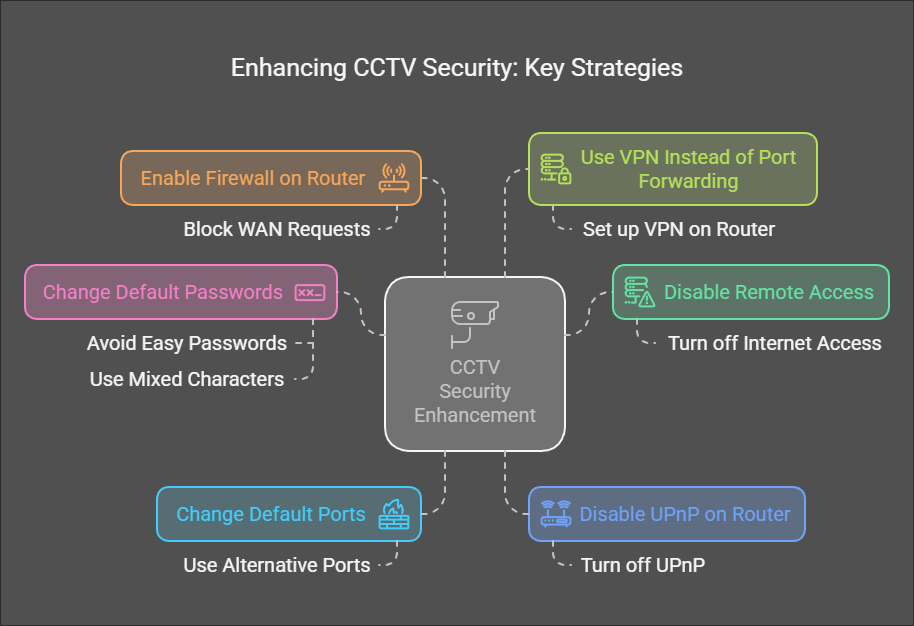
🛠 Step 2: Secure Your Home CCTV Camera (Prevent Hackers)
🔒 1. Disable Remote Access (If Not Needed)
If you only view the camera from home, turn off internet access in your camera settings.
🔐 2. Change Default Passwords & Use Strong Credentials
- Avoid easy passwords like
admin/admin - Use a mix of uppercase, lowercase, numbers, and symbols
- Example:
M0n$terC@m_S3cur3!
🚪 3. Change Default Ports
- Many cameras use port 554 (RTSP) and port 80 (HTTP) by default
- Change them in the camera settings (e.g., use 50554 instead of 554)
🚀 4. Disable UPnP on Your Router
- UPnP automatically opens ports for devices, making them vulnerable
- Turn it off in your router settings under Advanced > UPnP
🔐 5. Enable a Firewall on Your Router
- Some routers allow you to block all inbound traffic
- Look for options like “Block WAN Requests” or “Disable Remote Administration”
🛡 6. Use a VPN Instead of Port Forwarding
- Instead of exposing your camera online, use a VPN
- Set up a VPN on your router (e.g., OpenVPN, WireGuard)
- This way, only you can access your CCTV from outside
🧐 How to Check If a Hacker Has Accessed Your Camera
- Check Login History
- Many cameras log IP addresses of recent logins.
- If you see unknown IPs, your camera is hacked!
- Check Router Logs for Suspicious Traffic
- Look for unknown devices accessing ports 554, 80, 443
- Notice Unusual Camera Behavior
- Camera moves on its own? 😨
- Red light blinks when you’re not using it?
💀 These are signs someone is watching!
🚀 Final Thoughts: Stay Secure!
Exposed security cameras are a goldmine for hackers, and many people don’t realize their devices are broadcasting live on the internet.
✅ Check if your camera is exposed today using Shodan & Google Dorks
✅ Secure your camera with strong passwords, VPN, and port changes
✅ Disable unnecessary internet access if you don’t need remote viewing
🔴 DON’T WAIT UNTIL IT’S TOO LATE! Protect your privacy before hackers take control of your home security.
🚀 Have questions? Want help checking your setup? Drop a comment below! 🚀
Discover more from Spyboy blog
Subscribe to get the latest posts sent to your email.

I just wanted to let you know I appreciate your informati
LikeLike
This is my latest love from a hacker BS
LikeLike