
 Posted by
 Something uncomfortable is happening in cybersecurity.
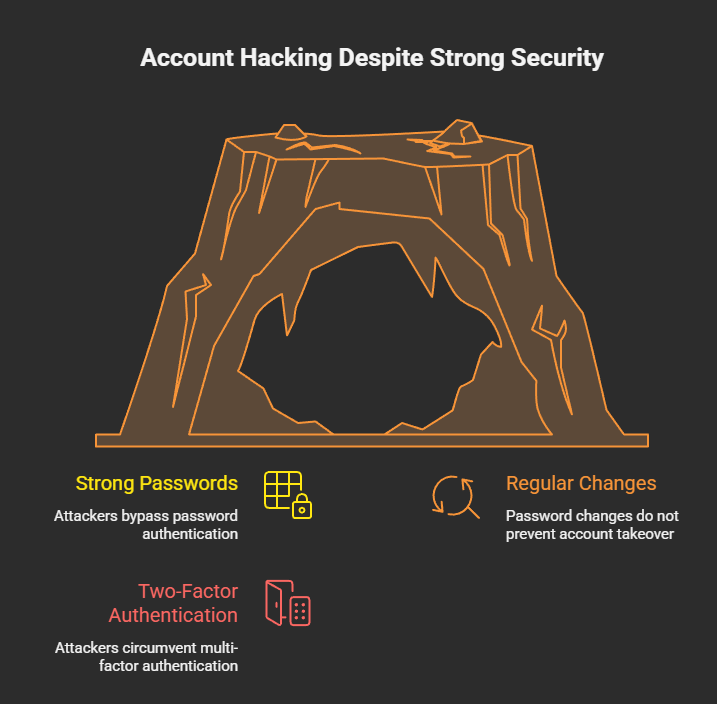
People are doing everything right:
- Strong passwords
- Regular password changes
- Two-factor authentication
And they’re still getting hacked.
No alerts.
No OTPs.
No suspicious login emails.
Just one day — locked out.
This isn’t a failure of passwords.
It’s proof that passwords are no longer the front door.
🧠 The Old Security Rule That No Longer Works
For years, security advice boiled down to one thing:
“If something feels wrong, change your password.”
That advice made sense when attacks focused on:
- Credential stuffing
- Phishing passwords
- Brute-force logins
But modern attacks don’t need your password at all.
They don’t attack login.
They attack what happens after login.
🔓 Authentication Is Not the Battlefield Anymore
Platforms like Google, Instagram, and WhatsApp have made authentication extremely strong.
Passwords + OTP + device checks = solid defense.
So attackers adapted.
They stopped fighting authentication
and started abusing authorization.
🔑 Authentication vs Authorization (The Critical Shift)
Let’s simplify:
- Authentication → Who are you?
- Authorization → What are you allowed to do?
Changing your password only affects authentication.
Authorization lives elsewhere:
- Connected apps
- OAuth tokens
- Linked devices
- Active sessions
- Admin roles
- Recovery emails
And password changes do not revoke these by default.
🎯 The New Attack Pattern (Why Passwords Are Irrelevant)
Here’s how modern attacks work:
- Victim is already logged in
- Attacker tricks them into approving something
- Platform records: User approved this
- Attacker gains long-term access
No login attempt occurs.
So when you change your password later?
👉 Nothing breaks for the attacker.
🎭 Real Examples Where Password Changes Fail
🧩 1. OAuth App Abuse
You click:
“Sign in with Google”
You approve email access.
Attacker reads your inbox forever.
You change your password:
- OAuth access still works
- Attacker stays inside
🧩 2. Session Hijacking
Attacker steals an active session.
You change your password:
- Session remains valid
- Attacker stays logged in
OTP is never triggered.
🧩 3. Linked Devices (Messaging Apps)
Attacker’s device is linked as “trusted”.
You change your password:
- Linked device remains
- Messages continue syncing
🧩 4. Business / Admin Role Abuse
Attacker gains admin rights via feature abuse.
You change your password:
- Ownership doesn’t revert
- Account stays hijacked
🚫 Why Platforms Don’t Auto-Fix This
Because from the system’s perspective:
“The user explicitly approved these actions.”
Revoking them automatically would:
- Break legitimate workflows
- Disrupt users
- Cause data loss
So platforms assume users know what they approved.
Attackers know users don’t.
👁️ Why Victims Say “I Changed My Password — Still Hacked”
Because they did the right thing —
for the wrong threat model.
The attacker didn’t steal credentials.
They were invited.
🧠 The Real Threat: Persistent Trust
Modern platforms prioritize:
- Convenience
- Cross-device access
- App ecosystems
That creates persistent trust objects:
- Tokens
- Sessions
- Permissions
These survive:
- Password changes
- OTP resets
- Device changes
Attackers aim for persistence, not credentials.
🛡️ What Actually Protects You (Password Change Isn’t Enough)
✅ 1. Revoke Authorizations (MOST IMPORTANT)
Audit regularly:
- Connected apps
- Third-party access
- Linked devices
This is where attackers live.
✅ 2. Kill Active Sessions
Force logout:
- All devices
- All browsers
Not just your own.
✅ 3. Secure Your Email First
Email controls recovery.
If email is compromised:
- Password changes are meaningless
✅ 4. Treat “Allow” as Seriously as “Enter Password”
Authorization = power.
Never approve something you didn’t initiate.
❌ 5. Stop Believing Passwords Are the Final Defense
Passwords are one layer.
Attackers walk around it.
🧠 For Security Teams & Developers
This is not a crypto problem.
Not a password policy problem.
It’s a UX trust problem.
Users can’t distinguish:
- Safe authorization
- Malicious authorization
Yet systems treat them the same.
🔮 The Future of Account Security
Future attacks will:
- Avoid login entirely
- Leave clean audit logs
- Use official APIs
- Survive password resets
Detection will get harder.
User education becomes critical.
⚠️ Final Reality Check
Changing your password feels powerful —
but against modern attacks, it’s often symbolic.
If the attacker:
- Has a token
- Has a session
- Has permission
Your password no longer matters.
🧨 You didn’t lose your account because your password was weak —
you lost it because trust was never revoked.
📢 Share this post. Someone you know thinks password changes are enough.
Stay aware. Stay skeptical. Stay secure.
Discover more from Spyboy blog
Subscribe to get the latest posts sent to your email.
