
 Posted by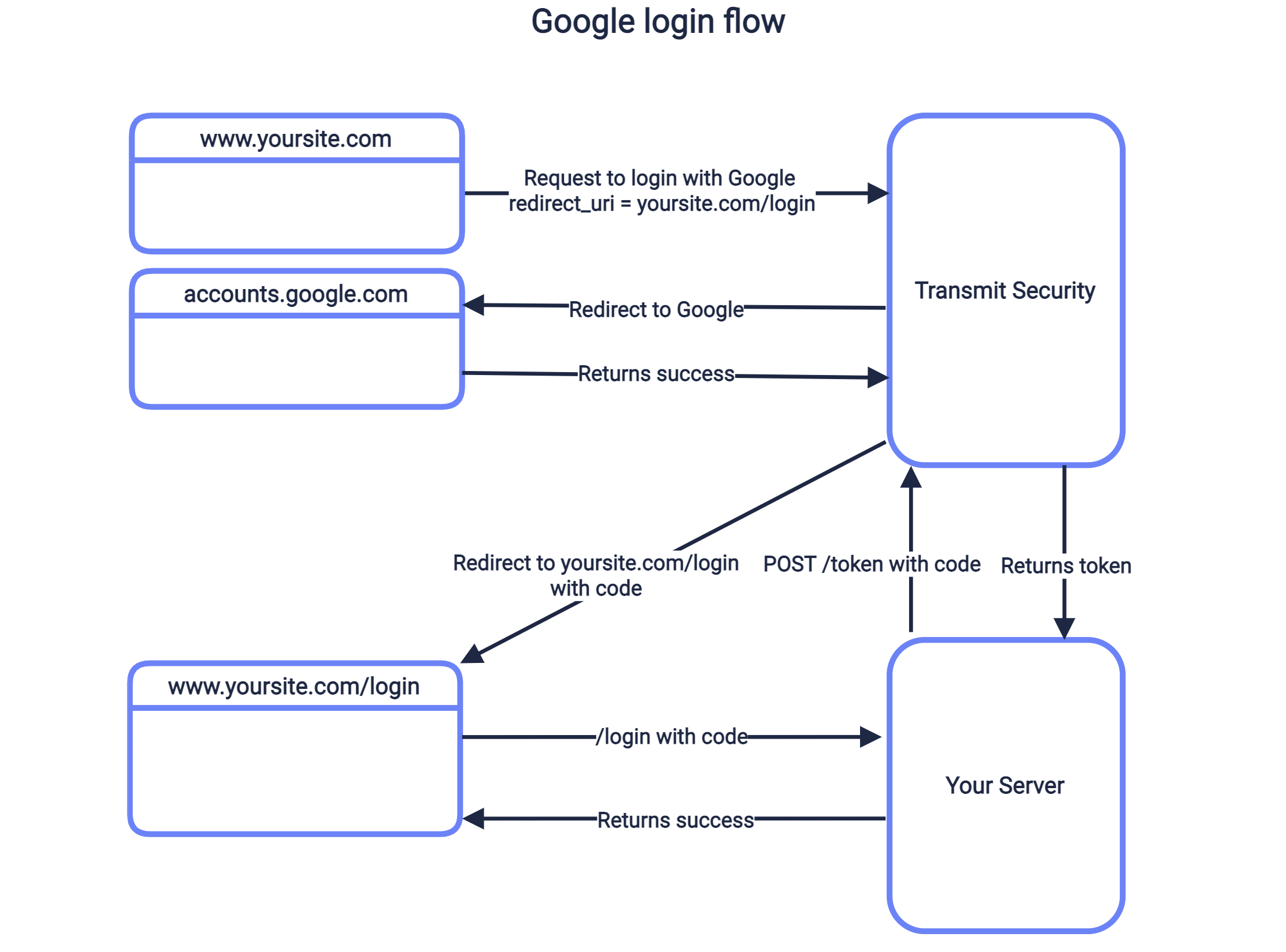

One Button to Rule Them All—and Break Them All
“Login with Google” is marketed as a security upgrade: fewer passwords, faster onboarding, and reduced friction. At internet scale, it does reduce certain risks—especially weak or reused passwords. But concentrating identity into a single IdP (Identity Provider) creates a powerful—and often underappreciated—blast radius.
If an attacker compromises one Google account, they don’t just get email. They can inherit access to dozens of third-party services, sometimes with persistent tokens that bypass MFA, sometimes without triggering fresh login alerts. Industry data (including Verizon’s DBIR) repeatedly shows credential misuse and social engineering as dominant breach drivers—exactly the conditions that turn federated login into a single point of failure.
This guide is a deep technical dive into how “Login with Google” works, where it fails in practice, how attackers abuse edge cases, and—critically—how to defend users and systems without abandoning SSO entirely.
What “Login With Google” Actually Is (Concepts)
At its core, “Login with Google” is OAuth 2.0 combined with OpenID Connect (OIDC):
- OAuth 2.0: Delegated authorization (access tokens, scopes).
- OIDC: Authentication layer (ID tokens, identity claims).
High-Level Flow
- App redirects user to Google’s authorization endpoint.
- User authenticates with Google (password, MFA, passkey).
- Google issues tokens to the app.
- App creates or links a local account.
This design is secure in theory. The dark side emerges in implementation choices, token handling, and human behavior.
Why Developers Love It (And Why Attackers Do Too)
Developer benefits
- No password storage liability
- Faster signup → higher conversion
- Google handles MFA, device trust, abuse detection
Attacker advantages
- One compromise → many services
- Tokens can outlive password changes
- Users rarely audit connected apps
- OAuth consent phishing bypasses MFA
Threat Model Overview (Concepts → Execution → Mitigation)
We’ll examine seven real-world risk categories:
- OAuth Token Theft & Replay
- Over-Privileged Scopes
- Account Linking Confusion (Pre-Account Takeover)
- Consent Phishing
- Session Persistence After Password Change
- Developer Misconfigurations
- SSO as a Single Point of Failure
Each section includes:
- What’s happening
- Why it works
- What to monitor
- How to mitigate
1) OAuth Token Theft: The Invisible Skeleton Key
Concept
OAuth tokens—especially refresh tokens—can grant long-lived access without reauthentication. If stolen, they bypass passwords and often MFA.
How It Happens (High-Level)
- Malware, malicious browser extensions, or leaked logs capture tokens.
- Attacker uses tokens to call APIs or impersonate the user.
- Access persists until explicit revocation.
Real-World Context
- Token replay is a known issue in OWASP Top 10 (Broken Authentication / Broken Access Control) discussions.
- Incident reports frequently show tokens surviving password resets.
Defensive Telemetry
# Conceptual: review unusual token usage patterns# Look for access from new IPs without login events
Mitigation
- Short token lifetimes
- Refresh token rotation
- Bind tokens to device/IP where possible
- Easy, visible “Sign out of all sessions”
2) Over-Privileged OAuth Scopes: When “Basic Profile” Isn’t Basic
Concept
Many apps request more scopes than necessary—sometimes for analytics, sometimes for convenience. Each scope expands impact.
Example Risky Scopes
- Gmail read access
- Contacts
- Drive files
Why It Matters
A breach of a low-quality third-party app can expose high-value Google data.
Detection
- Audit scopes granted per app.
- Flag apps with broad scopes + low trust.
Mitigation Checklist
- Least privilege scopes
- Separate auth vs data access
- Periodic forced re-consent
3) Account Linking Confusion (Pre-Account Takeover)
Concept
If a site allows:
- Email/password signup and
- “Login with Google”
…poor linking logic can let attackers bind their Google account to a victim’s existing account.
Typical Failure Mode
- Victim signs up with email/password.
- Attacker signs in with Google using the same email.
- App auto-links without verification.
Real-World Context
This class of bug has appeared in multiple bounty reports and aligns with OWASP Broken Authentication patterns.
Mitigation
- Explicit account linking confirmation
- Email verification before linking
- No silent merges
4) OAuth Consent Phishing: MFA’s Kryptonite
Concept
Instead of stealing passwords, attackers trick users into authorizing a malicious app.
Why It’s Dangerous
- No password entered
- MFA doesn’t help
- User legitimately grants access
Typical Lure
“Your account has a policy violation. Review details.”
User clicks → Google consent screen → grants access.
Detection Signals
- New app authorization followed by data access
- No corresponding login alert
Mitigation
- User education: consent ≠ login
- App reputation warnings
- Admin-restricted OAuth in enterprises
5) Password Change ≠ Session Death
Concept
Users assume changing their Google password logs out everything. Often, it doesn’t.
Why
- OAuth tokens remain valid
- Sessions persist by design
Defensive Reality
Incident response must include:
- Revoke all tokens
- Remove all third-party apps
- Invalidate sessions
User-Side Checklist
- Google Account → Security → Your connections to third-party apps
- Remove everything you don’t actively use
6) Developer Misconfigurations: Death by Defaults
Common Mistakes
- No
stateparameter (CSRF risk) - No PKCE for public clients
- Accepting ID tokens without verification
- No audience (
aud) checks
Example: Token Verification (Python)
from google.oauth2 import id_tokenfrom google.auth.transport import requestsidinfo = id_token.verify_oauth2_token( token, requests.Request(), CLIENT_ID)if idinfo['aud'] != CLIENT_ID: raise ValueError("Invalid audience")
Mitigation
- Enforce PKCE
- Strict token validation
- Follow Google’s latest OAuth security BCPs
7) SSO as a Single Point of Failure
Concept
SSO centralizes identity. That’s efficient—and dangerous.
If Google access is lost:
- Every dependent service is at risk
- Recovery becomes multi-platform chaos
Real-World Impact
During phishing waves, victims report losing access to:
- Social media
- Developer tools
- Finance dashboards
- SaaS platforms
All from one initial compromise.
Mitigation Strategy
- High-risk services: separate auth
- Hardware keys for Google accounts
- Secondary recovery emails locked down
Comparative Table: Benefits vs Hidden Risks
| Aspect | Benefit | Hidden Risk |
|---|---|---|
| No passwords | Less reuse | Token persistence |
| MFA handled | Strong baseline | Consent phishing |
| Fast signup | Higher conversion | Silent account linking |
| Central identity | Easy management | Massive blast radius |
Detection & Monitoring Playbook (Advanced)
For Users
- Monthly OAuth app review
- Login alerts enabled
- Hardware security key
For Organizations
- OAuth app allowlists
- CASB visibility into token use
- SIEM correlation: token use without auth
Should You Stop Using “Login With Google”?
No. But you should stop trusting it blindly.
SSO is powerful infrastructure. Like all infrastructure, it requires:
- Defense in depth
- Visibility
- Informed users
FAQ
Q1: Is “Login with Google” safe?
Yes, when implemented correctly—but misuse and token abuse create real risks.
Q2: Can hackers access all my apps if my Google account is hacked?
Potentially, yes—especially apps you logged into via Google SSO.
Q3: Does changing my Google password revoke access everywhere?
Not always. You must revoke third-party app access manually.
Q4: Is OAuth safer than passwords?
It removes password risks but introduces token and consent risks.
Q5: Can MFA protect against OAuth phishing?
No. OAuth consent phishing bypasses MFA by design.
Q6: What’s the biggest mistake developers make with Google login?
Over-privileged scopes and poor token validation.
Final Takeaway
“Login with Google” isn’t insecure—it’s powerful. And power without understanding creates silent failure modes. Most real-world compromises don’t break cryptography; they exploit tokens, trust, and assumptions.
Treat Google SSO like production infrastructure, not a convenience button. Audit it. Monitor it. Design for compromise.
Discover more from Spyboy blog
Subscribe to get the latest posts sent to your email.
