
 Posted by
 QR codes are everywhere now.
Restaurants.
Parking meters.
WhatsApp Web.
UPI payments.
Delivery apps.
Railway stations.
Online forms.
Most people scan them without thinking twice.
And that’s exactly why scammers love them.
Because unlike normal links…
QR codes hide what you’re actually opening.
You can’t instantly see:
- The website
- The payment request
- The malicious link
- The phishing page
You just scan and trust.
And cybercriminals are exploiting that trust at an alarming rate.
In this deep dive, we’ll uncover:
- 📱 How QR scams work
- 💸 How fake QR codes steal money
- 🧠 Why QR phishing (“Quishing”) is exploding
- 🏦 Real-world banking & UPI scams
- 🛠 How attackers create malicious QR codes
- ⚠️ The hidden dangers most people ignore
- 🛡 How to protect yourself
Because today…
A single scan can lead to financial fraud, malware, or stolen accounts.
Why QR Codes Became a Hacker’s Dream
QR codes exploded after:
- Digital payments
- Contactless systems
- COVID-era menus
- UPI adoption
- Mobile banking growth
People became conditioned to:
“See QR → Scan immediately.”
And scammers noticed.
Unlike suspicious URLs, QR codes:
- Hide the destination
- Feel official
- Are easy to replace physically
- Require less typing
- Create less suspicion
That makes them perfect for phishing.
What Is a QR Scam?
A QR scam happens when attackers use malicious QR codes to trick victims into:
- Sending money
- Visiting phishing sites
- Downloading malware
- Giving login credentials
- Linking banking apps
This is often called:
“Quishing”
(QR + Phishing)
And it’s growing rapidly worldwide.
The Most Common QR Scam Right Now
💸 Fake Payment QR Codes
This scam is exploding in:
- Small shops
- Parking areas
- Street vendors
- Delivery scams
- Rental listings
Here’s how it works:
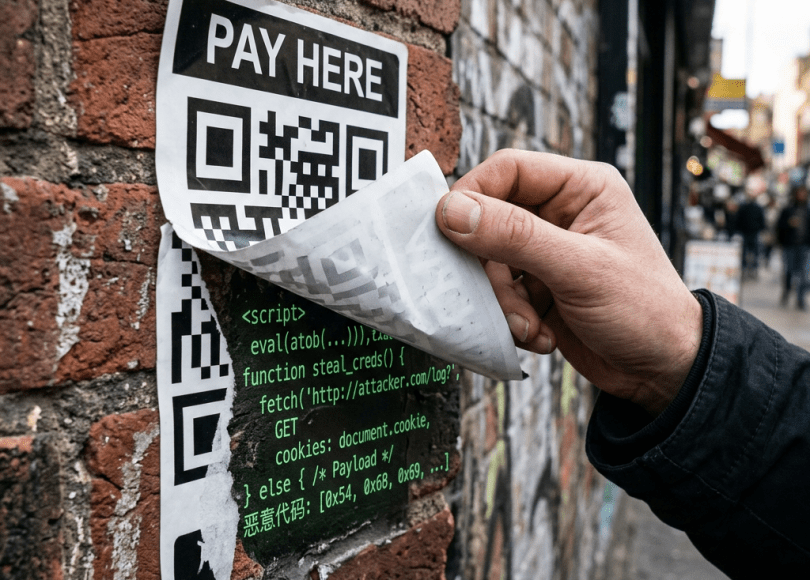
A scammer places a fake QR sticker over a real one.
You scan it.
You think you’re paying the shop.
But the money goes directly to the scammer.
Many victims never notice until later.
Real-World Example: UPI QR Fraud
In India, QR payment fraud has become extremely common.
Scammers:
- Print fake UPI QR stickers
- Paste them over merchant codes
- Wait for customers to scan
Victims unknowingly transfer money directly to fraud accounts.
Busy stores often don’t notice for hours or days.
Another Dangerous Scam: “Receive Money” Fraud
This scam targets:
- OLX users
- Marketplace sellers
- Freelancers
- Small businesses
The scammer says:
“I’ll send advance payment — scan this QR.”
Victims believe scanning receives money.
But many QR codes actually initiate payment requests.
The victim ends up PAYING instead.
How QR Phishing Works
QR phishing is becoming one of the fastest-growing cyber threats.
Here’s why.
Why Hackers Love QR Codes
QR codes bypass human suspicion because:
- Users can’t visually inspect links
- Mobile devices hide full URLs
- People trust QR technology
- Security awareness is low
Even experienced users can be tricked.
Step-by-Step: How a QR Phishing Attack Works
Step 1: Create Malicious Link
Attackers create:
- Fake banking pages
- Fake Microsoft logins
- Fake WhatsApp Web pages
- Fake Google login portals
Step 2: Convert Link Into QR Code
Free QR generators make this incredibly easy.
The QR looks harmless.
Step 3: Distribute the QR Code
Attackers spread it via:
- Posters
- Emails
- Fake invoices
- WhatsApp images
- Parking meters
- Restaurant tables
- Public places
Step 4: Victim Scans
The phone opens:
- Fake login page
- Payment request
- Malware download
- Session hijacking page
And the attack begins.
QR Codes Can Also Install Malware
Some QR codes redirect users to:
- Fake APK downloads
- Malicious apps
- Browser exploits
- Fake updates
This is especially dangerous on Android devices where APK installation is easier.
Examples include:
- Fake banking apps
- Crypto wallet malware
- Spyware
- Remote access trojans
The Fake WiFi QR Scam
This scam is appearing in:
- Airports
- Cafes
- Hotels
- Public places
You scan a QR to “connect to WiFi.”
Instead, it:
- Opens phishing pages
- Requests login credentials
- Installs malicious profiles
- Captures sensitive data
WhatsApp Web QR Hijacking
One of the sneakiest QR scams.
Scammers trick victims into scanning a fake “verification” QR.
But the QR is actually:
WhatsApp Web login pairing
Victims unknowingly connect their WhatsApp account to the attacker’s device.
The scammer gains access to:
- Messages
- Contacts
- Media
- Conversations
Without needing OTPs.
Why Mobile Phones Make QR Scams Worse
Phones are designed for:
- Speed
- Convenience
- Minimal friction
That means:
- URLs are shortened
- Security indicators are hidden
- Users react quickly
- Screens are smaller
Scammers exploit this perfectly.
The Psychology Behind QR Scams
Hackers exploit:
| Emotion | Example |
|---|---|
| Trust | “Official payment code” |
| Urgency | “Pay quickly” |
| Convenience | “Just scan here” |
| Confusion | Payment vs receive money |
| Authority | Fake parking/restaurant systems |
Most scams succeed because people act automatically.
Red Flags Most People Ignore
🚩 QR Sticker Looks Recently Added
Fake stickers are often pasted over originals.
🚩 No Business Branding
Legitimate payment systems usually include names/logos.
🚩 QR Opens Suspicious Website
Always inspect URLs before proceeding.
🚩 Requests APK Download
Huge warning sign.
🚩 Unexpected Login Page
Never enter credentials blindly after scanning.
Can QR Codes Be Dangerous Without Clicking Anything?
Usually, users still need to:
- Open the link
- Approve something
- Download an app
- Enter credentials
But QR codes are powerful because they shortcut human caution.
How Attackers Generate QR Codes
Creating QR codes is extremely easy.
Attackers:
- Create malicious link
- Convert it into QR
- Print or distribute image
That’s it.
No advanced hacking required.
The Rise of AI-Powered QR Phishing
Scammers now use AI to create:
- Professional fake websites
- Better phishing messages
- Realistic branding
- Personalized scam pages
This makes QR scams far more convincing than before.
How to Protect Yourself From QR Scams
Now the important part.
🔐 1. Preview URLs Before Opening
Many phones show:
“Open this link?”
Check carefully before proceeding.
🛡 2. Never Scan Random QR Codes Blindly
Especially from:
- Public posters
- Unknown messages
- Suspicious emails
- Social media comments
💸 3. Verify Merchant Name Before Paying
UPI apps usually show recipient name.
Always confirm before sending money.
🚫 4. Never Scan QR Codes to RECEIVE Money
This is critical.
Receiving money does NOT require you to scan someone’s QR code.
That’s a massive red flag.
📱 5. Avoid Installing Apps From QR Links
Only install apps from official app stores.
Never from random QR redirects.
🔍 6. Inspect Physical QR Stickers
Especially in:
- Parking areas
- Shops
- Restaurants
- Petrol pumps
Look for tampering.
Comparison: Safe QR vs Dangerous QR
| Safe QR Code | Dangerous QR Code |
|---|---|
| Official branding | Random sticker |
| Verified payment name | Unknown recipient |
| Trusted domain | Strange URL |
| App store links | APK downloads |
| Expected behavior | Unexpected login/payment |
The Bigger Problem: We Trust QR Codes Too Much
QR codes feel:
- Automatic
- Safe
- Official
- Convenient
That’s why they work so well for scammers.
Most people never stop to ask:
“What exactly am I opening?”
And attackers depend on that.
Final Thoughts: QR Codes Are Convenient — But Blind Trust Is Dangerous
QR technology itself isn’t unsafe.
The real danger is:
Blind trust.
Scammers know:
- People scan quickly
- Phones hide details
- Convenience overrides caution
And that’s why QR scams are exploding globally.
Today, a tiny black-and-white square can:
- Steal money
- Hijack accounts
- Install malware
- Capture credentials
All from a single scan.
Frequently Asked Questions (FAQ)
❓ Can a QR code hack my phone instantly?
Usually not instantly by scanning alone, but malicious QR codes can lead users to phishing pages, malware downloads, or scam payment requests.
❓ What is “Quishing”?
Quishing is QR-code phishing — using malicious QR codes to trick victims into scams or credential theft.
❓ Can QR codes steal banking information?
Yes. QR codes can redirect users to fake banking sites or scam payment pages.
❓ Is scanning a QR code safe?
Only if the source is trusted. Unknown or tampered QR codes can be dangerous.
❓ How do fake UPI QR scams work?
Scammers replace merchant QR codes with their own payment codes so victims send money directly to the scammer.
❓ Can QR codes install malware?
Yes. Some QR codes redirect users to malicious app downloads or phishing pages.
Final Call to Action
Right now:
- Double-check payment QR codes
- Verify UPI recipient names
- Stop scanning blindly
- Warn friends and family
- Share this article with someone who uses QR payments daily
Because scammers know something most people don’t:
The easier technology becomes…
The easier it becomes to exploit trust.
Discover more from Spyboy blog
Subscribe to get the latest posts sent to your email.
