
 Posted by
 Free WiFi feels harmless.
You walk into:
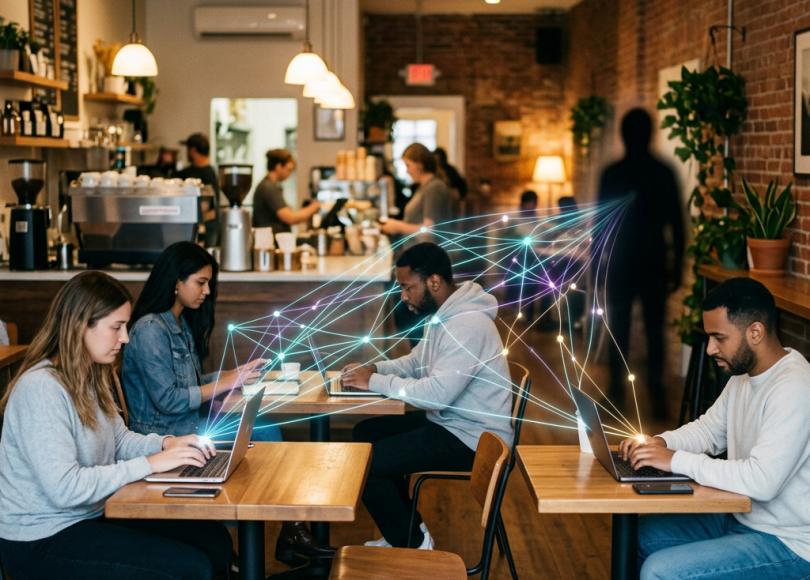
- A café
- Airport
- Hotel
- Railway station
- Shopping mall
You connect.
No password.
No setup.
Instant internet.
Convenient, right?
But behind the scenes…
Public WiFi networks can become playgrounds for hackers.
And most people have no idea how much risk they take when connecting to random networks.
Because on unsafe public WiFi, attackers may:
- Intercept traffic
- Steal login sessions
- Launch phishing attacks
- Spy on browsing activity
- Distribute malware
- Hijack accounts
All while victims casually scroll Instagram or check email.
In this deep dive, we’ll uncover:
- 🌐 How public WiFi attacks work
- 🎭 Fake hotspot scams explained
- 🕵️ What hackers can actually see
- ⚠️ The hidden dangers of “free internet”
- 🔐 Why HTTPS helps but isn’t enough
- 🛡 How to stay safe on public networks
Because sometimes…
The most dangerous network is the one offering “Free WiFi.”
Why Public WiFi Is a Huge Cybersecurity Risk
Public WiFi is dangerous because:
- Anyone nearby may connect
- Networks are often poorly secured
- Users trust them too easily
- Attackers can blend in anonymously
Unlike your home network…
Public WiFi environments are shared with strangers.
And cybercriminals love crowded digital environments.
What Hackers Can Potentially See on Public WiFi
Depending on network security, attackers may attempt to observe:
- Websites visited
- Unencrypted traffic
- DNS requests
- Login attempts
- Device information
Years ago, public WiFi attacks were incredibly easy.
Modern encryption improved security significantly…
But risks still remain.
Especially through phishing and fake hotspots.
The Most Common Public WiFi Scam: Fake Hotspots
🎭 “Evil Twin” Attacks
This is one of the most effective WiFi attacks today.
Here’s how it works:
A hacker creates a fake WiFi network with a legitimate-looking name like:
- Airport_Free_WiFi
- Cafe_Guest
- Railway_WiFi
- Hotel_Internet
Victims connect thinking it’s official.
But the attacker controls the network.
Everything passes through their system.
What Happens After You Connect?
The fake network may:
- Redirect users to phishing pages
- Capture login credentials
- Inject malicious ads
- Monitor traffic
- Distribute malware
Some fake hotspots even show:
Fake Login Portals
You think:
“I’m just accepting WiFi terms.”
But you’re actually entering:
- Email credentials
- Social logins
- Phone numbers
- Payment info
Directly to attackers.
Can Hackers Read My Passwords on Public WiFi?
It depends.
Most modern websites use:
HTTPS encryption
This protects data between your device and website.
That’s why browsers show:
🔒 Lock icons
HTTPS significantly reduced classic WiFi snooping attacks.
But attackers adapted.
The Real Danger Today: Phishing & Session Theft
Hackers now focus more on:
- Fake login pages
- Session hijacking
- Malware delivery
- Credential theft
Because tricking humans is often easier than breaking encryption.
What Is a “Man-in-the-Middle” Attack?
A:
Man-in-the-Middle (MITM) attack
Happens when attackers position themselves between:
- You
- The internet
Traffic flows through them.
Historically this allowed:
- Traffic monitoring
- Session stealing
- Data interception
Modern HTTPS reduced many MITM risks…
But not all.
Especially if users ignore warnings or interact with phishing pages.
Why Public Charging Stations Can Also Be Risky
Some attackers target:
- USB charging ports
- Public charging stations
This is sometimes called:
Juice Jacking
Malicious charging systems may attempt:
- Data access
- Malware installation
- Device compromise
Though modern phones improved protections significantly.
Still:
Using your own charger is safer.
Real-World Example: Airport WiFi Scams
Airports are prime targets because:
- Travelers are distracted
- People urgently need internet
- Users connect quickly without checking
Attackers create fake airport hotspots and wait for victims.
Some campaigns specifically target:
- Business travelers
- Corporate employees
- Remote workers
Because stolen corporate credentials are extremely valuable.
Public WiFi + Logged-In Accounts = Bigger Risk
If attackers steal:
- Session cookies
- Authentication tokens
They may hijack:
- Email accounts
- Social media
- Cloud dashboards
Sometimes without needing passwords.
This is why session theft became extremely popular among cybercriminals.
Why Mobile Phones Are Especially Vulnerable
Phones automatically:
- Reconnect to known networks
- Prioritize convenience
- Hide technical warnings
Users also:
- Read less carefully on small screens
- Click faster
- Ignore security indicators
Attackers exploit this perfectly.
The Psychology Behind Public WiFi Attacks
Hackers rely on:
| Human Behavior | Why It Works |
|---|---|
| Convenience | People want fast internet |
| Urgency | Travelers need access quickly |
| Trust | “It’s probably official” |
| Distraction | Busy environments reduce caution |
| Familiarity | Free WiFi feels normal |
Most attacks succeed because users don’t verify networks carefully.
Warning Signs a WiFi Network May Be Fake
🚩 Duplicate Network Names
Two similar hotspot names can indicate an Evil Twin attack.
🚩 No Password on Sensitive Locations
Completely open networks are riskier.
🚩 Strange Login Pages
Unexpected credential requests are suspicious.
🚩 Browser Security Warnings
Never ignore HTTPS/security warnings.
🚩 Frequent Redirects or Popups
Could indicate malicious network manipulation.
Can Public WiFi Infect Your Device?
Potentially yes.
Especially through:
- Fake software updates
- Malicious downloads
- Phishing pages
- Vulnerable devices
Most infections still require user interaction.
But unsafe networks increase exposure.
Why VPNs Help — But Aren’t Magic
A VPN encrypts traffic between:
- Your device
- VPN provider
This helps reduce:
- ISP visibility
- Local network snooping
- Public WiFi interception
But:
- VPN providers themselves may still see traffic
- VPNs do NOT stop phishing
- VPNs do NOT make users anonymous
Still, they’re useful on public WiFi.
How to Stay Safe on Public WiFi
Now the important part.
🔐 1. Verify Network Names Carefully
Ask staff for the exact WiFi name.
Don’t guess.
🛡 2. Avoid Sensitive Activity
Avoid logging into:
- Banking apps
- Crypto wallets
- Work dashboards
On unknown networks.
🌐 3. Use HTTPS Everywhere
Never proceed past browser security warnings.
📱 4. Disable Auto-Connect
Prevent devices from automatically joining networks.
🚫 5. Turn Off WiFi When Not Using It
Especially in crowded areas.
🔑 6. Use Multi-Factor Authentication
Even if credentials are stolen, MFA adds protection.
🔌 7. Use Your Own Charger
Avoid random public USB charging stations.
Comparison: Safe vs Risky Public WiFi Behavior
| Safer Habits | Riskier Habits |
|---|---|
| Verify network names | Connect blindly |
| Use VPN | Open sensitive accounts openly |
| Disable auto-connect | Save unknown networks |
| Check HTTPS | Ignore warnings |
| Use MFA | Password-only accounts |
The Bigger Problem: People Trust Public WiFi Too Easily
Public WiFi feels:
- Official
- Convenient
- Normal
- Safe
But attackers know:
Most users don’t think twice before connecting.
That’s what makes these attacks effective.
Final Thoughts: Free WiFi Isn’t Really Free
When you connect to public WiFi…
You may be exposing:
- Personal data
- Login sessions
- Credentials
- Browsing activity
Modern encryption improved internet safety dramatically.
But cybercriminals adapted.
Today, public WiFi attacks rely less on “movie-style hacking”…
And more on deception, phishing, and human trust.
Because the easiest system to hack…
Is often the human one.
Frequently Asked Questions (FAQ)
❓ Can hackers see my passwords on public WiFi?
Modern HTTPS encryption protects many passwords, but phishing pages and fake hotspots can still steal credentials.
❓ Is public WiFi safe with HTTPS?
Safer than before, but not completely safe. Fake hotspots and phishing attacks still pose risks.
❓ What is an Evil Twin WiFi attack?
A fake WiFi hotspot designed to look legitimate so victims connect unknowingly.
❓ Can public WiFi infect my phone?
Potentially yes through malicious downloads, phishing pages, or vulnerable software.
❓ Does a VPN make public WiFi safe?
VPNs improve security by encrypting traffic but do not stop phishing or malware attacks.
❓ Should I use banking apps on public WiFi?
It’s safer to avoid sensitive financial activity on unknown public networks whenever possible.
Final Call to Action
Right now:
- Disable auto-connect on your devices
- Review saved WiFi networks
- Stop blindly trusting public hotspots
- Use stronger account security
- Share this article with someone who uses free WiFi daily
Because sometimes…
The most dangerous hacker isn’t across the world.
They’re sitting in the same café.
Discover more from Spyboy blog
Subscribe to get the latest posts sent to your email.
