

 Posted by
 In the shadowy corners of the digital world, cybercriminals are constantly finding new ways to infiltrate systems without needing passwords. This blog post explores the various methods hackers use to breach computer security, the tools they employ, and, importantly, how you can protect yourself against such attacks.
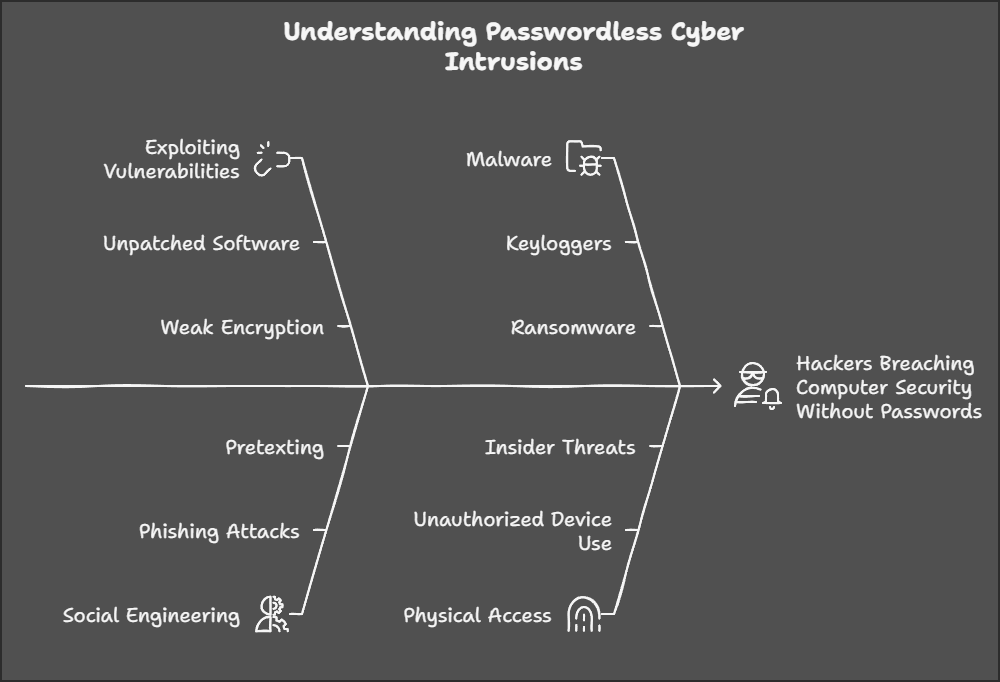
Understanding the Methods
1. Exploiting Software Vulnerabilities
- Zero-Day Exploits: Hackers find and use unknown vulnerabilities in software before they are patched by developers. These are particularly dangerous because there’s no defense until the vulnerability is discovered and fixed.
- Tool: Metasploit Framework for testing and using exploits.
- Example: A hacker might use a zero-day vulnerability in a widely used browser to gain access.
- Buffer Overflow: By sending more data to an application than it can handle, hackers can overwrite memory, execute arbitrary code, or crash the system.
- Tool: Custom scripts or tools like Immunity Debugger.
2. Social Engineering
- Phishing: Hackers trick individuals into providing access or clicking on malicious links.
- Tool: Email platforms, phishing kits like Gophish.
- Example: Emails that mimic legitimate services but lead to sites that steal login credentials or install malware.
- Baiting: Offering something enticing (like free software or movies) that’s actually malware in disguise.
- Tool: Malicious USB drives or websites.
3. Malware
- Trojan Horses: Disguised as legitimate software, these can give hackers control over your computer.
- Tool: Tools like Cobalt Strike for deploying Trojans.
- Ransomware: Encrypts files and demands payment for decryption.
- Tool: Ransomware strains like WannaCry or Ryuk.
- Spyware: Secretly monitors and collects information without user consent.
- Tool: Keyloggers like Ardamax.
4. Physical Attacks
- USB Drive Attacks: Inserting a malicious USB drive can automatically execute code if autorun is enabled.
- Tool: Custom-made USB drives with pre-installed malware.
- Direct Hardware Access: In rare, high-stakes scenarios, physical access can lead to direct tampering with hardware.
5. Network Attacks
- Man-in-the-Middle (MitM): Intercepting communications between networks to eavesdrop or alter data.
- Tool: Software like Wireshark for monitoring, or more malicious tools like SSLstrip.
- ARP Spoofing: Redirecting traffic to the hacker’s machine by poisoning the ARP cache.
- Tool: Ettercap.
- Wi-Fi Hacking: Cracking poorly secured Wi-Fi networks to gain access to connected devices.
- Tool: Aircrack-ng for cracking WEP/WPA keys.
How to Secure Yourself
Software Security:
- Regular Updates: Keep all software, especially OS and browsers, up to date. Developers often release patches for vulnerabilities.
- Use Security Software: Install reputable antivirus, anti-malware, and firewall solutions.
User Vigilance:
- Phishing Awareness: Be skeptical of unsolicited communications. Verify the authenticity of emails and websites.
- Password Management: Use strong, unique passwords for different services. Employ password managers.
Network Security:
- Secure Wi-Fi: Use WPA3 if available, change default router passwords, and use a guest network for visitors.
- VPNs: Use VPNs on public Wi-Fi to encrypt your internet traffic.
Physical Security:
- USB Vigilance: Don’t use unknown USB devices. Disable autorun features on your computer.
- Lock Your Devices: Always lock your computer when unattended, especially in shared spaces.
Behavioral Practices:
- Least Privilege Principle: Run applications with the least privileges necessary. Use admin rights only when needed.
- Backup Regularly: Regular backups can save you from data loss due to ransomware or hardware failure.
Monitoring and Response:
- Log Analysis: Regularly check system logs for suspicious activities.
- Incident Response Plan: Have a plan for what to do if you suspect a breach, including whom to contact and how to contain the damage.
Conclusion
Hackers exploit a range of methods to bypass traditional security measures like passwords. Understanding these methods not only demystifies their tactics but also underscores the importance of proactive security measures. By educating yourself and implementing robust security practices, you significantly reduce the risk of your computer being compromised. Remember, cybersecurity is an ongoing process, not a one-time setup. Stay vigilant, stay informed, and keep your digital life secure.
 Spyboy blog