
 Posted by
 In the world of open-source intelligence (OSINT), phone numbers are one of the most underrated identifiers. Unlike usernames or emails, which are often generic or pseudonymous, mobile numbers are personal, permanent, and often tied to multiple services—making them a goldmine for recon. In this guide, we’ll walk through step-by-step techniques (all legal and ethical) for phone number OSINT—from tools and apps to search engine dorks and UPI handles.
Whether you’re a cybersecurity analyst, a penetration tester, or a privacy enthusiast, this guide will show you just how much can be uncovered from a single 10-digit string.
🔍 Why Do Phone Number OSINT?
A mobile number is not just a contact point; it’s a digital fingerprint. People reuse the same number across social media, financial services, job boards, messaging apps, and e-commerce platforms. With the right tools and techniques, you can:
- Discover full names and profile pictures
- Identify email addresses, location, or employers
- Correlate social media accounts
- Determine financial app usage (like UPI, PayPal)
- Uncover data breaches
- Verify scam calls or suspicious texts
All without needing access to private databases or illegal tactics.
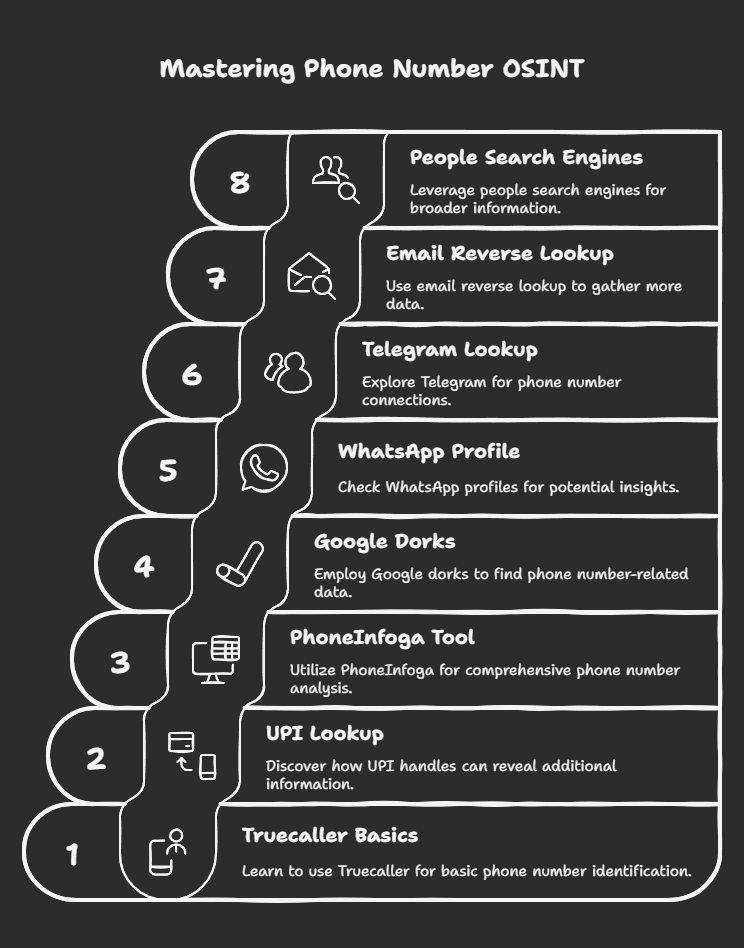
🛠️ 1. Start with the Basics – Truecaller
Truecaller is the de-facto first stop for phone OSINT. With over 350 million users worldwide, it often reveals:
- Full Name (or whatever name they used to register)
- Profile Picture (a huge clue)
- Email Address (sometimes)
- Social media links (if synced)
- Spam score or reporting history
🔸 How to Use:
- Visit Truecaller Web
- Sign in using your Google or Microsoft account
- Enter the phone number with country code (e.g.,
+91for India)
⚠️ Privacy Note:
Truecaller works on crowdsourced data. If the target’s number is in someone’s contact list who uses Truecaller, it may appear with the name saved there.
🧾 2. UPI (Unified Payments Interface) Lookup — Hidden Goldmine
Many Indian users link their phone numbers to UPI handles for payments through apps like PhonePe, Google Pay, Paytm, etc.
You can use payment apps to:
- Get the registered name for the number
- See their profile picture
- Sometimes infer their bank name
🔸 How to Use (PhonePe Example):
- Open PhonePe
- Go to To Contact > Add by phone number
- Enter the number. If it’s registered, it’ll show:
- Full name (bank-verified)
- Profile pic
- Do not proceed with sending money—this is just for lookup.
This method is not illegal, as no transaction is made. You’re just checking whether the number is valid on the UPI network.
🛠️ 3. Use PhoneInfoga – The OSINT Swiss Knife for Phone Numbers
PhoneInfoga is one of the best tools for phone number recon. It automates many steps like checking for leaks, VoIP info, country details, and Google dorks.
🔸 Features:
- Number validation and formatting
- Carrier lookup
- VoIP detection
- Google search and pastebin dorks
- API integration with tools like Numverify, OVH, etc.
🔸 Installation (Docker or Python):
git clone https://github.com/sundowndev/PhoneInfoga.git
cd PhoneInfoga
python3 -m pip install -r requirements.txt
python3 phoneinfoga.py -n +911234567890
You can also use the web version hosted temporarily at:
https://demo.phoneinfoga.crvx.fr/
🌐 4. Google Dorks for Phone Numbers
Search engines are still one of the most powerful OSINT tools when used properly.
🔸 Dork Examples:
"1234567890" site:facebook.com
"1234567890" site:linkedin.com/in
"1234567890" site:pastebin.com
"1234567890" filetype:xls OR filetype:csv
intitle:"contact us" "1234567890"
🔍 Try combinations like:
"Name Surname" "1234567890""email@example.com" "1234567890""1234567890" site:github.com
This can help:
- Find job profiles
- See where the number has been posted
- Check for past leaks or breaches
- Discover associated usernames or handles
💬 5. WhatsApp Profile Check (Passive)
When you save a number and check it on WhatsApp, you can often see:
- Their profile pic
- Name (if shared)
- About / Bio
- Last seen (if public)
🔸 Bonus Trick:
If they use a business account, it may show:
- Their Business Name
- Website
- Working hours
- Location
Again, this is passive recon—you’re not initiating contact.
📷 6. Telegram Lookup
Telegram allows search by phone number and sometimes shows:
- Username
- Display name
- Profile photo
- Bio or links
Use:
- Saved Contacts
- Add by phone number
- Bots like @PhoneFinderBot or @EyeofGod_bot (Note: use these with caution and ethics)
📧 7. Reverse Lookup via Email
Some users link their phone numbers to email addresses that are exposed in data breaches or social accounts.
Use these platforms to correlate:
- HaveIBeenPwned.com
- Dehashed.com (requires login)
- Hunter.io – for discovering emails tied to a domain or name
- Skymem – for publicly scraped emails
Once you find the email, you can pivot to LinkedIn, Twitter, or Gravatar.
👤 8. People Search Engines
Some websites offer reverse phone search capabilities. Most are paid, but some free options can yield limited info:
- ZLOOKUP: https://www.zlookup.com/
- OkCaller: https://www.okcaller.com/
- NumBuster (App-based)
- WhoCallsMe (for spam numbers)
- Truecaller Web (again, powerful)
🕵️ 9. Check for Leaks or Dumps
Google Dork for breaches:
"1234567890" site:pastebin.com
"1234567890" filetype:txt
Also check:
- Raidforums (archives)
- Breach forums (use caution; many are illegal)
- GitHub repos (people often accidentally push data)
📱 10. Use Caller ID and SMS Linking
Some online services link phone numbers in unexpected ways:
- Ride-sharing apps like Ola, Uber (emails/receipts leak info)
- Food delivery apps like Zomato, Swiggy
- SMS preview links that leak names
- Forgot Password flows (they may reveal email or name)
Try entering the number into a service’s forgot password page and observe what info is leaked (e.g., partially visible emails).
🔐 Legal and Ethical Reminder
All techniques mentioned here are for educational and lawful OSINT purposes only. Always:
- Avoid social engineering or impersonation
- Do not access private accounts or systems
- Do not spam or harass
- Respect privacy and data protection laws (like GDPR, IT Act, etc.)
🔚 Conclusion: One Number, Endless Clues
Phone number OSINT is an underutilized but incredibly rich field. From Truecaller and UPI verification to Google dorks and breach hunting, you can uncover a surprising amount of data legally and ethically. Whether you’re validating a suspicious message, mapping a scam ring, or conducting recon for a red team operation—these techniques are critical.
📌 Bonus Toolkit
| Tool | Use Case |
|---|---|
| Truecaller | Identity, photo, email |
| PhoneInfoga | VoIP check, Google dorks |
| UPI (PhonePe, Paytm) | Real name and DP |
| WhatsApp/Telegram | Photo, bio, account type |
| Google Dorks | Public exposure |
| HaveIBeenPwned | Breach correlation |
| ZLookup, OkCaller | Reverse lookup |
| LinkedIn, Facebook | Professional footprint |
| Forgot Password | Email & name hints |
🚨 Want to Stay Private?
If you’re concerned about your own number leaking data:
- Avoid linking numbers to public accounts
- Don’t reuse your number for spammy services
- Disable contact syncing
- Use apps like Jumbo, SimpleLogin, or Google Voice for safer communications
Have more recon tricks? Share them in the comments or reach out! OSINT is always evolving, and your input could help someone stay safer or get smarter in their investigations.
Happy hunting! 🔍📞
 Spyboy blog