

 Posted by
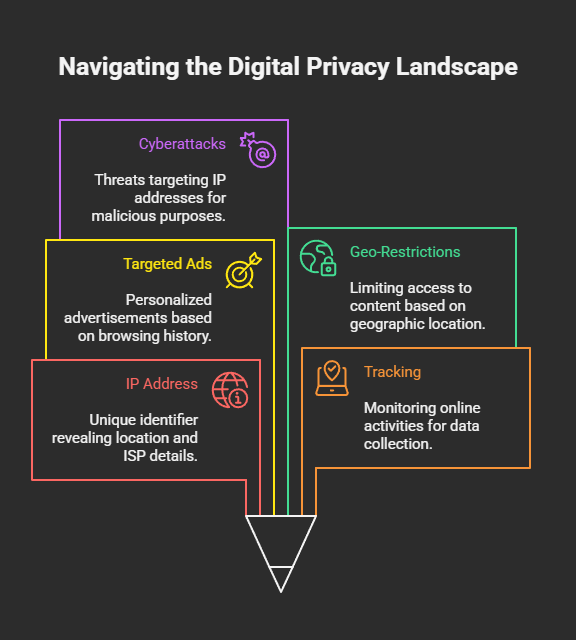
 In the digital world, your IP address is your unique identifier. It reveals your approximate location, your Internet Service Provider (ISP), and serves as a digital fingerprint whenever you browse the web. While your IP address is necessary for connecting to the internet, it can also expose you to tracking, profiling, targeted ads, geo-restrictions, and even cyberattacks.
For privacy-conscious users, cybersecurity enthusiasts, and even regular people tired of invasive ads, hiding or masking your IP address has become an essential practice.
In this post, we’ll cover everything you need to know about IP addresses, why hiding them matters, and the most effective methods to do it safely.
🔍 What Is an IP Address?
An IP address (Internet Protocol address) is a numerical label assigned to every device connected to the internet. Think of it as your online “home address” that tells websites and services where to send data.
There are two main types:
- IPv4 – Older, 32-bit addresses like
192.168.1.1. Limited in availability. - IPv6 – Newer, 128-bit format designed to replace IPv4, e.g.,
2001:0db8:85a3:0000:0000:8a2e:0370:7334.
Your IP address usually reveals:
- Your approximate geographic location
- Your ISP details
- The device/network you’re using
This information may seem harmless, but in the wrong hands, it could be used for tracking, advertising manipulation, censorship, or malicious activities like DDoS attacks.
🎯 Why Would You Want to Hide Your IP Address?
Here are the main reasons people hide their IP:
- Privacy Protection – Prevent advertisers, trackers, and websites from building a profile of your browsing habits.
- Avoid Geo-Restrictions – Access content only available in specific countries (e.g., Netflix, Hulu, BBC iPlayer).
- Bypass Censorship – Governments and institutions often block certain websites; hiding your IP can help regain access.
- Anonymity for Security Research – Ethical hackers, cybersecurity professionals, and journalists often need to protect their identity.
- Protection Against Hackers – Exposed IPs can be exploited for DDoS attacks, port scans, or other network-based threats.
- Safer Public Wi-Fi Usage – When using unsecured networks, masking your IP reduces the risk of being tracked.
🛡️ Ways to Hide Your IP Address Online
Let’s go over the most effective methods, from beginner-friendly tools to advanced techniques:
1. Use a VPN (Virtual Private Network)
A VPN is the most popular and secure method to hide your IP. It works by routing your traffic through an encrypted tunnel via a remote server, effectively replacing your real IP address with the VPN server’s IP.
✅ Pros:
- Strong encryption for privacy and security
- Easily bypasses geo-restrictions
- Prevents ISP and government tracking
- Works on most devices
❌ Cons:
- Premium VPNs cost money
- Free VPNs may log or sell data
- May reduce internet speed slightly
Best For: Everyday privacy, secure browsing, and streaming content globally.
2. Use the Tor Browser
Tor (The Onion Router) is a free, decentralized network that anonymizes your online activities. It routes your traffic through multiple volunteer-run servers (nodes), making it nearly impossible to trace back to your original IP.
✅ Pros:
- Excellent for anonymity
- Free and open-source
- Used by journalists, activists, and researchers
❌ Cons:
- Slower speeds due to multiple hops
- Blocked by some websites
- Using Tor may raise suspicion in restrictive countries
Best For: High anonymity needs (journalists, activists, privacy advocates).
3. Use a Proxy Server
A proxy acts as a middleman between you and the internet, masking your IP address with its own. There are different types of proxies:
- HTTP Proxies – Good for browsing websites.
- SOCKS5 Proxies – Better for activities like torrenting and gaming.
- Transparent Proxies – Don’t hide your IP, but are used for filtering.
✅ Pros:
- Easy to set up
- Can bypass regional restrictions
- Works in browsers or apps
❌ Cons:
- No encryption (unlike VPNs)
- Free proxies may log or inject ads
- Slower and less reliable
Best For: Light browsing, bypassing basic content restrictions.
4. Connect to a Public Wi-Fi
When you connect to a public Wi-Fi (like in a café or airport), you temporarily adopt the network’s IP address instead of your own.
✅ Pros:
- Free and simple
- Quick way to change your IP
❌ Cons:
- Extremely insecure without encryption
- Exposes you to hackers on open networks
- Temporary solution only
Best For: Quick IP masking in emergencies, not for long-term use.
5. Use Your Mobile Network (Hotspot)
Switching to your mobile data connection assigns you a new IP address from your cellular provider. You can also tether your mobile data to your PC via hotspot.
✅ Pros:
- Quick and easy
- Changes your IP instantly
- Safer than public Wi-Fi
❌ Cons:
- Limited by data plans
- Slower speeds compared to broadband
- Still traceable by your carrier
Best For: Quick anonymity when your main network is compromised.
6. Use Smart DNS Services
Unlike VPNs, Smart DNS services don’t hide your IP but reroute your DNS queries through servers in different regions. This tricks websites into thinking you’re browsing from a different location.
✅ Pros:
- Faster than VPNs
- Great for streaming geo-restricted content
- Works across devices
❌ Cons:
- No encryption
- Doesn’t truly mask your IP
- Limited privacy benefits
Best For: Streaming services like Netflix, Hulu, or Disney+.
7. Manually Change Your IP Address
On most devices, you can manually change your IP address through network settings. This works if your ISP provides dynamic IPs.
Steps (Windows Example):
- Go to Control Panel → Network and Sharing Center
- Click Change adapter settings
- Right-click your connection → Properties
- Select TCP/IPv4 → Properties
- Choose Use the following IP address and enter a new one
✅ Pros:
- Free and under your control
- Easy if ISP provides dynamic IPs
❌ Cons:
- Doesn’t guarantee anonymity
- Not effective against tracking
- Can break connection if misconfigured
Best For: Simple IP refresh or troubleshooting network issues.
8. Use a Privacy-Focused Browser with Built-in Proxy
Browsers like Opera and Brave include built-in VPN/proxy features that help hide your IP without extra software.
✅ Pros:
- Easy setup
- Free in many cases
- Good for basic browsing privacy
❌ Cons:
- Limited server options
- Not as secure as a full VPN
- Works only inside the browser
Best For: Casual users who want a quick, lightweight solution.
9. Advanced Method: Use a VPS (Virtual Private Server)
Tech-savvy users can rent a VPS in another country and route all traffic through it, essentially creating their own private proxy or VPN.
✅ Pros:
- Full control over privacy setup
- Can be customized for anonymity
- Useful for penetration testers and developers
❌ Cons:
- Requires technical knowledge
- Not beginner-friendly
- Monthly cost involved
Best For: Developers, cybersecurity researchers, advanced users.
⚠️ Common Mistakes When Trying to Hide Your IP
- Relying on Free VPNs/Proxies: These often log and sell your data.
- Not Combining with HTTPS: Even with a hidden IP, unencrypted sites expose your activity.
- Ignoring DNS Leaks: Some VPNs don’t protect against DNS leaks, which can reveal your ISP.
- Believing IP Hiding = Total Anonymity: Websites can still track you using cookies, fingerprinting, and other methods.
📝 Final Thoughts
Hiding your IP address is one of the first steps toward better online privacy, but it’s not a silver bullet. To truly stay anonymous online, you should combine IP masking with other security practices:
- Use HTTPS websites
- Regularly clear cookies and browser fingerprints
- Employ ad/tracker blockers
- Keep your system and apps updated
For most people, a trusted VPN or the Tor Browser will provide the perfect balance of security and anonymity. If you’re a researcher, journalist, or ethical hacker, you may want to combine multiple methods for maximum protection.
In today’s world, privacy is power—and hiding your IP is a powerful step in taking control of your digital identity.
 Spyboy blog