
 Posted by
 A Senior Security Researcher’s deep dive into remote mobile compromise — threats, telemetry, and real-world defenses
Why This Matters (Now)
Smartphones have become identity hubs: they hold MFA secrets, password reset links, session cookies, health data, wallets, and access to corporate SaaS. Compromising a phone often means compromising everything. Modern attackers know this—and increasingly they never touch the device.
According to industry reporting (e.g., Verizon DBIR), social engineering and credential misuse dominate breaches, while mobile-specific threats—from SIM swapping to zero-click exploits—enable silent account takeovers. The uncomfortable truth: many phone compromises leave no obvious signs.
This guide explains how remote phone compromise happens, the technical mechanics at a high level, and—most importantly—how defenders detect and stop it.
Threat Model Overview (Concepts → Execution → Mitigation)
We’ll structure this deep dive around five remote attack classes:
- Zero-click exploits (no user interaction)
- SIM swap & SS7 abuse (carrier-layer attacks)
- Cloud/session abuse (tokens, backups, OAuth)
- Phishing & smishing (psychology beats exploits)
- Rogue networks (IMSI catchers, Wi-Fi evil twins)
For each, you’ll get:
- What it is (concept)
- How it works (high-level execution)
- What to monitor (telemetry)
- How to mitigate (controls & configs)
1) Zero-Click Exploits (No Tap Required)
Concept
A zero-click exploit compromises a device without the victim tapping anything—often via messaging stacks (SMS/MMS, iMessage), VoIP, or push notification parsers. The exploit triggers during content parsing, not user interaction.
How It Works (High-Level)
- Crafted data hits a vulnerable parser (image/audio/video/codec).
- Memory corruption or logic flaws yield code execution.
- A loader establishes persistence or data exfiltration.
- Often no notification is shown to the user.
Notable public research has documented chains abusing media decoders and message services. These are typically patched quickly—but patch lag creates windows of exposure.
Real-World Context
- Multiple high-impact mobile CVEs have emerged in recent years across messaging and media stacks.
- Advanced spyware campaigns have leveraged zero-click chains to bypass user awareness entirely.
Detection Signals (Blue Team)
- Sudden crash logs in messaging/media services.
- Battery drain or thermal spikes without foreground use.
- Outbound traffic to rare domains shortly after message receipt.
Example: On-device log triage (defensive)
# Android (requires appropriate permissions / EDR)adb logcat | grep -E "media|codec|mms|imessage|voip" # iOS (managed devices / sysdiagnose review)# Look for repeated crashes in IMCore, SpringBoard media servicesMitigation Checklist
- Rapid OS updates (auto-update enforced).
- Disable rich previews where policy allows.
- Mobile EDR with exploit-chain heuristics.
- Network egress controls (DNS filtering, TLS inspection where lawful).
2) SIM Swap & SS7 Abuse (Carrier-Layer Attacks)
Concept
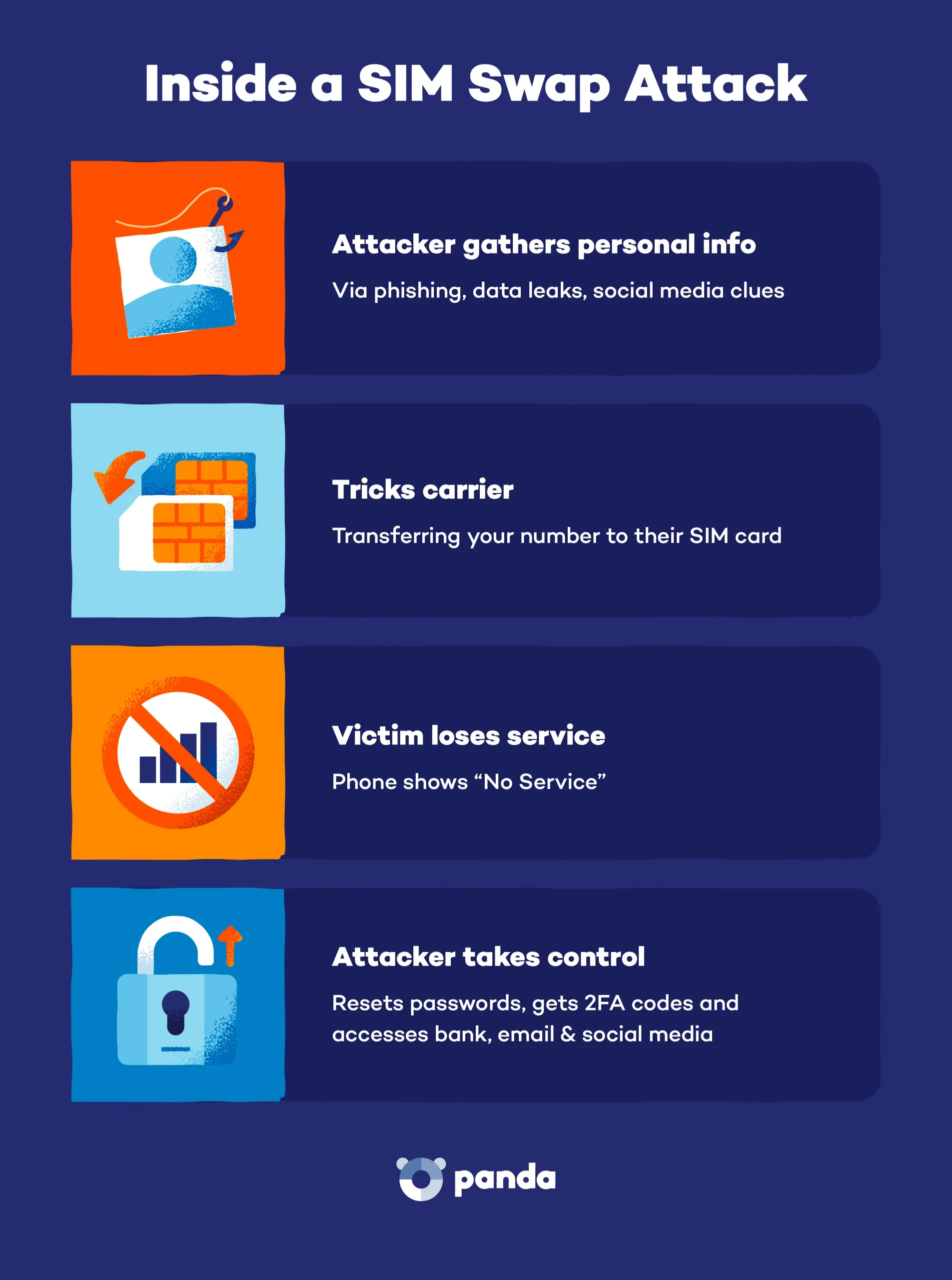
If attackers control your phone number, they can intercept OTP codes, reset accounts, and impersonate you—without touching your device.
How It Works (High-Level)
- Social engineering convinces a carrier to re-issue a SIM.
- Alternatively, weaknesses in SS7 signaling enable SMS interception.
- MFA codes, password resets, and calls route to the attacker.
Real-World Context
- SIM swapping has fueled cryptocurrency theft, social media hijacks, and CEO account takeovers.
- Regulatory pressure has improved controls, but human factors remain.
Detection Signals
- Sudden loss of service (“No SIM” / “No signal”).
- Carrier notifications about SIM changes.
- Account alerts for new device sign-ins.
Mitigation Checklist
- Carrier account PIN / port-out protection.
- Prefer app-based MFA or hardware keys over SMS.
- Number change alerts on critical services.
3) Cloud, Backups & Session Token Abuse
Concept
Many “phone hacks” are actually account compromises. If attackers steal session cookies, OAuth tokens, or access cloud backups, they inherit your phone’s data—remotely.
How It Works (High-Level)
- Phishing or malware steals refresh tokens.
- Cloud backups (photos, messages, app data) are accessed.
- Attacker syncs data to their device—no device contact.
Real-World Context
- OAuth misconfigurations and token theft appear in OWASP Top 10 discussions.
- Session replay attacks bypass passwords and MFA.
Detection Signals
- Impossible travel logins.
- New app authorizations you didn’t approve.
- Bulk data access from unfamiliar IPs.
Example: OAuth hygiene audit (defensive)
# Pseudocode: list and revoke unused OAuth grantsfor app in oauth_apps: if app.last_used > 90_days: revoke(app)Mitigation Checklist
- Review OAuth apps quarterly.
- Short token lifetimes + refresh rotation.
- IP/device binding for sessions.
- Encrypted backups with strong keys.
4) Phishing & Smishing (Still #1)
Concept
The most reliable phone “hack” is still tricking the user. SMS (“smishing”), WhatsApp, Telegram, and email deliver perfectly timed lures.
How It Works (High-Level)
- Message creates urgency (“Account locked”, “Package issue”).
- Link leads to credential harvesting or OAuth consent abuse.
- Attacker logs in legitimately.
Real-World Context
- Verizon DBIR consistently ranks social engineering at the top.
- Mobile browsers hide URLs, increasing success rates.
Detection Signals
- Shortened URLs or look-alike domains.
- Requests for codes or approvals.
- Messages outside normal business flows.
Mitigation Checklist
- Link preview disabled (policy-based).
- SMS filtering and domain reputation checks.
- User training with real examples.
5) Rogue Networks: IMSI Catchers & Evil Twins
Concept
Nearby attackers can deploy rogue base stations or fake Wi-Fi to downgrade encryption or intercept traffic—sometimes forcing devices onto weaker links.
How It Works (High-Level)
- Device connects to the strongest signal.
- Attacker performs traffic interception or downgrade.
- Credentials or metadata leak.
Detection Signals
- Unexpected network downgrades (e.g., LTE → 2G).
- Duplicate SSIDs with weak security.
- Certificate warnings.
Mitigation Checklist
- Disable 2G where possible.
- VPN with strict TLS.
- Wi-Fi auto-join off for unknown networks.
Comparative Table: Remote Phone Attack Classes
| Attack Class | User Interaction | Typical Goal | Detectability | Primary Defense |
|---|---|---|---|---|
| Zero-click exploit | None | Spyware / RCE | Low | Rapid patching, EDR |
| SIM swap / SS7 | None | Account takeover | Medium | Carrier PIN, MFA apps |
| Cloud/session abuse | None | Data sync | Medium | Token hygiene |
| Phishing/smishing | Yes | Credentials | High | Training + filters |
| Rogue networks | Proximity | Interception | Medium | VPN, disable 2G |
Defensive Tooling & Telemetry (What Actually Helps)
- Mobile EDR/MDR: exploit heuristics, network anomalies
- DNS filtering: block known bad domains
- IdP logs: OAuth grants, session anomalies
- Carrier alerts: SIM/port changes
Example: Simple anomaly check (defensive Python)
# Flag impossible travel from auth logs (conceptual)def impossible_travel(events, max_kmph=900): alerts = [] for i in range(1, len(events)): d = distance_km(events[i-1].loc, events[i].loc) t = hours(events[i-1].time, events[i].time) if t > 0 and (d/t) > max_kmph: alerts.append((events[i-1], events[i])) return alertsHardening Playbook (Executive-Ready)
Individuals
- Auto-update OS & apps
- App-based MFA / hardware keys
- Review OAuth & backups quarterly
Enterprises
- Enforce MDM + Mobile EDR
- Conditional access (device posture)
- SIM-swap awareness & response runbooks
FAQ
Q1: Can a phone be hacked without clicking anything?
Yes—via zero-click exploits that abuse vulnerable parsers. Patching and EDR are key defenses.
Q2: Is SIM swapping still a threat?
Yes. It’s less technical and highly effective. Use carrier PINs and avoid SMS MFA.
Q3: Can someone spy on my phone remotely?
Advanced spyware exists, but defenders can spot indicators via logs, network anomalies, and EDR.
Q4: Does a VPN stop phone hacking?
It helps against network interception, not against phishing or cloud token theft.
Q5: How do I know if my phone is compromised?
Look for unexplained crashes, battery drain, new OAuth apps, and account alerts.
Q6: Are iPhones or Androids safer?
Both are secure when updated. Risk increases with patch lag and sideloading.
Final Takeaway
“Phones being hacked without touching them” is rarely movie magic. It’s a combination of parser bugs, identity abuse, and human psychology. The good news: most risk is preventable with disciplined patching, identity hygiene, and visibility.
 Spyboy blog