
 Posted by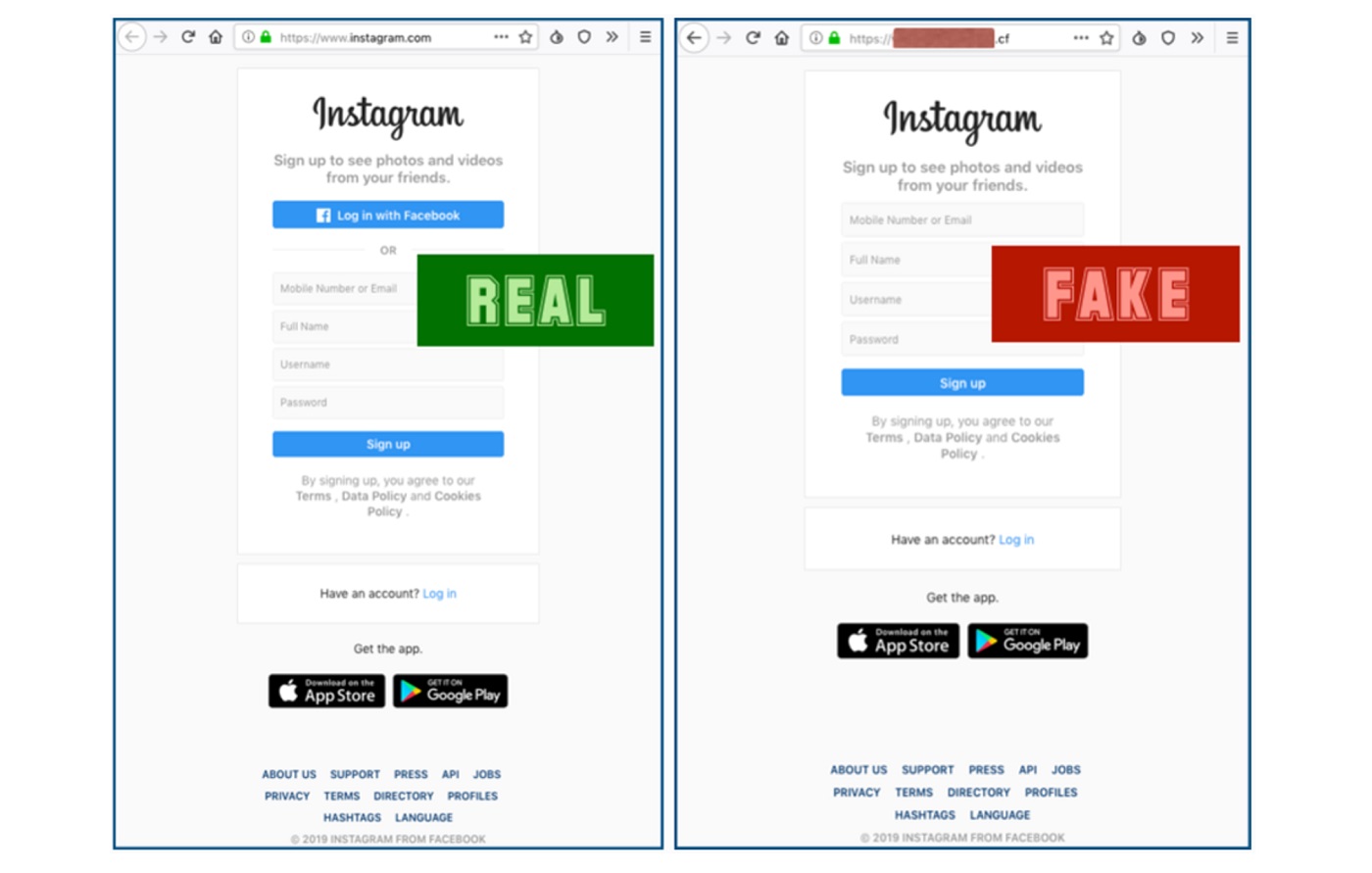
Why Instagram Account Takeovers Matter
An Instagram account isn’t “just social.” It’s an identity anchor tied to email addresses, phone numbers, ad accounts, brand reputations, and sometimes direct revenue. When attackers take over an account, the blast radius often includes:
- Brand damage (malicious posts, crypto scams in Stories)
- Financial loss (ads run on hijacked ad accounts, extortion)
- Privacy violations (DMs, photos, contacts)
- Downstream compromise (email resets, OAuth abuse on other platforms)
Industry data underscores why this keeps happening. The Verizon Data Breach Investigations Report (DBIR) consistently shows social engineering and credential misuse as top initial access vectors. Meanwhile, OWASP Top 10 risks—like broken authentication, credential stuffing, and insecure OAuth—map cleanly to how Instagram takeovers occur in the real world.
This deep dive breaks down how Instagram accounts are hacked (conceptually), what signals defenders can monitor, and exactly how to stop it—without glamorizing or enabling abuse.
Threat Model Overview (Concepts → Execution → Mitigation)
We’ll analyze five dominant takeover paths:
- Phishing & Smishing (still #1)
- Credential Stuffing (password reuse at scale)
- OAuth Token Abuse (malicious apps & consent traps)
- SIM Swap & SMS MFA Abuse (carrier-layer attacks)
- Session Hijacking & Malware (cookies, extensions)
For each, you’ll get:
- What it is
- How it works (high-level)
- What to watch (telemetry)
- How to stop it (controls)
1) Phishing & Smishing: The Workhorse Attack
Concept
Phishing targets human trust, not code. Attackers mimic Instagram notices (“Copyright claim,” “Account disabled,” “Unusual login”) and harvest credentials or MFA approvals.
How It Works (High-Level)
- Victim receives a convincing message (email, SMS, DM).
- Link leads to a look-alike login page or OAuth consent screen.
- Credentials, MFA codes, or session approvals are captured.
- Attacker logs in legitimately, often from a residential IP.
Why it works: Mobile browsers truncate URLs, and Instagram users are trained to react quickly to “policy” alerts.
Real-World Context
- DBIR repeatedly ranks phishing as a top vector.
- Mobile-first platforms amplify success rates due to small-screen UX.
Detection Signals
- Login from new device/location shortly after a message click.
- Password change followed by email/phone change within minutes.
- New authorized apps you didn’t approve.
Defensive Telemetry (Conceptual)
# Example: review recent security activity (manual workflow)# Look for clustered events: new device + email change + app authorization
Mitigation Checklist
- FIDO2 / App-based MFA (avoid SMS where possible)
- Security emails verified by domain (check headers)
- Never approve login prompts you didn’t initiate
- Account recovery codes stored offline
2) Credential Stuffing: Password Reuse at Scale
Concept
Credential stuffing abuses password reuse from unrelated breaches. No Instagram exploit required.
How It Works (High-Level)
- Attackers test breached email/password pairs against Instagram.
- Success spikes where password reuse exists.
- Automated defenses stop most attempts—but not all.
Real-World Context
- Credential reuse is explicitly called out in OWASP A2: Broken Authentication.
- High-profile breaches feed massive combo lists.
Detection Signals
- Multiple failed logins followed by a single success.
- Logins from automation-like user agents (later masked).
Defensive Controls
- Unique password (never reused)
- Password manager (long, random strings)
- Login alerts enabled
3) OAuth Token Abuse: “Log In With…” Gone Wrong
Concept
OAuth allows third-party apps to access Instagram features. Malicious or over-privileged apps can persist access even after password changes.
How It Works (High-Level)
- Victim authorizes a fake analytics/growth app.
- App receives long-lived tokens or broad scopes.
- Attacker posts, DMs, or harvests data without re-login.
Real-World Context
- OAuth misconfigurations are a recurring OWASP theme.
- Token theft bypasses MFA entirely.
Detection Signals
- Unknown apps/services listed in account settings.
- Actions performed without login notifications.
Defensive Audit (Conceptual)
# Pseudocode: flag unused OAuth appsfor app in authorized_apps: if app.last_used_days > 30: alert(app.name)
Mitigation Checklist
- Revoke all third-party apps you don’t actively use
- Prefer official integrations only
- Re-review apps after any security incident
4) SIM Swap & SMS MFA Abuse
Concept
If attackers control your phone number, they can intercept password resets and MFA codes—no Instagram exploit required.
How It Works (High-Level)
- Carrier support is socially engineered.
- SIM is ported to attacker’s device.
- Reset links and codes are captured.
Real-World Context
- SIM swapping has driven high-profile account hijacks across social platforms.
- Regulatory improvements help—but human factors remain.
Detection Signals
- Sudden loss of mobile service
- Carrier notices about SIM/port changes
- Account recovery emails you didn’t request
Mitigation Checklist
- Carrier PIN / port-out protection
- Authenticator app instead of SMS
- Backup contact email secured with MFA
5) Session Hijacking & Malware (Cookies, Extensions)
Concept
Malicious browser extensions or infostealer malware can steal session cookies, enabling account access without passwords or MFA.
How It Works (High-Level)
- User installs a fake extension or runs infected software.
- Session tokens are exfiltrated.
- Attacker replays the session from another device.
Real-World Context
- Infostealers are a common precursor in modern account takeovers.
- Cookie replay bypasses traditional auth controls.
Detection Signals
- Login alerts without password prompts
- Sessions active from unexpected devices
Mitigation Checklist
- Remove unnecessary extensions
- OS and browser updates
- Revoke all sessions after suspected compromise
Comparative Table: Instagram Takeover Methods
| Method | User Interaction | Bypasses MFA | Detectability | Best Defense |
|---|---|---|---|---|
| Phishing | Yes | Sometimes | Medium | FIDO2 MFA + training |
| Credential stuffing | No | No | High | Unique passwords |
| OAuth abuse | Yes | Yes | Medium | App audits |
| SIM swap | No | Yes | Medium | Carrier PIN |
| Session hijack | No | Yes | Low | Device hygiene |
Incident Response: What To Do If an Account Is Compromised
Immediate Actions (First 30 Minutes)
- Change password from a clean device
- Revoke all sessions and third-party apps
- Secure email and phone first (they’re the keys)
Recovery & Hardening
- Enable app-based or hardware MFA
- Rotate all reused passwords
- Review account activity logs
Detection & Monitoring Playbook (Advanced Users)
- Enable login alerts for every new device
- Weekly review of authorized apps
- Use a password manager breach monitor
- Track carrier account changes
FAQ
Q1: How do hackers hack Instagram accounts most often?
Primarily through phishing, followed by password reuse and OAuth abuse.
Q2: Can Instagram be hacked without the password?
Yes—via phishing approvals, OAuth tokens, SIM swaps, or session hijacking.
Q3: Does changing my password stop hackers?
Only if you also revoke sessions, remove malicious apps, and secure email/phone.
Q4: Is two-factor authentication enough?
App-based or hardware MFA is strong. SMS MFA alone is weaker due to SIM swapping.
Q5: How can I tell if my Instagram was hacked?
Look for new devices, unknown apps, unexpected posts, or changed recovery details.
Q6: Are business accounts more targeted?
Yes—due to ad spend access, brand reach, and monetization potential.
Final Takeaway
Instagram account takeovers rarely involve exotic exploits. They succeed because of identity weaknesses—password reuse, OAuth sprawl, SMS MFA, and rushed user decisions. The fix is unglamorous but effective: strong MFA, unique passwords, app hygiene, and rapid incident response.
 Spyboy blog