
 Posted by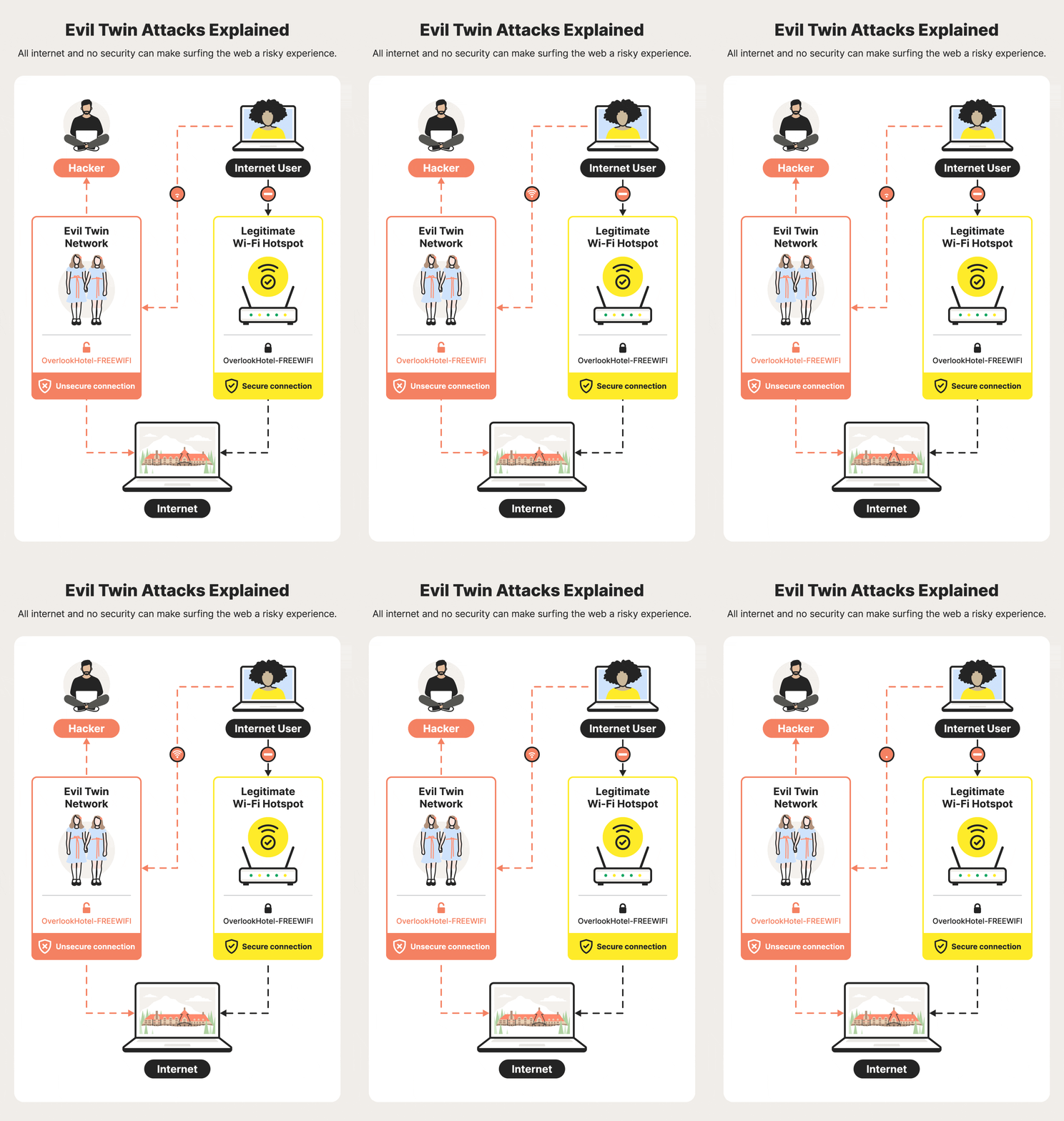
Public Wi-Fi Is Infrastructure—and It’s Under-Defended
Coffee shops, airports, hotels, campuses—public Wi-Fi underpins modern life. But it’s also one of the most abused access layers in cybersecurity. Attackers don’t need to “hack the internet”; they sit between you and it.
Industry reporting (including Verizon’s DBIR) consistently shows social engineering, credential theft, and misconfigurations as top initial access vectors. Public Wi-Fi amplifies all three: weak encryption choices, shared secrets, and user behavior collide in a place where anyone can join.
This guide answers the question users actually ask—“How do hackers hack Wi-Fi passwords?”—by separating myth from reality, explaining what’s possible, what’s common, and what’s preventable. We’ll focus on defensive understanding, not attack playbooks.
Mental Model: What “Hacking Wi-Fi” Really Means
“Hacking Wi-Fi” is a catch-all phrase. In practice, attackers succeed through four broad paths:
- Breaking weak protections (legacy encryption, shared passwords)
- Tricking users (fake networks, captive portal phishing)
- Sitting in the middle (traffic interception without cracking anything)
- Abusing devices (misconfigured routers, outdated firmware)
Important reality check:
- Modern Wi-Fi with WPA3 + strong passwords is hard to crack.
- Most real-world damage happens without cracking the password at all.
Threat Model Overview (Concepts → Execution → Mitigation)
We’ll examine seven real-world Wi-Fi attack classes:
- Open Networks & Passive Sniffing
- Evil Twin (Rogue Access Points)
- Man-in-the-Middle (MITM) Attacks
- Handshake Capture & Offline Guessing (Legacy)
- WPS Abuse & Router Misconfigurations
- Captive Portal Phishing
- Post-Wi-Fi Account Takeover Chains
For each:
- What it is (concept)
- How it works (high-level, defensive)
- What to watch (signals)
- How to stop it (controls)
1) Open Networks: No Password Needed
Concept
An open Wi-Fi network has no encryption. Anyone on the network can observe traffic that isn’t end-to-end encrypted.
What Attackers Can Do
- Observe DNS queries
- Identify visited domains
- Hijack unencrypted sessions
What They Can’t Do (Today)
- Read HTTPS content end-to-end
- See passwords protected by TLS
Why It’s Still Dangerous
- Many apps still leak metadata
- Misconfigured sites downgrade to HTTP
- Users reuse sessions across networks
Detection Signals
- Browser warnings about “Not Secure”
- Certificate errors
- Unexpected redirects
Mitigation Checklist
- Avoid open networks when possible
- Enforce HTTPS-only mode in browsers
- Use a reputable VPN on public Wi-Fi
2) Evil Twin Attacks: The Wi-Fi Doppelgänger
Concept
An Evil Twin is a fake access point that impersonates a legitimate one (“FreeAirportWiFi”, “Cafe_Guest”).
How It Works (High-Level)
- Attacker creates a network with the same name (SSID)
- Devices auto-connect to the strongest signal
- All traffic flows through the attacker
No password cracking required.
Real-World Context
Evil Twins are common in airports and hotels because users expect captive portals and shared networks.
Detection Signals
- Duplicate networks with identical names
- Captive portals asking for email or passwords
- Frequent disconnects/reconnects
Mitigation Checklist
- Disable auto-join for known SSIDs
- Verify network names with staff
- Use VPN before any login
3) Man-in-the-Middle (MITM): Between You and the Internet
Concept
MITM attacks intercept or modify traffic without breaking Wi-Fi encryption.
Common Techniques (Defensive Overview)
- ARP spoofing
- DNS manipulation
- Transparent proxies
What Attackers Gain
- Session hijacking (if protections are weak)
- Traffic metadata
- Redirects to phishing pages
Why HTTPS Changed the Game
TLS prevents content inspection—but:
- Certificate warnings ignored by users
- Legacy apps still vulnerable
Detection Signals
- Certificate mismatch warnings
- Login prompts appearing unexpectedly
- Slower or unstable connections
Mitigation
- Never bypass TLS warnings
- Keep OS and apps updated
- Prefer cellular data for sensitive tasks
4) Handshake Capture & Offline Guessing (Legacy Wi-Fi)
Concept
On older encryption (WPA/WPA2-PSK), attackers can capture a cryptographic handshake and attempt to guess the password offline.
Critical Clarification
- This does not expose the password instantly
- Success depends on password strength
- Strong passwords resist this indefinitely
Real-World Context
Weak Wi-Fi passwords remain common in home and small business routers.
Detection Signals
- Repeated client disconnects
- Router logs showing authentication floods
Mitigation Checklist
- Use WPA3 where available
- Long, random Wi-Fi passwords
- Disable legacy compatibility modes
5) WPS & Router Misconfigurations
Concept
Wi-Fi Protected Setup (WPS) and outdated firmware introduce risk independent of password strength.
Common Issues
- WPS enabled by default
- Default admin credentials
- Unpatched router CVEs
Real-World Context
Router vulnerabilities regularly appear in advisories and are often never patched by consumers.
Defensive Steps
- Disable WPS
- Change router admin credentials
- Update firmware quarterly
- Replace end-of-life hardware
6) Captive Portal Phishing: “Accept Terms to Continue”
Concept
Captive portals are expected on public Wi-Fi—attackers abuse that trust.
How It Works
- Fake portal asks for:
- Social login
- Sometimes passwords
- User assumes it’s normal
Detection Signals
- Portal asks for passwords
- Redirects to non-HTTPS pages
- Branding inconsistencies
Mitigation
- Never enter account passwords into Wi-Fi portals
- Use a VPN before interacting with portals
- Prefer cellular for logins
7) The Real Damage: Post-Wi-Fi Account Takeover Chains
Concept
Wi-Fi attacks are often step one, not the end goal.
Typical Chain
- Evil Twin or MITM
- Credential or session theft
- Email compromise
- Password resets across services
- Social or financial fraud
This is how “Wi-Fi hacking” becomes identity compromise.
Comparative Table: Wi-Fi Attack Methods Explained
| Method | Password Cracked? | User Interaction | Common | Severity |
|---|---|---|---|---|
| Open network sniffing | No | No | High | Medium |
| Evil Twin | No | Yes (connect) | High | High |
| MITM | No | No | Medium | High |
| Handshake guessing | Sometimes | No | Low | Medium |
| WPS abuse | Sometimes | No | Low | High |
| Captive portal phishing | No | Yes | Medium | High |
Detection & Monitoring Playbook
For Individuals
- Watch for certificate warnings
- Review device connection history
- Unexpected login alerts after public Wi-Fi use
For Network Operators
- Rogue AP detection
- Client isolation enabled
- Enforce WPA3 + Protected Management Frames
Step-by-Step Defensive Hardening (User)
Step 1: Device Hygiene
- Auto-update OS and browsers
- Remove unused apps
- Disable auto-join for open networks
Step 2: Network Hygiene
- Prefer WPA3 networks
- Use VPN on public Wi-Fi
- Avoid sensitive actions on unknown networks
Step 3: Identity Protection
- Password manager
- App-based or hardware MFA
- Secure email first
Developer & Operator Perspective: Designing Safer Wi-Fi
Do
- Enforce HTTPS everywhere (HSTS)
- Isolate clients on guest networks
- Rotate guest credentials
Avoid
- Shared passwords printed publicly
- Legacy encryption modes
- Trusting captive portals with credentials
FAQ
Q1: Can hackers really hack Wi-Fi passwords on public networks?
Usually no password is cracked—attackers use fake networks, interception, or phishing instead.
Q2: Is public Wi-Fi safe if I use HTTPS?
Safer, yes—but MITM and Evil Twin attacks can still cause harm without proper precautions.
Q3: Can someone see my passwords on public Wi-Fi?
Not if the site/app uses proper HTTPS and TLS, but phishing can still steal them.
Q4: Does a VPN protect me on public Wi-Fi?
Yes—it encrypts traffic and blocks many interception attacks.
Q5: Is WPA3 really more secure than WPA2?
Yes. WPA3 mitigates offline guessing and improves protection on public networks.
Q6: Should I avoid public Wi-Fi entirely?
For sensitive tasks, yes. Otherwise, use VPN + HTTPS + MFA.
Final Verdict: Wi-Fi Passwords Aren’t the Main Target—You Are
Most attackers don’t “hack” Wi-Fi passwords. They bypass the need by impersonating networks, intercepting traffic, or tricking users. Modern encryption works—but only if it’s used correctly and paired with identity-layer defenses.
Public Wi-Fi isn’t inherently evil. It’s just untrusted infrastructure. Treat it that way, and its power to hurt you drops dramatically.
 Spyboy blog