
 Posted by
 Most people see a photo.
A cybersecurity professional sees hidden data.
Every image, PDF, Word document, and file often contains metadata — hidden information that can reveal:
- GPS coordinates
- Device model
- Software version
- Author name
- Creation timestamps
- Editing history
Metadata is one of the most powerful OSINT techniques used in:
- Digital forensics
- Bug bounty reconnaissance
- Threat intelligence
- Journalism investigations
- Law enforcement analysis
In this guide, you’ll learn how to make a Metadata Extractor Tool using Python. You’ll build a CLI-based tool that:
- Extracts EXIF data from images
- Extracts metadata from PDFs
- Extracts metadata from DOCX files
- Formats output cleanly
- Saves results to JSON
All while understanding how attackers and defenders use metadata differently.
What Is Metadata?
Metadata literally means:
“Data about data.”
Examples:
Image Metadata (EXIF)
- GPS location
- Camera model
- Date taken
- Software used
PDF Metadata
- Author
- Producer
- Creation date
- Modification date
Document Metadata
- Creator name
- Company name
- Revision history
Even when a file looks clean, metadata can expose sensitive information.
Why Metadata Matters in Cybersecurity
Attackers use metadata to:
- Identify employee names
- Discover internal software
- Find office GPS coordinates
- Identify infrastructure leaks
Defenders use metadata to:
- Investigate breaches
- Track document origins
- Validate evidence
- Perform OSINT investigations
Some common tools used in investigations include:
- ExifTool
- FOCA
- Autopsy
Today, you’ll build your own lightweight version.
What We’re Going to Build
Our Python Metadata Extractor Tool will:
✔ Extract EXIF data from images
✔ Extract metadata from PDFs
✔ Extract metadata from DOCX files
✔ Print structured output
✔ Save results to JSON
✔ Handle errors cleanly
Step 1: Install Required Libraries
pip install Pillow PyPDF2 python-docxWe’ll use:
- Pillow → Image EXIF extraction
- PyPDF2 → PDF metadata
- python-docx → Word metadata
- json → Structured storage
Step 2: Project Structure
metadata_extractor/│├── extractor.py├── utils.py└── output/Step 3: Extract Image Metadata (EXIF)
Create extractor.py
from PIL import Imagefrom PIL.ExifTags import TAGSdef extract_image_metadata(image_path): metadata = {} try: image = Image.open(image_path) exif_data = image._getexif() if exif_data: for tag_id, value in exif_data.items(): tag = TAGS.get(tag_id, tag_id) metadata[tag] = value else: metadata["Info"] = "No EXIF data found." except Exception as e: metadata["Error"] = str(e) return metadataThis extracts hidden EXIF fields.
What EXIF Data Can Reveal
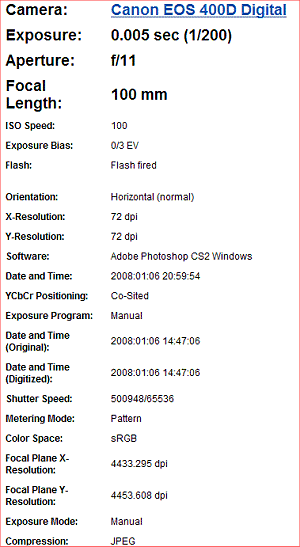
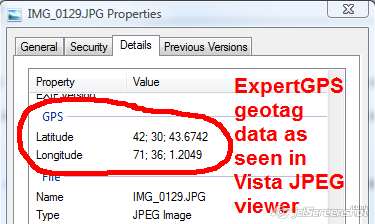
Common leaked EXIF data includes:
- GPSLatitude
- GPSLongitude
- Make (camera brand)
- Model (device model)
- DateTimeOriginal
- Software used
Many people accidentally leak GPS coordinates in photos.
Step 4: Extract PDF Metadata
Add to extractor.py
from PyPDF2 import PdfReaderdef extract_pdf_metadata(pdf_path): metadata = {} try: reader = PdfReader(pdf_path) info = reader.metadata if info: for key, value in info.items(): metadata[key] = str(value) else: metadata["Info"] = "No metadata found." except Exception as e: metadata["Error"] = str(e) return metadataPDFs often reveal:
- Author name
- Company name
- Creator software
- Modification dates
Step 5: Extract DOCX Metadata
Add:
from docx import Documentdef extract_docx_metadata(doc_path): metadata = {} try: doc = Document(doc_path) props = doc.core_properties metadata["Author"] = props.author metadata["Created"] = str(props.created) metadata["Modified"] = str(props.modified) metadata["Last Modified By"] = props.last_modified_by metadata["Title"] = props.title except Exception as e: metadata["Error"] = str(e) return metadataWord documents often leak internal employee names.
Step 6: Create Output Utility
Create utils.py
import jsonimport osdef save_to_json(data, filename): if not os.path.exists("output"): os.mkdir("output") path = os.path.join("output", filename) with open(path, "w") as f: json.dump(data, f, indent=4) print(f"[+] Results saved to {path}")Step 7: Build CLI Interface
Update extractor.py
import osfrom utils import save_to_jsondef main(): print("=== Metadata Extractor Tool ===") file_path = input("Enter file path: ") if not os.path.exists(file_path): print("File does not exist.") return extension = file_path.split(".")[-1].lower() if extension in ["jpg", "jpeg", "png"]: metadata = extract_image_metadata(file_path) elif extension == "pdf": metadata = extract_pdf_metadata(file_path) elif extension == "docx": metadata = extract_docx_metadata(file_path) else: print("Unsupported file type.") return print("\n=== Extracted Metadata ===") for key, value in metadata.items(): print(f"{key}: {value}") save_to_json(metadata, "metadata_results.json")if __name__ == "__main__": main()Now run:
python extractor.pyYour metadata tool is live.
How Hackers Abuse Metadata
Attackers use metadata to:
- Identify internal usernames
- Discover server software versions
- Extract GPS locations
- Map organizational structure
- Find hidden document authors
For example:
An employee uploads a PDF to a public website.
Metadata reveals:
- Author: John Smith
- Company: ABC Corp
- Software: Microsoft Word 2016
An attacker now knows:
- Real employee name
- Company software stack
- Potential phishing target
Defensive Use of Metadata Extraction
Blue teams use metadata tools to:
- Check if documents leak internal info
- Clean files before public release
- Investigate breach origins
- Track digital evidence
Before uploading files publicly, always strip metadata.
How to Strip Metadata
To remove EXIF data:
def strip_image_metadata(image_path): image = Image.open(image_path) clean_image = Image.new(image.mode, image.size) clean_image.putdata(list(image.getdata())) clean_image.save("clean_image.jpg")For PDFs and DOCX, exporting as clean copy often removes metadata.
Advanced Improvements
You can expand this tool by adding:
- Recursive folder scanning
- Bulk file processing
- CSV output
- SQLite storage
- Geo-location decoding from GPS EXIF
- Hidden stream detection
- File hashing (MD5/SHA256)
- Command-line arguments with argparse
- Multi-threaded scanning
You could turn this into a mini forensic suite.
Covered
- how to extract metadata using Python
- build metadata extractor tool
- python exif metadata script
- digital forensics metadata tool
- OSINT metadata analysis
Real-World Use Cases
✔ Bug bounty reconnaissance
✔ OSINT investigations
✔ Journalism research
✔ Corporate security review
✔ Data leak investigations
✔ Incident response
Metadata often reveals more than the visible file content.
Final Thoughts
Most people don’t think about metadata.
Attackers do.
Defenders should.
When you build your own metadata extractor tool, you gain:
- Technical OSINT skill
- Digital forensics knowledge
- Understanding of hidden data
- Defensive awareness
Once you start checking metadata, you’ll be surprised how often sensitive information leaks silently.
And in cybersecurity…
Silent leaks are the most dangerous.
 Spyboy blog