
 Posted by
 The internet is filled with enticing offers, eye-catching ads, and click-worthy links. But not all of them are what they seem. One of the most deceptive and malicious tactics used by cybercriminals is the Bait and Switch attack. This attack lures users into clicking on something seemingly harmless, only to redirect them to malicious content, scams, or malware-infected websites.
In this comprehensive guide, we will explore:
- What Bait and Switch attacks are
- How they work
- Real-world examples
- The dangers associated with them
- How to protect yourself and your organization
1. What is a Bait and Switch Attack?
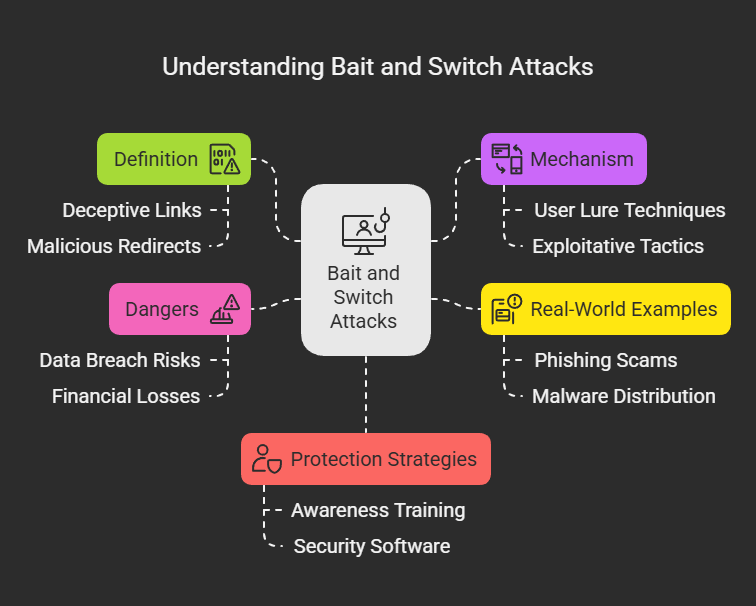
Bait and Switch is a type of social engineering attack where users are deceived into interacting with misleading content. Typically, attackers use enticing ads, download buttons, or links that appear to be legitimate but, when clicked, redirect the user to a completely different and often malicious website or file.
Key Characteristics:
- Deceptive Advertising: The attacker places an ad promising one thing but delivers another.
- Redirection to Malicious Content: Clicking on the link leads to malware, phishing sites, or scams.
- Exploit Kits: Some Bait and Switch techniques involve using exploit kits to deliver malware automatically.
Common Forms of Bait and Switch:
✅ Fake Download Buttons: Users think they are downloading software but get malware instead. ✅ Phishing Links in Emails: A link pretending to be from a trusted source leads to a fraudulent site. ✅ Malicious Ads (Malvertising): Fake ads on legitimate sites redirect users to harmful destinations. ✅ Software Installers with Hidden Payloads: A legitimate application comes bundled with unwanted software.
2. How Bait and Switch Works
Attackers use psychological manipulation and technical tricks to deceive victims. Here’s a step-by-step breakdown:
Step 1: The Setup
- The attacker creates an enticing advertisement or link.
- The ad is displayed on social media, websites, emails, or even legitimate ad networks.
- It appears completely legitimate and relevant to the target audience.
Step 2: The Bait
- The user sees the ad and clicks on it, expecting a legitimate product, service, or offer.
Step 3: The Switch
- Instead of receiving the expected content, the user is redirected to a malicious site.
- The site may:
- Try to install malware automatically.
- Request login credentials (phishing attack).
- Display fake security alerts urging the user to download rogue software.
Step 4: The Exploitation
- The victim either downloads malware, enters personal details, or gets tricked into making a payment.
- The attacker gains unauthorized access, financial information, or infects the victim’s device.
3. Real-World Examples of Bait and Switch Attacks
3.1 Malicious Google Ads
In 2022, attackers used Google Ads to promote fake versions of popular software like OBS Studio, CCleaner, and VLC Player. When users clicked on these ads, they were redirected to a phishing site that delivered malware instead of the actual software.
3.2 Facebook & Instagram Ad Scams
Cybercriminals have been running fake ads on social media platforms, often impersonating well-known brands. Users who click on these ads are taken to fake websites designed to steal credit card information or deliver malware.
3.3 Fake Download Buttons on Torrent & Streaming Sites
Many piracy and streaming websites contain fake ‘Download’ or ‘Play’ buttons, which actually trigger malware downloads instead of playing a video.
3.4 Cryptocurrency Scams via Fake Ads
Scammers have created fake websites mimicking real cryptocurrency exchanges, tricking users into entering their private keys and losing their funds.
4. Dangers of Bait and Switch Attacks
4.1 Identity Theft
- Phishing sites steal personal information like usernames, passwords, and financial data.
4.2 Malware Infections
- Many Bait and Switch attacks result in malware downloads, including ransomware, trojans, spyware, and keyloggers.
4.3 Financial Loss
- Users tricked into paying for fake products or services often lose money with no way to recover it.
4.4 Account Takeovers
- Attackers gain access to user accounts, leading to social media hijacking, email hacking, and even corporate data breaches.
5. How to Protect Yourself from Bait and Switch Attacks
5.1 Avoid Clicking on Suspicious Ads
✅ Be wary of too-good-to-be-true offers. ✅ Hover over links to check the actual destination URL before clicking. ✅ Avoid clicking on download buttons from unofficial sources.
5.2 Use Ad Blockers and Security Extensions
✅ Install browser extensions like uBlock Origin or AdGuard to block malicious ads. ✅ Use HTTPS Everywhere to ensure secure browsing.
5.3 Enable Security Features on Your Browser
✅ Keep your browser updated to prevent exploit-based attacks. ✅ Enable Safe Browsing Mode in Google Chrome and other browsers.
5.4 Verify Website Authenticity
✅ Always visit official websites directly instead of clicking on ads. ✅ Check for HTTPS encryption and valid SSL certificates.
5.5 Use Antivirus and Anti-Malware Software
✅ Install and regularly update Windows Defender, Malwarebytes, or Bitdefender. ✅ Run full system scans periodically to detect hidden malware.
5.6 Educate Yourself and Your Team
✅ Recognize phishing techniques and avoid sharing sensitive information online. ✅ Train employees to identify malicious ads and emails. ✅ Encourage the use of multi-factor authentication (MFA) to add extra security.
Conclusion
Bait and Switch attacks exploit human curiosity and trust to spread malware, steal credentials, and defraud victims. As cybercriminals continue to refine their deceptive tactics, it is essential for users to remain vigilant and adopt strong security practices.
By avoiding suspicious links, using security tools, and verifying online content, you can significantly reduce the risk of falling for these scams.
 Spyboy blog