

 Posted by
 In today’s digital world, browser extensions are ubiquitous. They promise to enhance productivity, streamline tasks, and improve user experience. However, behind the convenience and utility lies a significant privacy risk that many users overlook. If you value your privacy and security, it’s crucial to understand the dangers associated with browser extensions.

What Are Browser Extensions?
Browser extensions are small software programs that customize and enhance the functionality of a web browser. They can do everything from blocking ads and managing passwords to improving grammar and suggesting better writing styles. Popular examples include ad blockers, password managers, and tools like Grammarly and Wordtune.
While these tools can be useful, they also require access to your browser’s data to function effectively. This access can become a double-edged sword when privacy and security are concerned.
How Browser Extensions Threaten Your Privacy
- Access to Browsing Data Many browser extensions require permissions to read and change the data on the websites you visit. This means they can:
- Monitor your browsing habits.
- Track the websites you visit.
- Log sensitive information, such as login credentials, search queries, and personal details.
- Cookie Manipulation Extensions can access and modify cookies stored in your browser. Cookies are small files used to track your online activity and maintain session states (e.g., keeping you logged in). A malicious extension can:
- Steal session cookies to hijack your accounts.
- Inject tracking cookies to monitor your activity across the web.
- Alter cookies for fraudulent purposes, as seen in scams like the Honey extension controversy.
- Keylogging and Input Monitoring Extensions like Grammarly and Wordtune require permissions to read the text you type in your browser. While these tools aim to provide writing suggestions, they potentially capture:
- Sensitive personal information.
- Passwords typed into text fields.
- Financial details entered into forms.
- Keystroke Capture and Credential Theft Malicious or poorly secured extensions can act as keyloggers, capturing every keystroke. This opens the door to:
- Credential theft.
- Exposure of private communications.
- Unauthorized access to accounts.
- Unauthorized Data Collection Extensions often collect data to “improve user experience,” but this can include:
- Search history.
- Location data.
- Personal identifiers, such as email addresses and phone numbers.
- Remote Code Execution Extensions can download and execute code from remote servers. If an extension’s server is compromised, attackers can push malicious updates that:
- Install malware.
- Steal data.
- Perform phishing attacks.

Permissions: The Key to Understanding the Risks
When you install an extension, it requests permissions that dictate what it can access and control. Common permissions include:
- Access to all data on all websites: Allows the extension to read and modify anything you do online.
- Read and change your bookmarks: Grants access to your saved links and browsing history.
- Access to clipboard: Enables the extension to read and modify text copied to your clipboard.
- Access to geolocation: Allows tracking of your physical location.
- Manage downloads: Lets the extension intercept and modify files you download.
- Access to browser tabs: Permits monitoring of all open tabs, including the content within them.
Real-World Examples of Extension Abuse
- Honey Extension Scam The popular Honey extension, marketed as a money-saving tool, has faced criticism for collecting excessive user data and manipulating cookies to redirect affiliate earnings.
- Malicious Extensions in Chrome Web Store Google’s Chrome Web Store has repeatedly been found hosting malicious extensions. These extensions often disguise themselves as legitimate tools but secretly collect sensitive data or serve ads.
- Facebook Data Breach via Browser Extensions Some extensions have been caught siphoning off Facebook user data, exploiting permissions to gather information without users’ consent.
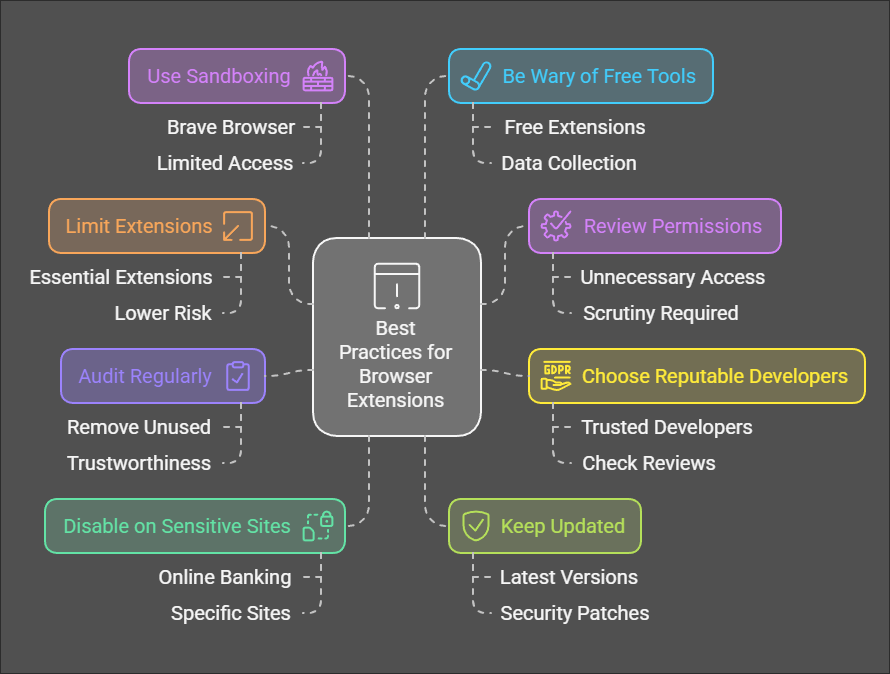
Best Practices to Stay Safe
- Limit the Number of Extensions Install only essential extensions. The fewer extensions you have, the lower the risk.
- Review Permissions Carefully Before installing an extension, scrutinize the permissions it requests. Avoid extensions that ask for unnecessary access.
- Stick to Reputable Developers Download extensions from trusted developers with a strong reputation. Check reviews and ratings before installation.
- Regularly Audit Installed Extensions Periodically review the extensions installed in your browser. Remove any you no longer use or trust.
- Disable Extensions on Sensitive Websites Many browsers allow you to disable extensions on specific sites. Use this feature to prevent extensions from accessing sensitive information, such as online banking portals.
- Keep Extensions Updated Ensure your extensions are updated to the latest versions, as updates often include security patches.
- Use Browser Sandboxing Some browsers, like Brave, sandbox extensions to limit their access. Consider using a browser with strong security features.
- Be Wary of Free Tools Remember, if a product is free, you are the product. Free extensions often monetize through data collection.
Conclusion
While browser extensions can enhance your online experience, they also pose significant privacy and security risks. By understanding the potential dangers and adopting best practices, you can protect yourself from data breaches, identity theft, and other threats. In the digital age, where personal data is as valuable as currency, it’s essential to prioritize privacy over convenience. Always think twice before adding a browser extension—your online safety depends on it.
 Spyboy blog