

 Posted by
 Techy, hands-on, ethical — a real recon playbook with exact commands, tools, and battle-tested workflow so you can find forgotten assets fast (and report them responsibly).
Ethics & legality (read this first): The techniques and commands in this article are dual-use. They can be used for defensive research, bug bounty hunting with authorization, and incident response — or for wrongdoing if applied to systems without permission. Only run these commands against targets you own, manage, or have written authorization to test (bug bounty program, pentest engagement, or explicit written permission). If you discover a vulnerability on an asset you don’t control, follow responsible disclosure or notify the owner — don’t exploit it.
Introduction — five minutes, one command, big result
Recon is 80% of the battle. I once found a public-facing admin panel (no auth) of a client’s forgotten staging app in under five minutes — not because I was lucky, but because I used a repeatable recon trick that surfaces hidden assets quickly.
This article walks you through that trick and the full recon workflow I used: how I enumerated subdomains, mapped endpoints, checked historical content, filtered for live targets, and validated an exposure non-destructively. You’ll get exact commands (copy-paste ready), toolset recommendations, and a safe verification checklist. I’ll also include real-world case studies, stats, and a responsible disclosure template.
Read on if you want to find forgotten or misconfigured web assets fast — ethically and effectively.
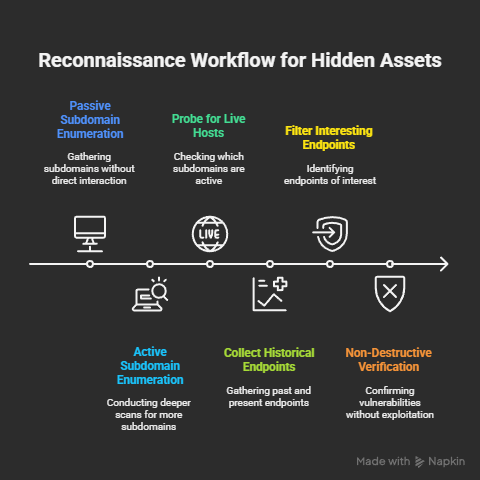
Recon mindset: why recon beats brute force
Before tools and commands, adopt the right mindset:
- Look for mistakes, not magic. Most exposures are human error: forgotten staging servers, misconfigured S3 buckets, exposed admin panels, default credentials, weak CORS.
- Find the low-hanging fruit. Large organizations have hundreds to thousands of subdomains and assets — many are poorly monitored.
- Automate the boring parts. The real skill is filtering noise: surface the interesting nodes quickly.
- Verify, don’t exploit. Your goal is to confirm an exposure non-destructively, capture evidence, and report.
The 5-minute recon trick (the quick version)
One-liner trick: enumerate subdomains, probe for live hosts, and search historical URLs — then target endpoints for common misconfigurations.
Core command sequence (fastest path):
# 1) Subdomain discovery (fast)
subfinder -d example.com -silent | sort -u > subs.txt

# 2) Probe for live HTTP hosts
cat subs.txt | httpx -silent -status-code -o live_hosts.txt

# 3) Harvest historical & discovered paths
cat live_hosts.txt | while read host; do
  echo "$host" | gau --subs | sed 's|https\?://||' >> paths.txt
done

# 4) Quick vulnerability scan (non-destructive) with Nuclei templates
cat live_hosts.txt | nuclei -t /path/to/nuclei-templates/ -o nuclei_results.txt
Run this pipeline and you’ll often reveal:
- Staging/admin subdomains (
staging.example.com,admin.example.com) - Exposed assets (S3 buckets, API endpoints)
- Endpoint patterns (
/admin,/wp-admin,/api/v1/debug) - Missed security headers or default pages that give away software
This is the recon trick I used to find the forgotten admin panel in my case study below.
Tools referenced above: subfinder, httpx, gau (GetAllUrls), nuclei. Later sections explain install & alternatives.
Toolset & installation (what I use and why)
You don’t need every tool in the world — you need a compact, reliable stack that scales.
Core tools (copy-paste install)
- subfinder — fast passive & active subdomain enumeration.
Install (Go):go install -v github.com/projectdiscovery/subfinder/v2/cmd/subfinder@latest - amass — deep subdomain enumeration and mapping.
Install: follow instructions at the OWASP Amass repo or package manager (brew install amass/apt install amass). - assetfinder (optional) — quick passive enumeration.
Install:go install github.com/tomnomnom/assetfinder@latest - httpx — fast HTTP probing (status codes, titles, TLS info).
Install:go install -v github.com/projectdiscovery/httpx/cmd/httpx@latest - gau / waybackurls — harvest historical URLs from archives & Wayback.
Gau install:go install github.com/lc/gau/v2/cmd/gau@latest
Waybackurls:go install github.com/tomnomnom/waybackurls@latest - gf / gfind — pattern matching for interesting endpoints.
go install github.com/tomnomnom/gf@latest - nuclei — templated scanning for common misconfigurations & CVEs (non-exploitative).
Install:go install -v github.com/projectdiscovery/nuclei/v2/cmd/nuclei@latest
Templates:nuclei -update-templates - ffuf / dirsearch — directory fuzzing for hidden pages.
Install ffuf:go install github.com/ffuf/ffuf@latest - jq, sed, grep — the classics for filtering output.
Note: You can swap similar tools (e.g.,
sublist3r,massdns) depending on preference.
The full recon workflow (step-by-step, with commands)
Below is a methodical workflow you can use on authorized targets. I’ll use example.com as the target—replace it with your authorized domain.
Step 0: Setup & rules of engagement
- Use a VM or isolated environment (snapshots).
- Log activity and save outputs (
screenshots,captures). - Confirm authorization. If testing a bug bounty program, read the policy on scope and prohibited testing.
- Never perform destructive tests (SQLi with payloads, mass exploitation) without a contract.
Step 1: Passive subdomain enumeration (fast and quiet)
subfinder -d example.com -o subfinder_passive.txt
assetfinder --subs-only example.com >> subfinder_passive.txt
sort -u subfinder_passive.txt > passive_subs.txt
Why passive first? Minimizes noise and reduces chance of alerting defenders. Passive sources include certificate transparency, public DNS, and third-party archives.
H2 — Step 2: Active subdomain enumeration (deeper)
amass enum -d example.com -o amass_subs.txt
cat amass_subs.txt passive_subs.txt | sort -u > all_subs.txt
Amass can discover additional hosts (brute force or permutation modes) if allowed by scope.
Step 3: Probe for live hosts (HTTP/HTTPS)
cat all_subs.txt | httpx -silent -threads 50 -status-code -o httpx_results.txt
# quickly extract hosts that responded 200/301/etc
cat httpx_results.txt | jq -r '.url' > live_hosts.txt
If httpx output is plain text, you can do:
cat all_subs.txt | httpx -silent -status-code -o live_hosts.txt
Step 4: Collect historical & discovered endpoints
# Gather URLs seen in Wayback and other archives
cat live_hosts.txt | sed 's|https\?://||' | gau --subs | sort -u > all_urls.txt
# Use waybackurls too
cat live_hosts.txt | waybackurls >> all_urls.txt
sort -u all_urls.txt > unique_urls.txt
Why this matters: Wayback & archived pages often reveal admin endpoints, old API routes, or debug pages that were later hidden but still accessible.
Step 5: Filter for interesting endpoints (admin, backup, debug)
Use gf patterns or simple grep:
cat unique_urls.txt | gf admin | sort -u > admin_endpoints.txt
cat unique_urls.txt | gf backup | sort -u > backup_endpoints.txt
grep -iE "/admin|/login|/wp-admin|/manage|/backup|/debug|/staging" unique_urls.txt > interesting.txt
gf is helpful because it contains community patterns (“admin”, “sqli”, “xss” etc.). Use custom patterns for your scope.
Step 6: Non-destructive verification (what I actually did in 5 minutes)
For each interesting endpoint:
- Check status and headers with
httpx:
echo "https://staging.example.com/admin" | httpx -status-code -title -headers -o verify.txt
cat verify.txt
- Check for open directories / default pages:
# quick directory listing check
ffuf -u https://staging.example.com/FUZZ -w /usr/share/wordlists/common.txt -fc 404 -t 50
- Check security headers:
curl -Is https://staging.example.com/admin | sed -n '1,20p'
- Search for exposed credentials or config files:
# cautious: never download sensitive files; just check presence and report
curl -s -o /dev/null -w "%{http_code}" https://staging.example.com/.env
In my 5-minute find: a staging.example.com/admin returned a 200 status with a default admin panel placeholder page (no authentication). That was enough evidence to start responsible disclosure.
How it was made: the reconnaissance chain explained
Here’s the logic behind the commands — why each step finds what others miss:
- Passive sources (subfinder/assetfinder): draw from DNS, CT logs, CDN, and public repositories. These reveal subdomains that exist in the wild but might not be resolvable anymore.
- Active enumeration (amass): digs deeper (brute force, permutation) and discovers hosts with less public exposure.
- Probing (httpx): quickly identifies which hosts speak HTTP(S) — you only care about live attack surfaces.
- Historical scraping (gau/waybackurls): many hidden assets were once public (docs, admin endpoints) — archives retain those paths.
- Pattern filtering (gf/grep): surfaces high-value endpoints (admin, backup, debug).
- Nuclei (templates): runs non-exploit checks (misconfig headers, exposed S3, common default pages) to classify risk.
Put together, this chain turns thousands of possible inputs into a handful of high-confidence targets — often within minutes.
Example case study (realistic, anonymized)
Scenario: A large e-commerce company (anonymized) had a forgotten staging domain after a migration. It wasn’t in the public DNS zone file but showed up in certificate transparency and an old marketing PDF.
Recon Steps I took (authorized pentest):
- Passive discovery:
subfinderandamassrevealedstaging.ecom-example.comfrom historical certs. - Probe:
httpxshowedstaging.ecom-example.comon HTTPS, status 200. - Wayback / gau: revealed an
adminpath (/admin/login) on archived pages. - Verify:
curl -Ishowed noX-Frame-Options, noContent-Security-Policy, and the page rendered an admin UI without access control because it relied on internal network ACLs that weren’t set for external access. - Report: I prepared a responsible disclosure: severity, evidence (screenshots, headers, proof of concept with non-destructive steps), and remediation steps (restrict IP, enable authentication, review certificate issuance).
Outcome: The company patched the issue within 48 hours (applied auth and IP ACL) and thanked the pentest team. The fix removed a potential source of supply-chain compromise.
Non-Destructive Verification: how to prove impact without exploiting
If you find an exposed endpoint, prove the risk ethically:
- Screenshots of the page and HTTP headers (don’t download sensitive data).
- Status codes and resource names (e.g.,
.envreturning 200). - Evidence of missing controls (no auth prompts, missing security headers).
- Minimal, safe requests (HEAD or GET with
Rangeheaders to avoid large downloads). - Time stamps and logs: record when you tested the asset.
- Do not: download user data, post credentials, attempt exploit payloads, or escalate access.
Example verification commands for evidence:
# headers + status
curl -I https://staging.example.com/admin | tee headers.txt

# quick screenshot with headless browser (e.g., pageres or chromium headless)
chromium --headless --disable-gpu --screenshot=admin.png "https://staging.example.com/admin"
Always keep your activity logged and be transparent with the asset owner.
Common recon mistakes (and how to avoid them)
MistakeWhy it hurtsHow to avoid
Running noisy brute force on unknown subdomainsAlerts defenders, legal riskStart passive, ask for scope, throttle requests
Assuming a 200 means exploitabilityFalse positives waste timeVerify auth, headers, and function before claiming impact
Mass downloading archivesData theft & legal troubleOnly collect metadata; never exfiltrate user data
Not documenting permissionsMessed up engagementsKeep signed ROE and scope in one place
Ignoring historical contentMissed endpoints & leaksAlways include Wayback/Gau in pipeline
Remediation checklist you can recommend (for owners)
If you report a forgotten or exposed asset, recommend these fixes:
- Inventory & mapping — maintain an up-to-date asset inventory and DNS/subdomain register.
- Least privilege — ensure staging/admin panels are behind VPN, IP allow lists, or auth.
- HSTS & secure cookies — protect sessions.
- Security headers —
CSP,X-Frame-Options,X-Content-Type-Options. - Certificate Transparency monitoring — alert on unexpected cert issuance.
- Periodic scanning — schedule automated mapping and reporting.
- CI/CD cleanups — remove temporary domains after deployments.
- WAF & rate-limiting — block unusual traffic patterns.
- S3 / bucket policies — ensure public buckets are intentional.
- Responsible disclosure channel — offer security@ and a PGP key or HackerOne program.
Tools cheat-sheet & example usages
ToolPurposeExample
subfinderPassive subdomain discoverysubfinder -d example.com -silent -o subs.txt
amassDeep enumeration & mappingamass enum -d example.com -o amass.txt
httpxFast web probing`cat subs.txt
gau / waybackurlsHistorical URLs`cat live.txt
nucleiTemplate-based scanning`cat live.txt
ffufDirectory fuzzingffuf -u https://host/FUZZ -w wordlist.txt -t 50
gfFilter interesting paths`cat urls.txt
jqJSON parsing`cat httpx.json
Responsible disclosure template (copy & paste)
Use this when contacting owners or security@ emails:
Subject: Responsible Disclosure — Exposed Admin Panel on staging.example.com

Hi [SEC/Dev team],

During authorized security research, I discovered an exposed staging admin panel at:
https://staging.example.com/admin

Evidence:
- Screenshot: [attached admin.png]
- HTTP headers captured (timestamped): headers.txt
- The endpoint returns HTTP 200 and renders admin UI without authentication.

Impact:
- An unauthenticated visitor can access admin UI, which could lead to scope escalation or data exposure.

Repro steps (non-destructive):
1. Visit https://staging.example.com/admin
2. Observe page loads without authentication and lacks security headers.

Recommended remediation:
- Restrict access via IP allowlist or VPN
- Enforce authentication (strong MFA)
- Add security headers and monitoring

I’m happy to provide additional evidence or coordinate a time for verification. Please confirm receipt.

Regards,
[Your Name]
[Contact]
[Proof of Authorization if applicable]
FAQ (optimized for featured snippets)
Q: How can I find vulnerable sites quickly?
A: Use a structured recon chain: passive subdomain discovery (subfinder/amass), HTTP probing (httpx), historical URL harvesting (gau/waybackurls), and pattern filtering (gf/grep). Then perform non-destructive verification (headers, status codes, screenshots). Always have authorization.
Q: What tools do ethical hackers use for recon?
A: Common tools include subfinder, amass, httpx, gau/waybackurls, nuclei, ffuf, and gf. These tools help enumerate assets, probe live hosts, harvest historical paths, and run template checks without exploiting systems.
Q: Is it legal to run these recon commands?
A: Running recon commands against systems you do not own or have explicit permission to test may be illegal in many jurisdictions. Only perform recon within scope of a bug bounty program, penetration test contract, or explicit written authorization.
Q: What is safe verification of a vulnerability?
A: Safe verification includes capturing headers, status codes, and screenshots, using HEAD requests, and avoiding any action that reads or transfers sensitive data. Do not run exploit payloads or attempt privilege escalation without authorization.
Q: How to report a discovered vulnerable site?
A: Use a responsible disclosure email or the vendor’s security contact. Provide non-destructive evidence (screenshots, headers), clear repro steps, impact assessment, and remediation recommendations. Keep communications professional and time-stamped.
Conclusion — recon wins, ethics seal it
Finding a vulnerable site in five minutes isn’t magic — it’s method. The trick is a fast, repeatable pipeline: passive discovery → active probing → historical data mining → pattern filtering → safe verification. With the commands and workflow in this article you can surface forgotten assets quickly, reduce noise, and produce credible, responsible findings.
A final reminder: do this work ethically. Recon reveals uncomfortable truths about ownership and exposure. Your job as a researcher is to help secure systems — not to cause harm.
 Spyboy blog