

 Posted by
 WordPress powers over 43% of the entire internet. From personal blogs to billion-dollar businesses, WordPress is everywhere — and that makes it a prime target.
If you’re a pentester, bug bounty hunter, security engineer, or even a WordPress developer, knowing how to properly pentest WordPress is no longer optional. Automated scanners catch the obvious stuff. Real vulnerabilities hide in logic, misconfigurations, and custom code.
This WordPress Pentesting Cheatsheet is not a copy-paste checklist. It’s a battle-tested, real-world methodology used in professional pentests and bug bounty programs — updated for 2026 realities.
You’ll learn:
- How WordPress is built (and where it breaks)
- A step-by-step pentesting workflow
- Common + high-impact vulnerabilities
- Tools, commands, examples, and usage
- Real-world case studies
- Reporting tips
- FAQs optimized for Google featured snippets
Bookmark this. You’ll come back to it.
Why WordPress Pentesting Is Still Critical in 2026
Despite being mature, WordPress remains vulnerable because of:
- Thousands of third-party plugins
- Poor update hygiene
- Custom themes & code
- Shared hosting environments
- Weak admin security practices
Real-World Stats (Still Relevant)
- 90%+ of WordPress hacks happen via plugins/themes
- Outdated plugins are the #1 attack vector
- Credential stuffing remains extremely effective
- Most compromises are non-zero-day
👉 Translation: attackers don’t need elite exploits — they need misconfigurations and bad hygiene.
Understanding WordPress Internals (Pentesters Must Know This)
Before exploiting WordPress, you must understand how it works.
Core Components
- Core –
/wp-admin,/wp-includes - Themes –
/wp-content/themes/ - Plugins –
/wp-content/plugins/ - Uploads –
/wp-content/uploads/ - Database – MySQL (posts, users, options)
Authentication Model
- Cookie-based sessions
- Nonces for CSRF protection
- Roles & capabilities (Subscriber → Administrator)
Common Mistake
Many pentesters:
“Scan plugins → exploit → done”
Professionals:
“Understand logic → map attack surface → exploit with context”
WordPress Pentesting Methodology (High-Level)
Here’s the modern WordPress pentesting flow:
- Passive Reconnaissance
- Active Enumeration
- Version & Component Discovery
- Authentication Attacks
- Authorization & Access Control
- Plugin & Theme Vulnerability Testing
- File Upload & RCE Testing
- Database & Injection Attacks
- Business Logic & Misconfigurations
- Post-Exploitation
- Reporting & Remediation
Let’s break each one down.
1. Passive Reconnaissance (Start Quiet)
What to Look For
- WordPress indicators in HTML source
/wp-content/,/wp-admin/- Meta generator tags
- Robots.txt leaks
- Sitemap exposure
Quick Checks
curl -I https://target.comLook for:
- Server headers
- PHP version leaks
- CDN or WAF presence
Real-World Example
A pentest revealed:
wp-jsonexposed- REST API open
- No authentication on custom routes
Result?
User enumeration + content manipulation.
2. Active Enumeration (This Is Where Gold Appears)
Enumerate WordPress
https://target.com/wp-admin/https://target.com/wp-login.phphttps://target.com/wp-json/Enumerate Users
https://target.com/?author=1If it redirects to /author/admin/, you just found a username.
REST API Enumeration
/wp-json/wp/v2/usersIf exposed:
- Usernames
- IDs
- Roles (sometimes)
3. WordPress Version, Plugins & Themes Discovery
Why This Matters
Most real-world WordPress compromises happen via:
- Vulnerable plugins
- Abandoned themes
Manual Enumeration
Check page source:
/wp-content/plugins/contact-form-7//wp-content/themes/astra/Directory Listing Checks
/wp-content/plugins//wp-content/uploads/If directory listing is enabled — jackpot.
4. Authentication Attacks (Still Extremely Effective)
Common Attacks
- Brute force
- Credential stuffing
- XML-RPC abuse
- Password reuse
XML-RPC Bruteforce
/xmlrpc.phpMultiple login attempts in one request.
Real-World Case
Client reused:
- Email + password across sites
Result?
Full admin takeover in under 10 minutes.
Pentester Tip
Always test:
- Weak passwords
- Default credentials
- Leaked credentials
5. Authorization & Access Control (Highly Underrated)
Test User Roles
- Subscriber
- Contributor
- Author
- Editor
- Admin
What to Check
- Access to
/wp-admin/ - Media uploads
- AJAX endpoints
- REST routes
Example
Subscriber accessing:
/wp-admin/admin-ajax.php?action=export_dataResult?
Sensitive data disclosure.
6. Plugin & Theme Vulnerability Testing
Common Plugin Bugs
- SQL injection
- XSS
- CSRF
- File upload
- Auth bypass
How to Test
- Identify plugin version
- Check changelogs
- Analyze exposed endpoints
- Fuzz parameters
Example
/wp-content/plugins/plugin-name/readme.txtVersion disclosure → vulnerability match → exploit.
7. File Upload & Remote Code Execution (High Impact)
Common Upload Paths
/wp-content/uploads/What to Try
- Upload PHP disguised as image
- Double extensions
- MIME-type bypass
- SVG XSS
Real-World Example
Uploaded:
shell.php.jpgServer executed it.
Result?
Full server compromise.
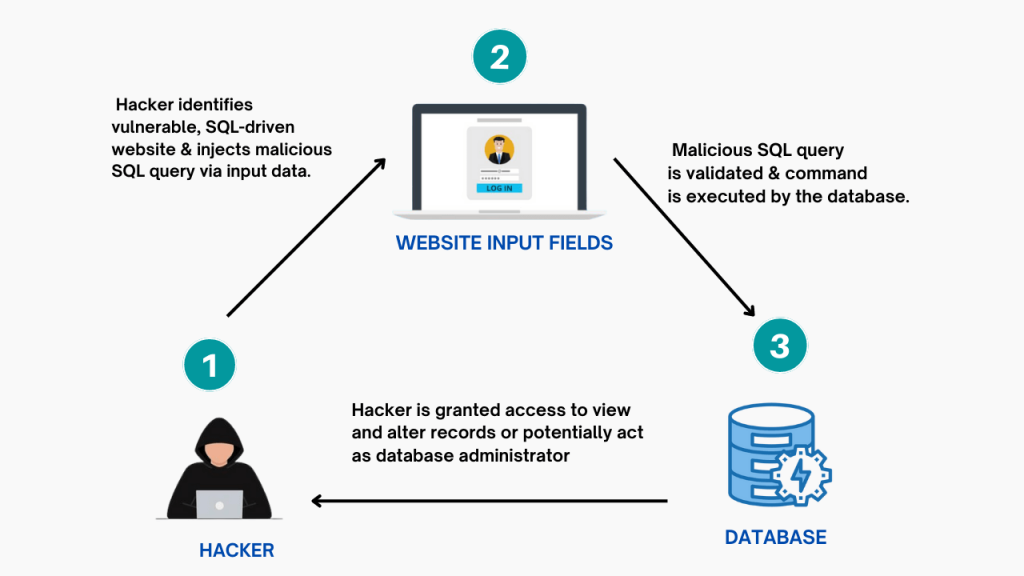
8. SQL Injection & Database Attacks

Injection Points
- Search parameters
- Plugin endpoints
- AJAX actions
- REST API
Blind SQLi Example
?id=1 AND SLEEP(5)If delay happens — investigate further.
Modern Reality
- Core WordPress is fairly hardened
- Plugins are not
9. Business Logic & Misconfigurations
This is where experienced pentesters win.
Common Logic Issues
- Unrestricted password resets
- Email change without verification
- Order manipulation
- Coupon abuse
- Subscription bypass
Case Study
WooCommerce site allowed:
- Order status change via AJAX
Result?
Free products shipped.
10. Post-Exploitation (If You Get In)
What to Do (Ethically)
- Prove impact
- Avoid persistence unless allowed
- Capture evidence
- Stop
Typical Impact Proof
- Access admin panel
- Read sensitive data
- Execute limited commands
Logging Setup (Highly Recommended)
Logging is essential for credible pentests.
Use This Script (Preserves Colors & Output)
#!/bin/bash# Helper script by @sechurityif [ -z "${UNDER_SCRIPT}" ]; then logdir="${HOME}/logs" logfile="${logdir}/$(date +%F.%H-%M-%S).$$.log" mkdir -p "${logdir}" export UNDER_SCRIPT="${logfile}" echo "The terminal output is saving to ${logfile}" script -f -q "${logfile}" exitfiInstall globally:
chmod +x logt.shsudo cp logt.sh /usr/local/bin/logtRun:
logtReporting WordPress Vulnerabilities (How Pros Do It)
Bad Report ❌
“XSS found in plugin.”
Good Report ✅
“Unauthenticated reflected XSS in contact form plugin allows attacker to execute arbitrary JavaScript in victim browsers, enabling session hijacking.”
Always include:
- Steps to reproduce
- Impact
- Screenshots
- Fix guidance
WordPress Pentesting Cheatsheet (Quick Reference)
| Area | What to Test |
|---|---|
| Core | Version, config leaks |
| Auth | Brute force, XML-RPC |
| Plugins | Known & custom bugs |
| Uploads | RCE, XSS |
| REST API | IDOR, auth bypass |
| Logic | Workflow abuse |
Frequently Asked Questions (FAQ)
Is WordPress still secure in 2026?
Yes — if properly configured and maintained. Most hacks are due to human error.
What is the most common WordPress vulnerability?
Vulnerable plugins and weak credentials.
Can automated scanners replace manual testing?
No. They miss logic flaws, access control issues, and custom code bugs.
Is WordPress pentesting legal?
Only with explicit permission or within bug bounty scope.
How long does a WordPress pentest take?
- Small site: 1–2 days
- Large WooCommerce site: 1–2 weeks
Final Thoughts: WordPress Security Is About Discipline
WordPress itself isn’t “insecure”.
Poor updates, bad plugins, weak passwords, and no monitoring are.
If you:
- Understand WordPress internals
- Follow a structured methodology
- Focus on real impact
- Log everything
- Report clearly
You’ll outperform most automated audits.
🚀 Call to Action
If this WordPress Pentesting Cheatsheet helped you:
- Bookmark it
- Share it with your team
- Apply one new technique today
Stay sharp. Stay ethical.
 Spyboy blog