
 Posted by
 You visit a trusted website. The URL looks correct. The padlock icon is there. The design is familiar. You enter your username and password without hesitation.
Days later, your account is locked. Your email password has changed. Your bank alerts you about suspicious activity. You swear you never entered your credentials on a fake site.
So what happened?
Here’s the uncomfortable truth: hackers don’t always need fake websites to steal login details. Sometimes they exploit legitimate platforms, trusted domains, browser behavior, third-party integrations, or even the login process itself.
In this deep-dive guide, we’ll break down:
- How hackers steal login credentials from legitimate websites
- Real-world examples and data breaches
- The tools and techniques attackers use
- How these attacks are built (for educational awareness)
- How to protect yourself and your organization
- Frequently asked questions (optimized for Google snippets)
If you care about cybersecurity, privacy, or protecting your digital identity — this is a must-read.
Why Login Credentials Are So Valuable
Before we explore the techniques, let’s understand the motive.
According to IBM’s Cost of a Data Breach Report, compromised credentials are one of the most common initial attack vectors in breaches worldwide.
Why?
Because login details give attackers:
- Direct account access
- Email control (for password resets)
- Access to cloud storage
- Banking & financial systems
- Corporate networks
- Social media accounts
- Admin dashboards
Stolen credentials are sold on underground marketplaces in bulk — often sorted by service type (banking, gaming, SaaS, enterprise).
Now let’s break down how hackers steal login details — even from legitimate websites.
1. Phishing Using Legitimate Domains (Advanced Phishing)
Most people think phishing always involves obviously fake websites.
Not anymore.
Modern attackers use:
- Subdomain tricks
- URL encoding
- Open redirects
- Compromised legitimate domains
- Cloud-hosted phishing pages
How It Works
Instead of creating fake-bank-login.com, attackers:
- Compromise a legitimate website.
- Upload a fake login page under a subdirectory.
- Send phishing emails linking to:
https://legitimate-site.com/account/secure-update/login
Victims see a real domain and trust it.
Real-World Example
In multiple phishing campaigns, attackers used compromised WordPress websites to host fake Microsoft 365 login pages. Since the domain itself was real, spam filters were less likely to block it.
Why This Works
- Users trust real domains
- SSL certificate (padlock) is present
- Email filters allow trusted domains
- Link previews show legitimate site name
2. Man-in-the-Middle (MITM) Credential Interception

A Man-in-the-Middle (MITM) attack intercepts communication between a user and a legitimate website.
How It Works
- Attacker sets up a fake WiFi hotspot (e.g., “Free Airport WiFi”).
- Victim connects.
- Traffic passes through attacker’s device.
- Login data is captured.
Even with HTTPS, attackers may use:
- SSL stripping
- DNS spoofing
- Rogue access points
- Proxy-based credential harvesting
Real Example
Public WiFi attacks have repeatedly been demonstrated at security conferences, showing how easy it is to intercept login sessions when users connect to rogue networks.
3. Keyloggers and Malware
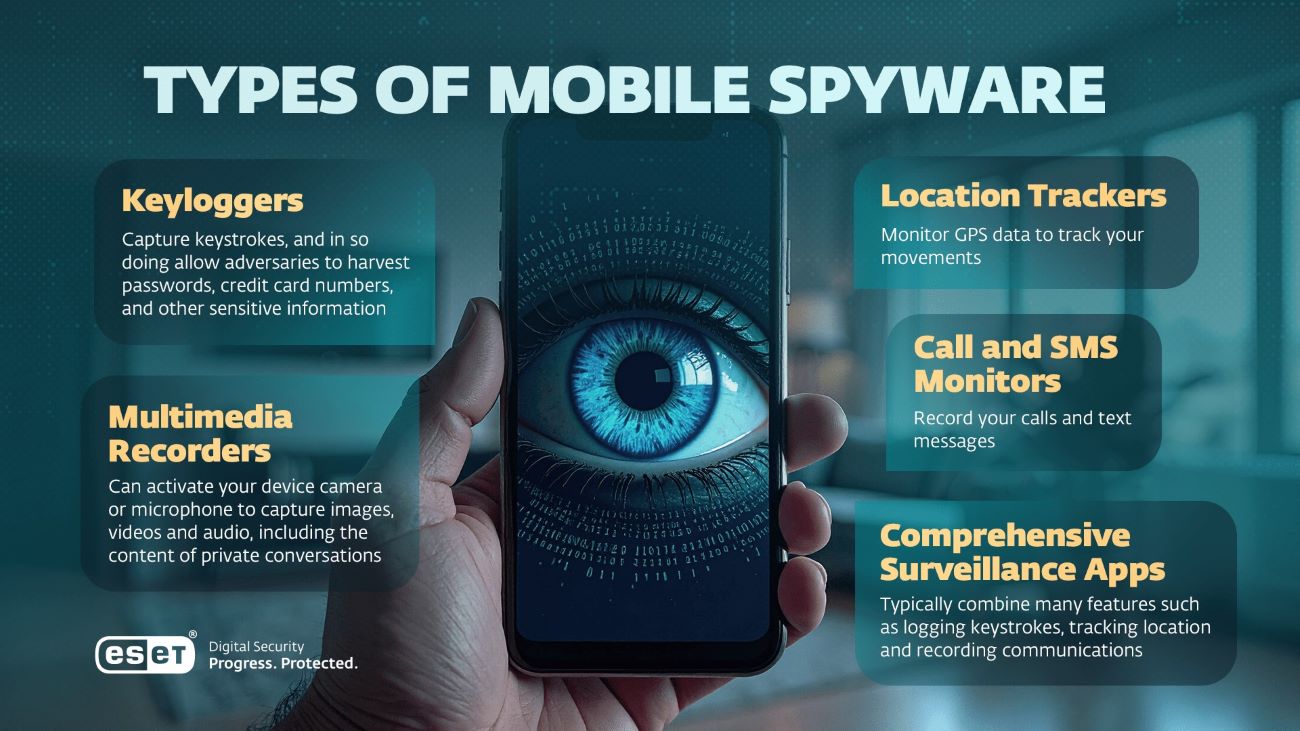
Sometimes hackers don’t attack the website.
They attack you.
How It Works
- User downloads a cracked program or fake browser extension.
- Malware installs silently.
- Keystrokes are logged.
- When login credentials are typed into a legitimate site — they are recorded.
Popular Malware Families (Historically Observed)
- RedLine Stealer
- Raccoon Stealer
- Agent Tesla
These malware strains specifically target:
- Browser-stored passwords
- Crypto wallets
- FTP credentials
- Email logins
Why This Is Dangerous
Even the most secure website can’t protect you if your device is compromised.
4. Session Hijacking

You log into a website.
The server creates a session token (usually stored as a cookie).
If hackers steal that session token — they don’t need your password.
How It Works
- Attacker steals session cookies via:
- XSS vulnerability
- Malware
- Browser extension abuse
- They inject the stolen cookie into their own browser.
- They gain access without credentials.
Real-World Example
Large-scale session hijacking campaigns have targeted platforms like Facebook and Twitter using browser malware that extracts authentication cookies.
5. Credential Stuffing
Credential stuffing doesn’t steal login details directly — it reuses them.
But it often begins with credentials stolen from legitimate websites.
How It Works
- Data breach leaks emails & passwords.
- Hackers test those credentials across:
- Banking websites
- E-commerce
- Streaming platforms
- SaaS tools
Because people reuse passwords, success rates can be surprisingly high.
Case Study
The 2012 LinkedIn breach led to millions of credentials being reused across multiple platforms years later.
6. OAuth Token Abuse (Login With Google/Facebook)
“Login with Google” feels secure — and generally is.
But attackers abuse OAuth in two main ways:
Method 1: Fake OAuth Consent Pages
Users are redirected to a page that looks like Google login but is malicious.
Method 2: Malicious Apps
Attackers create apps requesting excessive permissions.
If granted, they can:
- Read email
- Access files
- Extract data
- Maintain persistent access
7. Open Redirect Exploits
Some legitimate websites have redirect functionality like:
example.com/redirect?url=somewhere.com
If not secured, attackers modify the URL:
example.com/redirect?url=malicious-site.com
Users see a legitimate domain in the link — then get redirected to a phishing page.
This technique increases phishing credibility dramatically.
8. Browser Extension Abuse
Many users install random Chrome extensions.
Some malicious extensions:
- Read all browsing data
- Access login forms
- Capture credentials before submission
Google has removed thousands of malicious extensions over the years for this reason.
9. Cross-Site Scripting (XSS)
XSS vulnerabilities allow attackers to inject malicious JavaScript into legitimate websites.
That script can:
- Capture login inputs
- Steal cookies
- Redirect users silently
- Inject fake login forms
This is one of the most dangerous vulnerabilities in web applications.
How These Attacks Are Built (High-Level Overview)
For awareness purposes, here’s how attackers typically structure credential theft campaigns:
Phase 1: Infrastructure Setup
- Register domain or compromise site
- Setup hosting
- Configure phishing kit
- Install credential logging backend
Phase 2: Delivery
- Phishing emails
- SMS messages (smishing)
- Social media DMs
- Malvertising
- SEO poisoning
Phase 3: Harvesting
- Credentials logged into database
- Exported to file
- Sold on dark web markets
- Used for account takeover
Modern phishing kits even include:
- Admin dashboards
- Real-time victim monitoring
- Telegram bot alerts
- Automatic redirect after capture
Real Statistics You Should Know
- Over 80% of hacking-related breaches involve compromised credentials.
- Phishing is consistently ranked as the top initial attack vector.
- Credential stuffing attacks increased dramatically after major data leaks.
- Millions of passwords are traded daily on underground markets.
The threat is massive — and growing.
How to Protect Yourself From Credential Theft
Now the most important part.
1. Use a Password Manager
- Generates unique passwords
- Prevents reuse
- Auto-fills only on correct domains
2. Enable Multi-Factor Authentication (MFA)
Even if password is stolen:
- Attacker still needs OTP or hardware key
- Reduces account takeover risk significantly
3. Avoid Public WiFi (or Use VPN)
If using public WiFi:
- Use trusted VPN
- Avoid logging into sensitive accounts
4. Check URLs Carefully
Look for:
- Subdomain tricks
- Misspellings
- Extra characters
5. Keep Devices Clean
- Update OS
- Avoid pirated software
- Scan for malware regularly
6. Review App Permissions
Audit:
- Google account apps
- Facebook connected apps
- Microsoft connected apps
Remove unknown integrations.
7. Monitor Data Breaches
Use services that alert you if your email appears in a breach.
Credential Theft Techniques Comparison Table
| Method | Requires Fake Website? | Steals Password Directly? | Hard to Detect? | Common Target |
|---|---|---|---|---|
| Phishing | Sometimes | Yes | Medium | Email, Banking |
| MITM | No | Yes | High | Public WiFi Users |
| Keylogger | No | Yes | High | Individuals |
| Session Hijacking | No | No (Steals Token) | Very High | Social Media |
| Credential Stuffing | No | No (Reuses) | Medium | E-commerce |
What Businesses Must Do
If you run a website:
- Enforce rate limiting
- Implement CAPTCHA
- Use Web Application Firewall (WAF)
- Enable login anomaly detection
- Implement strict CSP headers
- Secure OAuth flows
- Patch XSS vulnerabilities
- Enforce MFA by default
Credential theft isn’t just a user problem — it’s a platform responsibility.
Frequently Asked Questions (FAQ)
How do hackers steal login details from legitimate websites?
Hackers use techniques like phishing on compromised domains, malware keyloggers, session hijacking, man-in-the-middle attacks, and OAuth abuse to capture credentials even when users visit real websites.
Can hackers steal passwords from HTTPS websites?
Yes. HTTPS encrypts traffic, but attackers can still steal credentials through malware, session hijacking, phishing pages hosted on compromised domains, or social engineering.
What is credential stuffing?
Credential stuffing is an attack where hackers use leaked usernames and passwords from previous breaches to attempt logins on other websites.
How can I check if my password was stolen?
Use trusted breach notification services and monitor unusual login activity, password reset emails, or suspicious account behavior.
Is using “Login with Google” safe?
Generally yes, but you must verify the consent screen and review app permissions regularly. Attackers can create malicious OAuth apps.
What is session hijacking?
Session hijacking occurs when attackers steal a session cookie or token, allowing them to access your account without knowing your password.
Final Thoughts: The Real Danger Isn’t Fake Websites — It’s Complacency
The scariest part about credential theft?
It often happens while you’re doing everything “normally.”
You’re on a trusted site. You see the padlock. You type your password.
But hackers don’t need to break the front door if they can:
- Intercept traffic
- Steal session tokens
- Infect your device
- Abuse third-party integrations
- Reuse leaked passwords
Cybersecurity today isn’t about paranoia.
It’s about awareness.
If this article opened your eyes, share it with someone who still reuses the same password everywhere.
Because in 2026, the biggest vulnerability isn’t software.
It’s trust.
 Spyboy blog