
 Posted by
 You’re excited.
Vacation booked.
Airport check-in complete.
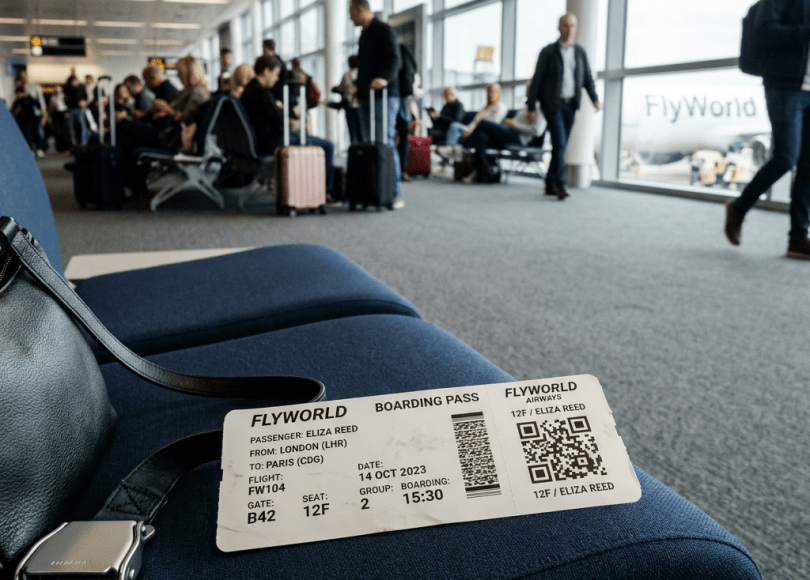
You snap a quick photo of your boarding pass and post it online:
✈️ “Finally heading to Dubai!”
Or:
🌴 “Vacation mode activated!”
Looks harmless.
Thousands of people do it every day.
But cybersecurity experts have been warning about this mistake for years.
Because that little boarding pass contains far more information than most travelers realize.
Sometimes much more than:
- Your name
- Flight number
- Destination
Depending on the airline and format, boarding passes can contain encoded information inside barcodes and QR codes that travelers never even notice.
In this deep dive, we’ll uncover:
- ✈️ What information boarding passes can reveal
- 🕵️ Why hackers and scammers love travel data
- ⚠️ The hidden risks of posting travel plans publicly
- 📱 How social media makes targeting easier
- 🔐 What criminals can learn from your vacation posts
- 🛡 How to travel more privately
Because sometimes…
The biggest travel mistake happens before you even leave home.
Why People Post Boarding Passes
Travel is exciting.
People naturally share:
- Flight announcements
- Airport photos
- Boarding passes
- Vacation countdowns
The problem?
Travel posts often reveal:
- Where you are
- Where you’re going
- When you’ll be gone
- When your house may be empty
That’s valuable information.
Your Boarding Pass Contains More Than You Think
Many travelers focus only on:
- Seat number
- Gate
- Flight time
But boarding passes often include:
- Passenger information
- Booking references
- Frequent flyer identifiers
- Reservation details
- Encoded data inside barcodes
Most users never inspect the barcode.
Yet it may contain information used by airline systems.
The Hidden Risk: Public Travel Schedules
Imagine posting:
“Leaving for Thailand for two weeks!”
You just told the internet:
- You’re traveling
- You’re likely not home
- How long you’ll be away
Not everyone seeing your post is necessarily a friend.
Public information spreads.
Why Criminals Love Predictability
Attackers often look for:
Patterns.
Travel posts reveal patterns such as:
- Home city
- Travel habits
- Favorite destinations
- Family movements
Small details accumulate.
And accumulated details become profiles.
The Problem Isn’t Just Hackers
When people hear cybersecurity they imagine:
Someone in a dark room hacking systems.
But information abuse often starts with:
Publicly available data.
No hacking required.
Just observation.
Social Media Makes Travel Tracking Easy
A typical travel post may reveal:
- Airport location
- Departure time
- Travel companions
- Destination
- Travel duration
Now combine that with:
- Public profiles
- Previous posts
- Geotags
The picture becomes surprisingly detailed.
Why QR Codes and Barcodes Matter
Most people see:
A weird black-and-white square.
Nothing more.
But those codes often exist for a reason:
To store information.
Airline systems use encoded data to process passengers efficiently.
That doesn’t mean every boarding pass creates massive danger.
But it does mean:
You shouldn’t casually broadcast them.
Another Hidden Risk: Loyalty Programs
Many travelers belong to:
- Airline reward programs
- Travel memberships
- Frequent flyer accounts
Travel information sometimes connects to broader digital identities.
The more information exposed:
The more valuable profiling becomes.
Vacation Posts Can Reveal Empty Homes
One of the oldest security concerns:
Announcing extended travel publicly.
People effectively publish:
“Nobody’s home for the next ten days.”
Not ideal.
Especially when profiles are public.
The Psychology Behind Travel Sharing
Humans love sharing experiences.
Especially:
- Vacations
- Adventures
- Milestones
Social media rewards sharing.
More photos.
More engagement.
More visibility.
But visibility has tradeoffs.
Why Attackers Build Profiles Slowly
Most attacks don’t begin with:
Technical hacking.
Instead attackers often gather:
- Names
- Locations
- Travel habits
- Public interests
Travel posts become one piece of a larger puzzle.
Warning Signs You’re Oversharing
🚩 Posting boarding passes publicly
Avoid it.
🚩 Posting exact departure times
Unnecessary.
🚩 Sharing live location updates
Think carefully.
🚩 Public vacation countdowns
Creates predictability.
🚩 Public profiles with travel history
Review visibility settings.
How To Travel More Privately
Now the important part.
🔐 1. Don’t Post Boarding Passes
Simple.
Effective.
🛡 2. Share Photos After Returning
Delay posting when possible.
📱 3. Remove Sensitive Details
Crop:
- QR codes
- Booking references
- Personal information
🌐 4. Review Privacy Settings
Limit public visibility.
🚫 5. Avoid Live Travel Updates
Real-time information creates unnecessary exposure.
🔍 6. Think Like an Observer
Ask:
“What could someone learn from this post?”
Comparison: Safer vs Riskier Travel Sharing
| Safer Habits | Riskier Habits |
|---|---|
| Post after returning | Post live updates |
| Hide boarding pass details | Share full passes |
| Limit audience | Public posts |
| Remove QR codes | Show entire ticket |
| Review privacy settings | Share everything |
The Bigger Problem: Travel Data Is Personal Data
People don’t think of travel information as sensitive.
But travel reveals:
- Habits
- Locations
- Schedules
- Relationships
- Routines
And routines are valuable.
Because routines create predictability.
Final Thoughts: The Best Travel Photo Might Be the One You Don’t Post
Most travelers aren’t exposing themselves to catastrophic risk with every airport photo.
But boarding passes are different.
They contain information designed for airline systems.
Not social media audiences.
The safest approach?
Keep them off the internet.
Because in cybersecurity…
You don’t always need to hide everything.
You just need to stop sharing things that provide no benefit.
And a boarding pass photo is usually one of them.
Frequently Asked Questions (FAQ)
❓ Is it dangerous to post a boarding pass online?
It can expose travel details and potentially reveal information contained in barcodes or reservation-related data.
❓ Can QR codes on boarding passes contain personal information?
They often contain encoded information used by airline systems and should not be shared casually.
❓ Should I blur my boarding pass before posting?
If you must share it, remove identifying details and barcode/QR code information.
❓ Is it safe to post vacation photos?
Generally safer after returning rather than while actively traveling.
❓ Why shouldn’t I post travel dates publicly?
Public travel schedules may reveal when you’re away from home.
❓ What is the safest travel-sharing strategy?
Share memories after the trip instead of broadcasting movements in real time.
Final Call to Action
Before your next trip:
- Stop posting boarding passes
- Hide QR codes and booking details
- Delay vacation updates
- Review social media privacy settings
- Think about what your travel posts reveal
And share this article with someone who posts their boarding pass every time they fly.
Because sometimes…
The most valuable information in your photo isn’t the picture.
It’s the data hidden inside it.
Discover more from Spyboy blog
Subscribe to get the latest posts sent to your email.
