
 Posted by
 A few years ago, scammers wanted you to click a link.
Today?
They want you to scan a QR code.
And it’s working.
Because people have become suspicious of:
- Weird links
- Shortened URLs
- Unexpected emails
But QR codes?
Most people trust them instantly.
You see a QR code on:
- A restaurant table
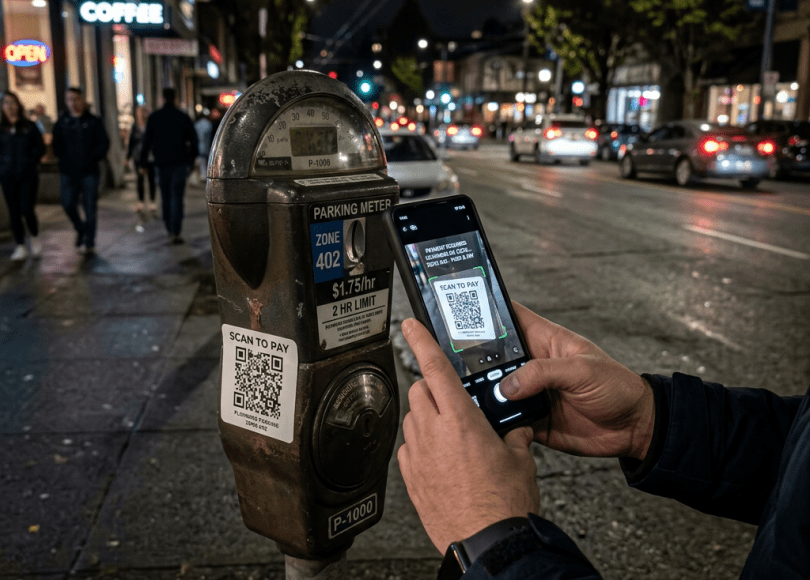
- A parking meter
- A package
- An email
- A poster
- A payment request
And without thinking:
📱 Scan.
That’s exactly why cybercriminals are increasingly using QR codes in scams.
In fact, security researchers have even given this trend a name:
Quishing
(QR Code + Phishing)
In this deep dive, we’ll uncover:
- 📱 Why QR code scams are exploding
- 🕵️ How quishing attacks work
- ⚠️ Real-world QR code tricks scammers use
- 🔐 Why phones make QR attacks effective
- 💳 Payment scams involving QR codes
- 🛡 How to scan safely
Because today…
The most dangerous phishing link may not look like a link at all.
Why QR Codes Became So Popular
QR codes exploded in popularity because they’re convenient.
Use cases include:
- Payments
- Menus
- Event tickets
- Login systems
- Product information
- App downloads
One scan.
Instant action.
No typing required.
Convenience always wins.
Why Attackers Love QR Codes
Traditional phishing emails often reveal:
Suspicious URLs.
But QR codes hide the destination.
Before scanning, users can’t easily see:
- The website
- The domain
- The destination
That creates opportunity.
Attackers love hidden destinations.
What Is Quishing?
Quishing is phishing through QR codes.
The process is simple:
- Victim scans QR code
- QR code opens website
- Website requests information
- Victim enters credentials
The technique is effective because:
People trust QR codes more than links.
The Parking Meter Scam
One of the most common examples:
Attackers place fake QR code stickers over legitimate ones.
Victims think:
“I’m paying for parking.”
Instead they may land on:
- Fake payment sites
- Credential harvesting pages
- Scam portals
The fake sticker may look completely normal.
Why Smartphones Make This Easier
Phones create urgency.
People are often:
- Walking
- Traveling
- In a hurry
- Distracted
When users scan QR codes, they rarely perform detailed inspections.
The process feels:
Fast.
Automatic.
Trusted.
Fake Business QR Codes Are Growing
Scammers have experimented with fake QR codes placed on:
- Restaurant menus
- Public posters
- Payment terminals
- Community notice boards
Users often assume:
“If it’s printed, it’s legitimate.”
Not always.
The Email QR Code Trick
Many people learned:
Don’t click suspicious links.
So attackers adapted.
Instead of a link:
The email contains a QR code.
Victims scan using their phone.
The attack moves from:
Computer → Smartphone
And bypasses some traditional caution.
Why Payment QR Codes Are Attractive Targets
QR payments are increasingly common.
Especially in countries where mobile payments dominate.
Attackers know:
People expect QR codes during transactions.
That familiarity creates trust.
Trust creates opportunities.
Another Hidden Risk: App Downloads
Some QR codes direct users to:
- App stores
- Downloads
- Install pages
If users aren’t paying attention:
They may install something they never intended.
Always verify the source.
Why Humans Trust QR Codes
Psychologically:
QR codes feel:
- Technical
- Official
- Modern
People assume:
“A QR code wouldn’t be there if it wasn’t legitimate.”
That’s not how reality works.
Anyone can create one.
Can QR Codes Hack Your Phone Automatically?
Generally:
No.
A QR code itself is usually just information.
The danger comes from:
What happens after scanning.
The website.
The download.
The action.
Not the square itself.
Warning Signs a QR Code Might Be Suspicious
🚩 Sticker placed over another QR code
Major red flag.
🚩 Unexpected login requests
Verify carefully.
🚩 Requests for payment information
Double-check legitimacy.
🚩 Poor-quality printed codes
Use caution.
🚩 QR codes received unexpectedly
Question the source.
How To Scan QR Codes Safely
Now the important part.
🔐 1. Check the Destination URL
Many phones preview links before opening.
Read them.
🛡 2. Be Careful With Public QR Codes
Especially stickers.
📱 3. Verify Payment Requests
Don’t rush.
🌐 4. Avoid Entering Credentials Immediately
Pause first.
🚫 5. Don’t Install Apps Blindly
Verify developers.
🔍 6. Trust the Business, Not the QR Code
The QR code itself proves nothing.
Comparison: Safe vs Risky QR Code Habits
| Safer Habits | Riskier Habits |
|---|---|
| Check URLs | Open immediately |
| Verify businesses | Trust stickers blindly |
| Inspect payment pages | Pay instantly |
| Review app sources | Install anything |
| Stay alert | Assume QR = safe |
The Bigger Problem: Scammers Follow Human Behavior
Cybercriminals don’t attack technology.
They attack habits.
Years ago:
People trusted links.
Now people distrust links.
So attackers moved to:
QR codes.
Tomorrow?
It’ll be something else.
The technology changes.
Human psychology remains surprisingly consistent.
Final Thoughts: A QR Code Is Just a Link Wearing a Costume
That’s the simplest way to think about it.
A QR code isn’t magic.
It isn’t automatically trustworthy.
It isn’t automatically dangerous.
It’s simply:
A shortcut.
And shortcuts deserve scrutiny.
Because sometimes…
The scam isn’t hidden behind a suspicious URL.
It’s hidden inside a square that everyone assumes is safe.
Frequently Asked Questions (FAQ)
❓ What is quishing?
Quishing is phishing that uses QR codes to direct victims to malicious websites or scams.
❓ Are QR codes dangerous?
QR codes themselves are usually harmless, but the destinations they point to may not be.
❓ Can QR codes steal information?
They can direct users to websites designed to collect credentials or payment information.
❓ Should I trust QR codes on public posters?
Verify carefully. Public QR codes can potentially be replaced or modified.
❓ Can QR codes install malware?
The risk generally comes from actions users take after scanning, such as downloading software.
❓ How can I scan QR codes safely?
Check destination URLs, verify sources, and avoid entering sensitive information immediately.
Final Call to Action
Before scanning your next QR code:
- Check the destination
- Verify the source
- Be careful with payment requests
- Avoid rushing
- Think before entering credentials
- Share this article with someone who scans every QR code they see
Because in 2026…
The newest phishing link might not look like a link at all.
Discover more from Spyboy blog
Subscribe to get the latest posts sent to your email.
