

 Posted by
Imagine walking through a parking lot and spotting a USB flash drive lying near your car.
It looks ordinary. Maybe it has a company logo, a handwritten name or a sticker saying:
CONFIDENTIAL — EMPLOYEE DATA
You pick it up.
You wonder who lost it. Perhaps there are important documents inside. Maybe you can identify the owner and return it.
You take it home, connect it to your laptop and open File Explorer.
A few seconds later, something unexpected happens.
Your computer begins behaving strangely. A new program appears. Your security software raises an alert. Or perhaps nothing visibly happens at all.
But what if that little USB device was deliberately placed there?
This is not just a movie-style hacking scenario. Cybersecurity professionals call this technique a USB drop attack, also known as USB baiting. It exploits something more powerful than a software vulnerability: human curiosity.
An attacker does not necessarily need to send you a phishing email, trick you into visiting a malicious website or guess your password. Sometimes, all they need is for you to pick up an object and connect it to a computer.
And if that computer belongs to an organisation, the consequences may extend far beyond one laptop.
A compromised workstation could expose company files, credentials, internal systems and potentially other connected devices.
The scary part is that the attack can begin without the victim ever receiving a suspicious link.
1. What Is a USB Drop Attack?
A USB drop attack is a form of physical social engineering in which someone deliberately leaves a USB device somewhere a potential victim is likely to find it.
The attacker is betting that the person will connect it to a computer.
Possible locations include:
- Office parking lots.
- College campuses.
- Libraries.
- Conference venues.
- Hotel reception areas.
- Shared workplaces.
- Cafeterias.
- Building entrances.
- Public transport stations.
The device may look like an ordinary flash drive. Sometimes it is labelled with something designed to attract attention:
Salary_InformationCompany_ConfidentialProject_2026Private_PhotosEmployee_DatabaseImportant_Backup
The label is part of the attack.
The attacker wants the person to think there is a good reason to inspect the device.
This is known as baiting because the USB drive acts as bait.
The US Department of Health and Human Services describes this exact scenario in its cybersecurity guidance: an attacker leaves a storage device in a public area, hoping someone will connect it, potentially exposing a personal computer or an organisation’s network. HHS.gov
The important point is that the attack does not begin with advanced hacking.
It begins with a decision.
2. People Really Do Plug In USB Drives They Find
You might think:
“Who would actually connect a random USB drive to their computer?”
More people than you might expect.
Researchers from Google and several universities investigated this behaviour in a controlled experiment published in 2016.
They dropped 297 USB drives around a university campus and studied what happened.
Their research estimated that between 45% and 98% of the drives were connected to a device, depending on how the researchers measured the outcome. The first drive was connected in less than six minutes.
One interesting finding was that people often connected the drives because they wanted to identify the owner and return the device. Google Research
Think about that.
People were not necessarily trying to access free software, steal documents or do anything malicious.
Some were simply trying to help.
That is what makes USB baiting effective: the attacker can exploit curiosity, helpfulness, greed or the desire to investigate something unusual.
A cybersecurity attack does not always require the victim to make a reckless decision. Sometimes it only requires a normal human reaction.
3. What Actually Happens When You Plug In a Malicious USB?
There is an important technical distinction here.
A normal USB flash drive is a storage device. Connecting it to a modern Windows computer does not ordinarily mean every program on it automatically executes.
Windows has restricted traditional AutoRun behaviour for USB storage devices, and simply inserting an ordinary flash drive is not the same as running a program from it.
So how can a USB device compromise a computer?
There are several possible attack paths.
Method 1: The USB contains malicious files
This is the simplest scenario.
Imagine a USB drive contains:
USB DRIVE│├── Photos/├── Documents/├── Project_Report.pdf├── Salary_Details.xlsx├── Important_Document.pdf.exe└── Setup.exe
The attacker hopes the victim will open one of the malicious files.
For example, a file may have a deceptive name or icon that makes it look like a document.
If the user executes a malicious program, it may attempt to install malware.
Depending on its capabilities, the malware could:
- Steal accessible files.
- Collect browser information.
- Attempt to capture credentials.
- Download additional malicious software.
- Establish persistence.
- Encrypt or delete files.
- Connect to an attacker-controlled server.
The USB drive is simply the delivery mechanism.
The actual compromise happens when malicious code successfully executes or exploits a vulnerability.
Microsoft documents removable drives as one way malware can spread and specifically warns users about USB drop attacks. Microsoft Support+1
Method 2: The USB pretends to be a keyboard
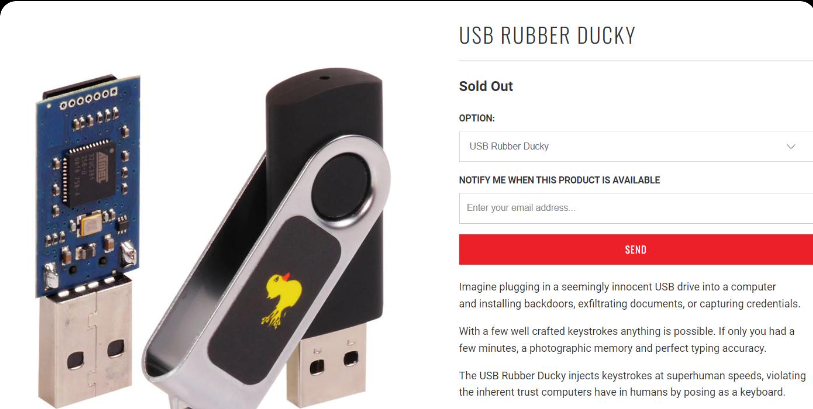
This is where things become more interesting.
Not every USB device is just a storage device.
USB supports different device types, including keyboards, mice, network adapters and storage devices.
A specially designed or modified device can identify itself to a computer as a keyboard.
The computer may then process its input as ordinary keystrokes.
This class of attack is commonly associated with BadUSB and HID injection.
HID stands for Human Interface Device.
A malicious device could be designed to send rapid keyboard input to a connected computer. Depending on the operating system, account privileges and security controls, this could be used to interact with applications or attempt to launch unwanted processes.
The victim might not even open a file.
The device itself is acting as an input device.
The Cyber Security Agency of Singapore specifically warns about USB Rubber Ducky-style devices that masquerade as ordinary USB drives and can send pre-programmed commands when connected. Cyber Security Agency of Singapore
Important: an ordinary flash drive cannot generally become a keyboard simply because someone copied a file onto it. HID attacks require compatible hardware or a device with suitable firmware capabilities.
Method 3: The USB exploits a vulnerability
A malicious device may also target vulnerabilities in software that processes data from the device.
For example, a vulnerability could exist in a file parser, image viewer, document application or operating-system component.
If the device contains specially crafted data and the vulnerable software processes it, an attacker may be able to trigger unintended behaviour.
This is not guaranteed to work. It depends on the vulnerability, software version, security configuration and whether the relevant component is exposed.
This is one reason keeping operating systems and applications updated matters.
Method 4: The USB spreads existing malware
A USB drive can also act as a carrier for malware that has already infected another computer.
For example:
- A computer becomes infected.
- Malware searches for connected removable drives.
- It copies malicious files or components onto a drive.
- Someone carries that drive to another computer.
- The next user opens or executes the malicious content.
- The infection may spread further.
Microsoft documents removable-drive propagation in its descriptions of Autorun-related malware. Microsoft Security Intelligence+1
The device can therefore become a bridge between computers that are not directly connected to one another.
4. The Real Danger: One USB Drive Could Become an Entry Point Into an Entire Network
Let’s move beyond a personal laptop.
Imagine an employee at a company finds a USB drive in the office parking lot.
They connect it to their work computer because they want to identify its owner.
That computer may have access to:
- Internal company documents.
- Shared network folders.
- Business applications.
- Customer information.
- Email systems.
- Development environments.
- Internal databases.
If an attacker successfully compromises that workstation, the device may become an initial entry point into the organisation.
The potential attack chain might look like this:
How a USB incident can become a company-wide security incident
- The USB is plantedAn attacker leaves a malicious device in a place employees regularly visit.
- An employee connects itThe device is plugged into a company laptop or workstation.
- A compromise occursA malicious file is executed, a vulnerability is exploited or a malicious peripheral interacts with the computer.
- The attacker gains a footholdMalware may attempt to access information available to the compromised account.
- Internal access is abusedIf the compromised machine has excessive permissions or accessible credentials, other systems may become exposed.
- The incident expandsSensitive data may be stolen, business operations disrupted or additional systems compromised.
Illustrative attack chain. A USB connection does not automatically grant access to an entire network; each stage depends on successful exploitation and the organisation’s security controls.
Why network access matters
A company computer is rarely an isolated machine.
It may communicate with file servers, identity services, cloud applications and other endpoints.
If an attacker compromises a workstation, they may attempt to abuse the access already available to its user.
For example, if an employee can access a shared folder containing sensitive customer records, malware running under that employee’s account may be able to access those records too.
If the organisation has weak access controls, exposed credentials or poorly segmented networks, the potential impact can become much larger.
This is why security teams care about the principle of least privilege.
An ordinary employee should not automatically have access to every important system simply because they work for the company.
A USB device may be the initial delivery mechanism, but the wider damage depends on what happens after the first compromise.
5. Real-World USB Attacks: This Is Not Just a Hypothetical Threat
USB attacks have appeared in documented cybersecurity incidents and government advisories.
FIN7 and malicious USB devices
In March 2020, the FBI and the Texas Department of Information Resources warned about USB devices being mailed to employees of targeted US businesses.
The devices were associated with the financially motivated cybercrime group FIN7.
Some packages included items such as gift cards or teddy bears to make the delivery appear legitimate.
The warning described devices capable of acting as keyboards and injecting keystrokes to initiate malicious activity. dir.texas.gov
The lesson is significant.
The attacker did not need to convince an employee to click a suspicious email attachment. The physical package itself was part of the social-engineering operation.
USB attacks against organisations
The Cybersecurity and Infrastructure Security Agency (CISA) has documented removable-media attack scenarios in which malicious USB devices are introduced into organisations.
Its threat-scenario report describes how attackers can use removable media to introduce malware into systems, potentially bypassing network perimeter defences.
It also discusses the risk of compromised systems spreading malware through connected removable drives. CISA
The Singapore Cyber Security Agency warning
In April 2024, Singapore’s Cyber Security Agency published an advisory about malware threats spread through USB devices.
It described how attackers could use infected removable drives to spread malware and highlighted programmable USB devices that can impersonate keyboards. Cyber Security Agency of Singapore
These examples demonstrate that USB attacks are not limited to one type of attacker or one type of victim.
They can target individuals, businesses and organisations with valuable information.
6. Why Attackers Leave USB Drives in Parking Lots and Offices
The location is part of the attack design.
An attacker does not necessarily want to leave a device somewhere nobody will notice it.
They want someone to find it.
Consider these examples:
| USB label | Psychological trigger |
|---|---|
Employee_Salaries | Curiosity |
CEO_Confidential | Authority and curiosity |
Private_Photos | Curiosity |
Bitcoin_Wallet_Backup | Greed |
Company_Project | Professional interest |
Exam_Results | Personal interest |
Customer_Database | Curiosity and perceived importance |
A USB drive labelled “Employee Salaries” may attract someone who works in HR.
A drive labelled “Project Backup” may attract an employee who assumes it belongs to their team.
A drive labelled “Private Photos” may tempt someone to inspect it.
The attacker is trying to create a reason for the victim to connect the device.
This is social engineering in physical form.
Why a company logo can make it more convincing
Imagine finding a USB drive with your employer’s logo.
You might assume that it belongs to someone in the organisation.
But a logo does not establish where a device came from or who prepared it.
An attacker can use publicly available branding to make a device look familiar.
The same principle applies to fake delivery packages, fraudulent ID cards and counterfeit promotional material.
Physical appearance is not proof of digital trustworthiness.
7. Can Your Antivirus Stop a Malicious USB?
This is a question worth understanding properly.
Antivirus and endpoint security products are important, but they are not universal protection against every type of USB attack.
Consider the differences:
| Attack type | What security software may help with |
|---|---|
| Malicious executable | Detecting known malware and suspicious behaviour |
| Malicious script | Detecting suspicious scripts and execution patterns |
| Infected removable drive | Scanning files and blocking detected threats |
| HID injection device | Device control and endpoint protections may reduce risk |
| Exploitation of an unpatched vulnerability | Patching and exploit protections are important |
| USB Killer | Antivirus cannot prevent physical electrical damage |
A malicious keyboard-style device is particularly important to understand.
Traditional antivirus is primarily concerned with software and system behaviour. A USB device presenting itself as a keyboard may be processed as an input device before a conventional file-scanning workflow becomes relevant.
That does not mean antivirus is useless. It means that organisations need controls beyond antivirus.
These can include:
- USB device-control policies.
- Blocking unauthorised HID devices where appropriate.
- Application allowlisting.
- Endpoint detection and response.
- Least-privilege accounts.
- Network segmentation.
- Operating-system updates.
- Security monitoring.
The goal is to prevent an unknown device from becoming a trusted entry point.
8. How to Protect Your Computer From USB Drop Attacks
The most effective defence is also the simplest.
Never connect a USB device you find lying around to a computer you care about.
If you find one at your office, college or another organisation, hand it to the IT or security team.
Do not connect it to your personal laptop to find the owner’s name.
For personal computers, follow these precautions:
1. Do not plug in unknown USB devices
This is the most important rule.
A device may look harmless, but its internal hardware and firmware cannot be reliably assessed by looking at the outside.
2. Keep Windows and applications updated
Security updates fix vulnerabilities that could otherwise be exploited when software processes malicious content or interacts with devices.
3. Keep Microsoft Defender or another reputable security product enabled
Make sure real-time protection and security intelligence updates are enabled.
Microsoft also explains how to scan removable drives using its security software. Microsoft Support
4. Avoid running files from unknown drives
Be particularly cautious with executable and script formats such as:
.exe.msi.bat.cmd.ps1.js.vbs
But remember: a dangerous USB device does not always need to rely on a file that you manually open.
5. Use standard user accounts
Avoid using an administrator account for everyday work.
If malware executes under a standard user account, its ability to make system-wide changes may be more limited.
This is not a guarantee, but it reduces unnecessary privileges.
6. Disable unnecessary USB access in organisations
Businesses can use endpoint-management and device-control policies to restrict removable storage and unauthorised USB peripherals.
7. Back up important files
Maintain backups that are protected from ordinary access by compromised computers.
A backup that is permanently connected and writable from every workstation may also be exposed during a malware incident.
For important business systems, offline or immutable backups can help reduce ransomware impact.
8. Never use a random USB drive to charge or transfer files
Unknown devices and cables can present different risks depending on their hardware.
Use trusted charging equipment and trusted storage devices.
9. What Should You Do If You Already Plugged In a Suspicious USB?
Suppose you made the mistake.
You found a USB drive, connected it and opened something.
What now?
Don’t panic, but don’t ignore it either.
Follow these steps:
- Disconnect the USB device. Do not continue browsing its contents or running files.
- Disconnect the computer from the network if you observe suspicious activity or suspect malware execution. This can help limit further communication, although it does not remove malware.
- Do not delete evidence immediately. If this is a work device, contact IT or the security team and follow their incident-response instructions.
- Run a full security scan using an updated security product.
- Check for suspicious activity, including unfamiliar applications, startup entries, browser extensions and security alerts.
- Change potentially exposed passwords from a separate, trusted device. Prioritise email, work accounts and other important services.
- Contact your organisation’s security team if the computer contains business information or connects to company systems.
If you suspect a serious compromise, avoid experimenting with random cleanup tools. A security team may need to preserve logs, isolate the device and investigate how the incident happened.
10. How Organisations Can Defend Against USB Drop Attacks
Companies should not rely entirely on employees remembering not to connect unknown devices.
Security controls should make unsafe connections harder in the first place.
Some useful measures include:
USB device control: Restrict removable storage and unauthorised USB peripherals through endpoint-management policies.
Device allowlisting: Permit only approved devices where the organisation’s risk profile justifies it.
Least privilege: Ensure employee accounts do not have unnecessary administrative permissions.
Network segmentation: Limit how far an attacker can move if one workstation is compromised.
Endpoint detection and response: Monitor suspicious processes, device activity and unusual network connections.
Security awareness: Teach employees how USB baiting works and provide a clear procedure for reporting found devices.
Incident response: Have a process for isolating affected computers, preserving evidence and investigating suspicious removable media.
The Singapore Cyber Security Agency recommends organisational controls to reduce the risks associated with USB-borne malware. Cyber Security Agency of Singapore
A company should also make it easy for employees to report a found device without feeling that they need to investigate it themselves.
11. Can You Safely Investigate a Found USB Drive?
Cybersecurity researchers sometimes need to analyse suspicious removable media. However, that is very different from connecting an unknown device to an everyday computer.
A professional investigation should use an isolated forensic environment, appropriate hardware controls and a documented evidence-handling process.
Even then, a software virtual machine alone is not a complete defence against malicious USB hardware. A device that behaves as a keyboard or another peripheral can interact with the host before a researcher has inspected its files.
For organisations, the safest response is to hand the device to trained security personnel.
For ordinary users, there is no compelling reason to investigate an unknown USB drive themselves.
If you find one, report it rather than testing it.
Frequently Asked Questions
Can a USB drive hack my PC just by plugging it in?
A normal storage drive generally does not automatically execute every file when connected to a modern Windows PC. However, specially designed USB hardware, malicious peripherals and software vulnerabilities can create risks without the user opening a file.
Can a USB drive steal my passwords?
It may be possible if malicious software executes or a device successfully interacts with the computer. The actual information accessible to an attacker depends on permissions, security controls and the attack method.
Can a USB drive infect an entire office network?
Potentially. If malware compromises a workstation, it may attempt to access connected systems or spread further. But connecting a USB drive does not automatically compromise an entire network.
What is USB baiting?
USB baiting is a social-engineering technique in which an attacker leaves a USB device somewhere in the hope that someone will connect it to a computer.
What is BadUSB?
BadUSB refers to attacks involving malicious or compromised USB device behaviour, including devices that impersonate other types of peripherals, such as keyboards.
Does formatting a suspicious USB make it safe?
Not necessarily. Formatting can remove ordinary files from storage media, but it does not prove that the device’s firmware or hardware is trustworthy.
Should I plug a found USB drive into an old laptop?
No. An old laptop is still a computer containing data and potentially connected to other devices or networks. Using it does not make an unknown USB device safe.
What if I find a USB drive at my workplace?
Do not connect it. Report it to your IT or security department and follow their procedure for handling unknown devices.
Final Thoughts: The Most Dangerous Part of a USB Attack Might Be Your Curiosity
We spend a lot of time learning how to protect ourselves from phishing emails, suspicious websites, fake applications and malicious downloads.
But physical cybersecurity deserves just as much attention.
An attacker can leave a USB drive in a parking lot, outside an office or inside a college campus. They can make it look ordinary, label it with something interesting and wait for someone to connect it.
The device might contain malicious files. It might use specialised hardware to impersonate a keyboard. It might exploit a vulnerability or simply act as a carrier for malware.
And if the compromised computer belongs to an organisation, the consequences may reach far beyond that one machine.
You don’t need to be afraid of every USB drive. You simply need to understand that connecting an unknown device is a security decision, not just a way to open files.
The next time you see a pen drive lying on the street, remember:
Someone may have lost it.
Someone may have dropped it accidentally.
Or someone may be waiting for you to plug it in.
Don’t let curiosity become the attacker’s entry point.
Further Reading and Sources
- Google Research — Users Really Do Plug in USB Drives They Find — Research into how people respond to found USB devices.
- US Department of Health and Human Services — USB Baiting and Cybersecurity — Guidance explaining the risks of found storage devices.
- Cyber Security Agency of Singapore — Protect Your Organisation Against Malware Threats Spread Through USB Devices — Official advisory on USB malware and malicious peripherals.
- Texas Department of Information Resources — Cyber Actors Targeting Businesses Through USB Keystroke Injection Attacks — Advisory about malicious USB devices associated with FIN7.
- CISA — ICT Supply Chain Risk Management Threat Scenarios — Technical discussion of removable-media attacks.
- Microsoft Support — How Malware Can Infect Your PC — Guidance on infected removable drives and USB drop attacks.
- Microsoft — How to Scan Removable Drives — Instructions for scanning USB storage devices.
This article is for cybersecurity awareness and defensive education. Do not connect unknown USB devices to computers you own or manage.
Discover more from Spyboy blog
Subscribe to get the latest posts sent to your email.
