
 Posted by
 Your Phone Is Almost Dead. You Find a Free USB Charging Station.
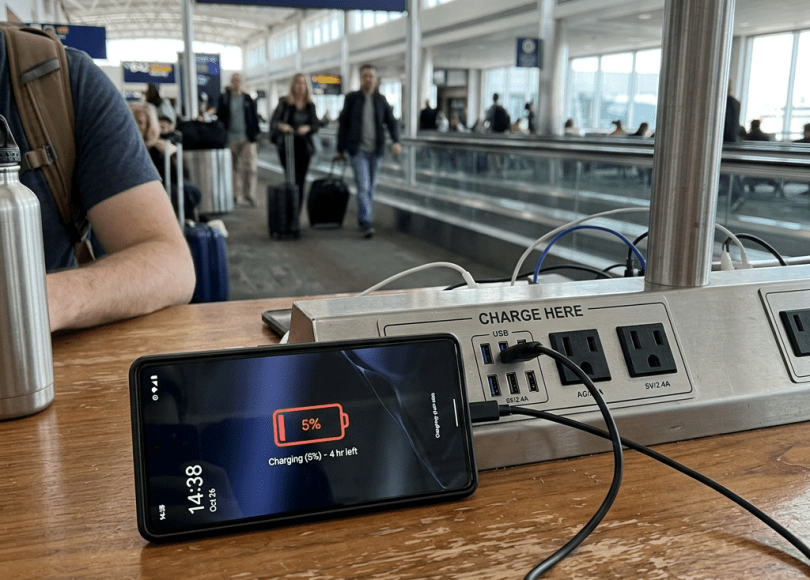
You’re at an airport.
Your phone is at:
3%
You need to make a call.
You need your boarding pass.
You need Google Maps.
Then you see it:
FREE PHONE CHARGING
Perfect.
You plug in.
The battery starts increasing.
You continue scrolling through Instagram.
Nothing happens.
No popup.
No warning.
No suspicious app.
You unplug the phone and leave.
You probably assume:
“It’s just a charger.”
But here’s the uncomfortable part:
USB is not only a power connection.
Depending on the device, cable and configuration, USB can also carry data.
That means a USB connection can potentially create a communication path between your phone and another device.
And that’s where the security concept known as:
Juice jacking
comes from.
What Is Juice Jacking?
Juice jacking is a term used to describe malicious activity involving compromised or malicious USB charging connections that can potentially be used for more than simply delivering electrical power.
Instead of:
Charger ↓Power ↓Phone
the malicious setup may attempt to create:
Phone ↕USB connection ↕Attacker-controlled equipment
The important distinction is:
Charging and data transfer can use the same physical connection.
That’s why USB security matters.
Is Juice Jacking Actually Real?
The underlying security issue is real.
USB connections have historically supported both:
Power
and:
Data
Security researchers have demonstrated attacks involving malicious USB devices, cables and charging infrastructure.
But there is an important distinction between:
“USB can be abused.”
and:
“Every airport charging station is secretly stealing everyone’s data.”
The second claim is sensationalized.
Modern smartphones have introduced additional protections, and many attacks require specific device conditions, vulnerabilities, user interaction or specialized hardware.
So don’t panic every time you see a USB port.
Instead:
Understand the risk and use safer charging habits.
Why USB Is Different From a Normal Wall Outlet
Look at these two scenarios.
Wall outlet
Wall ↓Power adapter ↓Phone
The adapter’s primary job is electrical power.
USB data connection
Computer ↓USB cable ↓Phone
Now the connection can potentially carry:
Power + Data
That’s useful.
It’s also why the connection deserves more security consideration.
Your USB Cable Isn’t Always “Just a Cable”
This is something many people don’t realize.
USB cables can contain different wiring/configurations.
Some cables are designed primarily for:
Charging
Others support:
Charging + data
A cable that supports data creates a different security situation from a power-only cable.
The Simplest Defense: Bring Your Own Charger
This is one of the easiest recommendations in the entire article.
Instead of:
Public USB port → Phone
use:
Public wall outlet → Your charger → Phone
Now the public infrastructure supplies electricity.
Your charger handles the connection to your phone.
The difference is significant.
Think About the Direction of Trust
With a normal wall outlet:
Electricity ↓Your charger ↓Your phone
With a potentially malicious USB port:
Public USB device ↕ Your phone
The second connection may provide a data pathway.
That’s the part you want to avoid when possible.
Airports Are Not the Only Place This Can Happen
You might encounter USB charging ports in:
- Airports
- Railway stations
- Hotels
- Cafés
- Shopping malls
- Buses
- Trains
- Libraries
- Conference centers
- Universities
- Rental cars
- Waiting rooms
- Public transport
A charging station doesn’t automatically mean:
Malicious.
It simply means:
You don’t necessarily control the equipment on the other end.
What Could a Malicious USB Connection Potentially Do?
The exact possibilities depend on:
- Phone operating system
- Device model
- Security patch level
- USB configuration
- User interaction
- Hardware
- Vulnerabilities
- Whether the device is locked
- Whether data access is authorized
Potentially, a malicious USB setup could attempt to:
- Identify the connected device
- Establish a data connection
- Trigger unauthorized interactions
- Exploit vulnerable software
- Attempt data access
- Deliver malicious content under specific conditions
But a critical point:
Modern phones don’t simply hand over everything because you plugged in a USB cable.
Security protections exist.
The Hollywood Version Is Wrong
You’ve probably seen videos claiming:
“Hackers plug in one USB cable and instantly download your entire phone.”
That’s not how every real-world attack works.
A modern phone isn’t a USB flash drive containing:
everything-you-own.zip
There are operating-system security boundaries, permissions, encryption and user prompts.
Some attacks may require sophisticated vulnerabilities.
Others may require user interaction.
Some may simply be impossible against a properly patched device.
So Why Should You Care?
Because cybersecurity isn’t about:
“This attack works 100% of the time.”
It’s about:
“Can I eliminate unnecessary exposure?”
If you can charge through:
Your own charger + wall outlet
why deliberately create a potentially unnecessary data connection with an unknown USB device?
What Is a USB Data Blocker?
You may have heard about:
USB data blockers
Sometimes called:
USB condoms
Despite the funny name, the concept is simple.
A data blocker is designed to allow:
Power
while blocking:
USB data connections
Conceptually:
USB port ↓[DATA BLOCKER] ↓Power → PhoneData → Blocked
This can reduce the risk of malicious USB data communication when charging from an untrusted USB source.
But Data Blockers Aren’t Magic
A data blocker is useful only within its intended scope.
It doesn’t protect against:
- Malicious wall adapters
- Compromised power equipment
- Malware already on your phone
- Phishing
- Malicious apps
- Network attacks
- Account compromise
And compatibility varies.
Think of it as:
One additional layer.
Not:
Complete phone security.
The Best Option Is Still Your Own Charger
If you have:
Phone
Your charger
Wall outlet
that’s generally preferable to:
Phone
Unknown USB port
What About USB-C?
USB-C makes this topic more complicated.
USB-C is a connector standard, not simply:
“Power.”
USB-C can support different capabilities depending on the device, cable and implementation.
It can carry:
- Power
- Data
- Video
- Other protocols
So:
USB-C doesn’t automatically mean “safe charging only.”
USB-C Is Extremely Powerful
That’s why modern laptops can use one USB-C port for:
Charging
External monitors
Storage
Networking
Docking
Data
A USB-C connection can therefore be extremely capable.
And capabilities create both convenience and attack surface.
What About iPhones?
Modern iPhones have security controls around USB connections and accessory access.
Depending on the iPhone model and settings, the device may require authentication/unlocking before allowing certain USB accessory functionality.
Apple has also implemented security features intended to reduce unauthorized access through wired connections.
The exact behavior varies by iOS version, device and settings.
So:
Keep iOS updated.
And don’t assume that a public USB port can simply dump your data.
What About Android?
Android devices also have USB security controls.
Depending on the device and Android version, USB connections can require user interaction or unlocking before data access is enabled.
Again:
Device + OS version + configuration matter.
Keep Android updated and pay attention to USB prompts.
The Most Important Rule:
If you connect your phone to a public USB port and it asks:
“Trust this computer?”
or:
“Allow access to data?”
or:
“Allow accessory?”
and you don’t know what the device is:
Don’t approve it.
Your Phone Being Locked Helps
A locked phone generally exposes fewer capabilities than an unlocked one.
That’s another reason to:
Keep your phone locked when you’re not actively using it.
Don’t leave it unlocked while connected to unknown hardware.
What If You Accidentally Plugged Into a Public USB Port?
Don’t panic.
Simply connecting a phone doesn’t automatically mean:
“You’ve been hacked.”
Do this:
1. Disconnect.
2. Don’t approve unexpected prompts.
3. Check whether anything unusual happened.
4. Keep your phone updated.
5. If the phone behaved strangely, investigate further.
For most ordinary users, that’s enough.
What If You Accidentally Approved a Data Connection?
The risk depends on what you approved and what device was connected.
If you don’t recognize the computer/accessory:
Disconnect it.
Then review:
- USB/device permissions
- Trusted computers/accessories
- Installed apps
- Security settings
On some platforms, previously trusted computers/accessories can be managed through device settings.
What If Your Phone Starts Installing Something?
That’s a much bigger warning sign.
Don’t approve unknown software installations.
If an unexpected app appears:
Disconnect
→ Remove suspicious app
→ Update OS
→ Run built-in security checks
If you believe the phone may be seriously compromised, consider professional incident-response help rather than immediately deleting evidence.
Can a USB Charger Steal Your Photos?
Not simply because it’s supplying power.
The USB connection would need a mechanism for data access and the device’s security controls would have to permit or be bypassed.
Modern phones generally restrict access to private data.
So:
“Plugging into a charger instantly copies your gallery”
is an oversimplification.
But avoiding unnecessary data connections remains a sensible security practice.
Can It Steal Your Passwords?
Again:
Not simply because electricity is flowing.
A malicious USB device would need a path to interact with the phone’s software and data.
That may involve:
- User authorization
- A vulnerability
- Malicious accessory behavior
- Compromised software
- Other attack techniques
The risk is therefore very different from:
“Any USB port automatically steals passwords.”
What About Malware?
A malicious USB device could theoretically be used as part of a malware-delivery chain if the target device has a relevant vulnerability or the user approves something malicious.
But modern mobile operating systems have strong application sandboxing.
This is why keeping the OS patched matters enormously.
Why Updates Matter for USB Security
Security vulnerabilities are discovered constantly.
A vulnerability in:
- USB drivers
- OS components
- Bluetooth
- Media processing
- File handling
- Device communication
could potentially change the security picture.
Updates patch these vulnerabilities.
So:
An outdated phone is a bigger target than a fully patched phone.
Don’t Root or Jailbreak Your Phone Casually
Rooting/jailbreaking can remove or weaken certain security boundaries.
For cybersecurity enthusiasts, that may be useful in controlled research environments.
But on your everyday phone containing:
- Banking
- Passwords
- Photos
- Work
- UPI
- Crypto
weakening platform security can increase risk.
Your Charging Cable Can Also Be a Security Problem
Be careful with cables you find lying around.
For example:
“Free USB cable!”
You don’t know where it came from.
A malicious or modified USB device can potentially contain hardware designed to interact with a connected device.
You don’t need to assume every random cable is malicious.
Just don’t treat an unknown cable as automatically trustworthy.
Why You Shouldn’t Use Random USB Drives Either
This is related but different.
A random USB flash drive can contain:
- Malware
- Malicious files
- Exploits
- Suspicious executables
If you find:
“Free 128 GB USB”
don’t plug it into your main computer just because it’s free.
This is an old social-engineering trick for a reason.
The USB Drop Attack
Imagine someone deliberately leaves USB drives in:
- Parking lots
- Offices
- Universities
- Conference venues
with labels such as:
EMPLOYEE SALARIES
or:
CONFIDENTIAL
Curiosity does the rest.
Someone plugs it in.
The attacker gets an opportunity.
This is called a USB drop attack.
It’s different from juice jacking, but the lesson is identical:
Don’t connect unknown hardware to trusted devices.
What About Cars?
Modern cars increasingly contain USB ports.
You may connect your phone to:
- Android Auto
- Apple CarPlay
- Charging
- Media systems
A car’s USB connection may support data.
That’s why you should be cautious about plugging your personal device into unfamiliar or modified equipment.
For your own car, use trusted hardware and keep vehicle software updated where applicable.
Hotel Rooms
Hotel rooms may have:
USB charging ports
built directly into the wall.
That doesn’t automatically mean they’re malicious.
But if you’re security-conscious:
Bring your own charger.
The hotel wall outlet doesn’t need to communicate digitally with your phone.
Conference Charging Stations
These deserve special caution.
At conferences you may see:
FREE CHARGING LOCKER
or:
USB charging station
The equipment may be legitimate.
But if you don’t know how it is configured, use:
Your own adapter
or:
Power bank.
Power Banks Are Often Safer
A power bank can act as an intermediate power source.
Conceptually:
Wall outlet ↓Power bank ↓Your phone
Instead of:
Unknown USB port ↓Your phone
A reputable power bank is therefore a useful travel security tool.
But Don’t Buy a Random Power Bank
A poor-quality power bank can create:
- Electrical risks
- Battery risks
- Charging problems
Use reputable hardware.
Safety matters too.
The Best Travel Security Kit
If you travel frequently, carry:
🔋 Power bank
🔌 Your own charger
🔗 Your own cable
🛡️ USB data blocker
🔋 Spare cable
This means you don’t need to depend on random charging stations.
“My Battery Is at 1%!”
This is exactly when attackers—or scam scenarios—can exploit your desperation.
You’re more likely to think:
“I don’t care. I just need power.”
That’s the psychological problem.
Security often fails when:
Urgency > caution.
The Same Psychology Appears Everywhere
Attackers exploit:
Low battery
Urgency
Fear
Curiosity
Convenience
The charging station doesn’t have to look suspicious.
It can look like:
“Free help.”
That’s why awareness matters.
What If You Need an Emergency Charge?
Use:
Your charger
with:
A normal electrical outlet.
If that’s unavailable:
Use a power bank.
If neither is available:
A USB port may be preferable to having no phone at all in a genuine emergency.
Security isn’t absolute.
If you’re stranded and need emergency communication, use the safest available option.
Don’t Let Security Advice Become Paranoia
This is important.
You shouldn’t walk around airports thinking:
“Every charging station is controlled by hackers.”
That’s not realistic.
The correct mindset is:
“Unknown USB devices are an unnecessary trust relationship.”
If you can avoid that relationship easily:
avoid it.
The Bigger USB Problem: Trusting Unknown Hardware
This is the deeper lesson.
Your phone trusts:
Something you connect to it.
That could be:
- Computer
- Car
- Charger
- USB hub
- Dock
- Adapter
- Flash drive
- Accessory
You should therefore think of USB like you think of software:
Don’t blindly trust unknown sources.
How to Make USB Charging Safer
🔐 1. Use Your Own Charger
Best simple option.
🔋 2. Carry a Power Bank
Especially while traveling.
🔌 3. Prefer Wall Outlets
Use your own adapter.
🛡️ 4. Consider a Data Blocker
Useful when you must use USB power.
📱 5. Keep Your Phone Updated
Security patches matter.
🔒 6. Keep the Phone Locked
Don’t authorize unknown accessories.
🚫 7. Don’t Approve Unknown Prompts
Especially:
Trust
Allow
Pair
File access
🔗 8. Use Your Own Cable
Avoid unknown cables/accessories.
A Simple Rule for Airports
If you remember nothing else from this article:
Don’t plug your phone directly into the airport’s USB port.
Instead:
Airport wall outlet → your charger → phone.
Or:
power bank → phone.
It’s simple.
A Simple Rule for Hotels
Same thing.
Use your charger.
Not the unknown USB port built into the bedside table.
A Simple Rule for Offices
Don’t plug your phone into:
Someone else’s laptop
unless you intentionally need a data connection and trust the computer.
A Simple Rule for Found USB Devices
If you find a USB drive:
Don’t plug it into your computer.
Give it to the appropriate administrator/security team if it belongs to an organization.
A Simple Rule for Your Own Devices
Only connect:
Known hardware
to:
Trusted devices
when possible.
Juice Jacking vs USB Malware
These terms are sometimes mixed together.
Juice jacking
Generally refers to malicious charging/USB connections used to potentially facilitate unauthorized data access or other attacks.
USB malware
Broader category involving malicious software delivered through USB devices.
BadUSB
A class of attacks involving USB devices behaving maliciously, potentially by impersonating other types of USB devices.
They’re related concepts but aren’t identical.
Why “BadUSB” Is More Serious
A malicious USB device doesn’t necessarily have to look like a flash drive.
USB devices can identify themselves to computers in different ways.
A malicious device could potentially impersonate another class of USB device and exploit how the operating system responds.
This is much more of a computer-security concern than simply:
“Someone wants to charge your phone.”
Don’t Test Malicious USB Attacks on Your Everyday Computer
If you’re a cybersecurity student or researcher, this is important.
If you’re studying:
- USB attacks
- BadUSB
- HID injection
- Malicious peripherals
use:
Lab hardware
Isolated systems
Virtual machines where appropriate
Non-production devices
Don’t experiment on:
Your primary laptop containing passwords, banking accounts and work data.
What Businesses Should Do
Companies should have policies around:
- Unknown USB devices
- Charging stations
- Removable media
- USB data access
- Endpoint device control
Enterprise endpoint-security systems can restrict unauthorized USB device classes or removable storage.
Why This Matters in Corporate Environments
Imagine an employee plugs a phone into:
Company laptop
for charging.
The phone may be legitimate.
But the USB connection creates a data relationship.
Organizations may therefore enforce:
- USB device restrictions
- Endpoint monitoring
- Mobile-device management
- Data-loss prevention
- Removable-media controls
The Most Secure Charging Setup
For ordinary users:
                WALL
                 │
                 ▼
           YOUR CHARGER
                 │
                 ▼
             YOUR CABLE
                 │
                 ▼
              PHONE
Simple.
Controlled.
No unknown computer involved.
What You Should Never Do
Don’t:
❌ Use random USB cables when you can avoid them.
❌ Approve unknown computer/accessory prompts.
❌ Plug unknown USB drives into your main computer.
❌ Disable phone security to make a USB connection work.
❌ Ignore unexpected device-trust prompts.
❌ Assume “charging only” means the hardware is incapable of data communication.
❌ Panic and assume every public charger is malicious.
Public Charging Security Checklist
Before charging your phone:
- Do I know what the USB port is connected to?
- Can I use my own charger instead?
- Do I have a power bank?
- Is my phone updated?
- Is the phone locked?
- Did the phone ask to trust/allow anything?
- Did I approve anything?
- Is the cable mine?
- Do I actually need this USB connection?
If you can answer:
“I’ll use my own charger.”
That’s usually the easiest answer.
What To Do If You Used a Public USB Charger
Again:
Don’t panic.
If you simply charged your phone and nothing unusual happened:
- Disconnect.
- Keep the device updated.
- Review any prompts you may have accepted.
- Check for unexpected apps or device-management profiles.
- Continue normal security hygiene.
You don’t need to immediately factory-reset your phone just because you used an airport USB port.
When Should You Take It More Seriously?
Pay closer attention if:
- You approved an unexpected trust prompt.
- The device behaved strangely.
- An unknown profile appeared.
- An unexpected app was installed.
- Security warnings appeared.
- The phone suddenly behaved abnormally.
- You connected to an unknown computer rather than simply charging.
If you suspect a real compromise, investigate rather than assuming.
Final Thoughts
Your phone contains:
Photos
Messages
Passwords
Banking apps
Emails
Work documents
Authentication credentials
Private conversations
And yet most people will happily connect it to a random USB port because:
“I just need 10% battery.”
That’s the convenience trap.
The good news is that protecting yourself doesn’t require advanced cybersecurity knowledge.
You don’t need to analyze USB packets.
You don’t need to inspect hardware.
You don’t need to understand firmware.
Just remember:
Power is not the same thing as data.
A wall outlet with your own charger gives you electricity without requiring a digital relationship with an unknown computer.
So when your phone is dying in an airport, hotel, café or railway station:
Don’t panic.
Don’t trust blindly.
Bring your own charger.
Carry a power bank.
Use a USB data blocker when appropriate.
And if a strange device asks:
“Do you trust this computer?”
don’t click Allow just because your battery is at 2%.
Because sometimes the safest way to charge your phone…
is to make sure the charger never gets the opportunity to talk to it.
Discover more from Spyboy blog
Subscribe to get the latest posts sent to your email.
