
 Posted by
 You open a website.
You request:
https://example.com
The browser sends an HTTP request containing:
Host: example.com
It looks harmless.
After all, the Host header is simply telling the server which website you’re trying to reach.
But modern applications sometimes use the Host header for much more than routing.
It can influence:
- Password-reset links
- Account-verification URLs
- Absolute URLs
- Redirects
- Multi-tenant routing
- Cache behavior
- Security policies
- Email links
- Application-generated URLs
And if an application blindly trusts the value supplied by the client, an attacker may be able to manipulate how the application thinks its own domain should look.
This vulnerability class is known as:
Host Header Injection
And in the right circumstances, a seemingly insignificant HTTP header can become part of a serious attack chain.
What Is the HTTP Host Header?
When you access:
https://example.com/login
the request may look like:
GET /login HTTP/1.1Host: example.com
The Host header identifies the host being requested.
It’s important because many servers can host multiple websites on the same infrastructure.
For example:
             Server
               │
       ┌───────┼───────┐
       ↓       ↓       ↓
 example.com site-a.com site-b.com
The server uses the hostname to determine which virtual host should handle the request.
The Problem Begins When Applications Trust It Too Much
The Host header comes from the HTTP request.
That means an attacker can potentially send a request with a different value.
Conceptually:
GET / HTTP/1.1Host: attacker-controlled.example
The important question is:
Does the application use this untrusted value to construct security-sensitive output?
If it does, unexpected behavior may occur.
A Simple Example
Imagine a website has a password-reset function.
A user requests:
Reset my password
The application generates:
https://example.com/reset/ABC123
and emails it to the user.
That is normal.
But imagine the application constructs the URL like this:
scheme + Host + reset-token
If the application blindly trusts:
Host: example.com
then manipulating the host could potentially influence the generated link.
For example, conceptually:
Host: attacker.example
could result in:
https://attacker.example/reset/ABC123
Now the security problem isn’t necessarily that the attacker stole the token directly.
The problem is:
The application generated a security-sensitive URL using attacker-controlled input.
Why Password Reset Links Matter
Password-reset links often contain a credential-like value:
/reset/<unique-token>
The token may allow the person possessing it to reset the account password.
Therefore:
Password reset token=Highly sensitive credential
If an attacker can cause that token to be sent to an attacker-controlled destination, the impact can become severe.
But there must be a complete exploit chain.
A manipulated Host header by itself doesn’t automatically steal password-reset tokens.
Host Header Injection vs Host Header Poisoning
These terms are sometimes used interchangeably, but there is a useful distinction.
Host Header Injection
The attacker supplies a manipulated Host value that influences application behavior.
Host Header Poisoning
The manipulated host value gets stored, cached, propagated, or used in a way that affects other users or security-sensitive responses.
For example:
Attacker ↓Manipulated Host ↓Application ↓Generated response ↓Cache ↓Other users
The exact terminology varies between researchers.
Why Developers Trust the Host Header
Because normally:
Browser ↓example.com ↓Host: example.com
Everything appears consistent.
But security-sensitive code should remember:
HTTP request headers are input.
They must not automatically be considered trustworthy simply because browsers normally generate them correctly.
Attackers don’t have to behave like browsers.
Where Host Header Injection Can Matter
Potentially affected functionality includes:
Password resets
Generated links may use the host.
Account verification
Email verification URLs may use the host.
Invitation links
Organization or team invitations may use the host.
OAuth flows
Redirect URLs can be security-sensitive.
Canonical URLs
Applications may construct links dynamically.
Multi-tenant applications
The host may determine which tenant is being accessed.
Cache behavior
Host values can affect cache keys and routing.
Redirects
Applications may redirect users based on host information.
The Password Reset Scenario
Let’s look at the concept without targeting a real service.
Suppose:
User requests password reset
The server generates:
https://example.com/reset/TOKEN
But the application derives the hostname from the request.
A malicious request could cause:
Host:attacker-controlled.example
If the application accepts it without validation, it might construct:
https://attacker-controlled.example/reset/TOKEN
If that URL is subsequently delivered to the victim, the attacker may obtain the token.
This is why password-reset URL generation must not depend blindly on request headers.
The Important Missing Piece
There is often confusion around this attack.
People discover:
Host: attacker.example
changes the response.
Then they immediately report:
“Account takeover!”
That’s not enough.
You need to prove:
Host manipulation ↓Security-sensitive behavior ↓Attacker-controlled destination ↓Sensitive information exposed
Without the complete chain, the severity may be much lower.
Host Header and Password Reset: Safe Testing
If you’re testing a bug-bounty target, use an account you control.
For example:
researcher-test@example.com
Request a password reset for your own account.
Then determine whether changing the host affects:
Reset URLVerification URLRedirectEmail content
Never test by trying to capture another person’s password-reset token.
Host Header and Redirects
Another common pattern is:
HTTP/1.1 302 FoundLocation: https://example.com/login
Some applications dynamically generate:
Location: https://<Host>/login
If the host is attacker-controlled:
Host: attacker.example
the application might generate:
Location: https://attacker.example/login
This can create an open redirect-like behavior.
But again, the actual impact depends on how the redirect is used.
Why Redirects Matter for Security
Redirects can become dangerous when combined with:
- OAuth
- SSO
- password resets
- phishing
- trusted-domain assumptions
For example:
Trusted application ↓Redirect ↓Attacker-controlled domain
A user may trust the initial domain and not realize they are being sent somewhere else.
Host Header and OAuth
OAuth uses redirect URIs as part of its security model.
A simplified flow:
User ↓Application ↓Identity Provider ↓Authentication ↓Redirect URI ↓Application
If an application dynamically builds redirect URLs from an untrusted host value, the security boundary can become complicated.
Modern OAuth providers generally require registered redirect URIs, which can prevent many simplistic attacks.
But dynamically constructed URLs still deserve careful review.
Host Header and Multi-Tenant Applications
Imagine a SaaS platform hosting:
company-a.example.comcompany-b.example.comcompany-c.example.com
The application may use the hostname to determine the tenant.
For example:
Host: company-a.example.com
means:
Tenant = Company A
If tenant selection isn’t correctly validated, host manipulation could potentially cause cross-tenant security issues.
The core problem becomes:
The application is treating a client-controlled routing value as a trusted security boundary.
Host Header and Virtual Hosts
At the infrastructure level, multiple websites may share an IP address.
For example:
203.0.113.10 ├── example.com ├── shop.example.com └── api.example.com
The web server uses the host information to choose the virtual host.
That’s normal.
The security problem occurs when application logic assumes:
Host = trusted domain
without enforcing that assumption.
The X-Forwarded-Host Problem
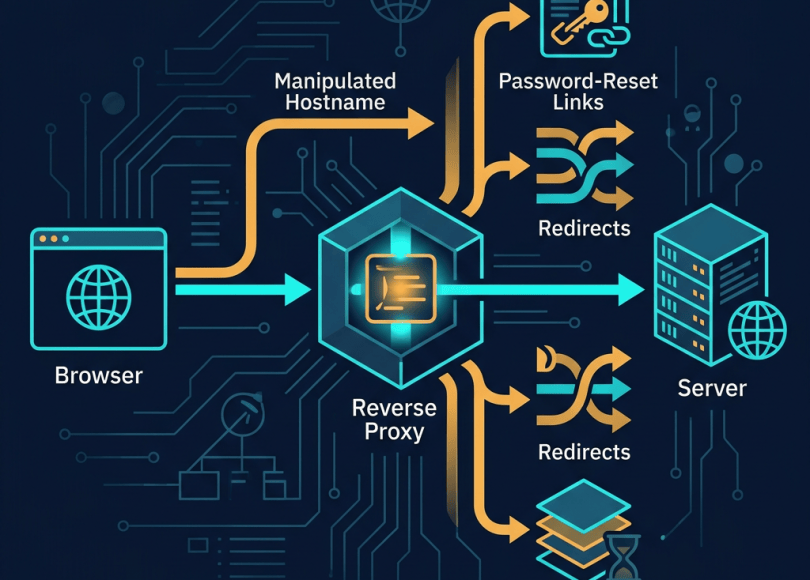
Things become even more complicated when reverse proxies are involved.
A deployment may look like:
Browser ↓CDN ↓Reverse Proxy ↓Application
The proxy may forward information using headers such as:
X-Forwarded-Host
or related forwarding headers.
The application may then use the forwarded host to generate URLs.
This creates another trust boundary:
Client ↓Proxy ↓Forwarded headers ↓Application
The application needs to know which headers are trusted and which proxies are authorized to set them.
Why Proxy Configuration Matters
Suppose the application assumes:
“
X-Forwarded-Hostis always supplied by our trusted proxy.”
But the proxy configuration allows clients to supply or influence it.
Now:
Untrusted client input ↓Proxy ↓Trusted-looking header ↓Application
The application may accidentally trust attacker-controlled information.
This is why forwarded headers must be normalized and controlled at the infrastructure boundary.
Host Header and Cache Poisoning
Caching makes the situation even more interesting.
Imagine a cache stores:
GET /loginHost: example.com
But the response includes a host-derived value.
If the cache key and host handling are inconsistent, an attacker may potentially cause a response generated using a malicious host value to be cached.
Then:
Attacker ↓Poisoned response ↓Cache ↓Other users
This can turn a request-level issue into a multi-user problem.
The exact exploitability depends heavily on the caching architecture.
Host Header Injection Isn’t Automatically High Severity
A common mistake in bug bounty reports is reporting:
“The Host header can be changed.”
That’s expected.
Clients can send arbitrary HTTP headers.
The vulnerability is:
The application trusts an attacker-controlled host value in a security-sensitive context.
The impact determines severity.
Example Severity Spectrum
Low impact
Host value changes a harmless piece of text.
Moderate impact
Host manipulation changes redirects or generated URLs.
High impact
Host manipulation affects security-sensitive workflows.
Critical impact
A reliable exploit chain leads to serious account compromise or broad user impact.
Don’t decide severity based only on the header.
How Security Researchers Find Host Header Issues
For authorized testing:
Step 1: Capture a normal request
For example:
GET /account HTTP/1.1Host: target.example
Record the response.
Step 2: Change the Host in Your Test
Use a domain or hostname you control where appropriate.
For example:
Host: test-controlled.example
Then compare:
- Status
- Response body
- Redirects
- Links
- Cookies
- Headers
- Error messages
Step 3: Look for Host Reflection
Does the response contain:
test-controlled.example
?
Reflection alone isn’t necessarily a vulnerability.
But it tells you:
The application is using the supplied host value somewhere.
That is a useful lead.
Step 4: Identify Security-Sensitive Usage
Look for places where host information affects:
Password resetAccount verificationInvitation linksOAuthRedirectsAbsolute URLsTenant selectionCache behavior
That’s where the investigation becomes interesting.
Step 5: Use Controlled Accounts
For example:
Account AAccount B
Test only workflows belonging to you.
For password-reset testing:
Your email+Your token
is sufficient.
Step 6: Document the Exact Impact
A strong report explains:
Input ↓Host header ↓Application behavior ↓Security-sensitive output ↓Impact
Avoid vague statements.
Common False Positives
Host header testing produces many false positives.
Host reflected in HTML
Not automatically exploitable.
Host appears in an error message
Usually informational.
Redirect changes
Could simply be intended behavior.
Server returns 400
That may actually be a security control working correctly.
CDN ignores your Host header
Not a vulnerability.
Application has an allowlist
Excellent.
The important question is:
Can attacker-controlled host information cross a meaningful security boundary?
How Developers Should Defend Against Host Header Injection
The strongest defense is:
Don’t blindly trust the Host header.
Instead, define which hosts are valid.
For example:
Allowed:example.comwww.example.com
Anything else should be rejected or handled safely.
Use an Explicit Canonical Origin
For security-sensitive URL generation, applications can use a configured canonical origin:
https://example.com
instead of dynamically constructing it from arbitrary request headers.
For example:
Configured application origin ↓Password reset URL
is much safer than:
Incoming Host header ↓Password reset URL
Validate Forwarded Headers
If your infrastructure uses:
X-Forwarded-HostX-Forwarded-ProtoX-Forwarded-For
make sure the application only trusts these headers when they come from known, trusted proxies.
Don’t blindly accept client-supplied forwarding headers.
Configure Reverse Proxies Correctly
Your architecture might look like:
Internet ↓CDN ↓Reverse Proxy ↓Application
The reverse proxy should:
- Normalize expected host information
- Remove untrusted forwarding headers
- Set trusted headers explicitly
- Reject unexpected hostnames where appropriate
The application should understand exactly which upstream components it trusts.
Password Reset Security Checklist
For developers:
- Don’t construct reset URLs from arbitrary Host values
- Use a configured canonical domain
- Use HTTPS
- Make reset tokens unpredictable
- Make tokens expire
- Make tokens single-use where appropriate
- Avoid leaking reset tokens
- Protect email links
- Monitor suspicious reset activity
Host Header Security Checklist
Application
- Validate allowed hostnames
- Don’t blindly trust
Host - Don’t blindly trust forwarded host headers
- Use canonical origins for sensitive URLs
- Review tenant-routing logic
Infrastructure
- Configure reverse proxies correctly
- Normalize host information
- Strip untrusted forwarding headers
- Review CDN host handling
- Review cache keys
Authentication
- Audit password-reset links
- Audit email verification links
- Audit invitation URLs
- Audit OAuth redirects
Why This Vulnerability Is Often Overlooked
Developers typically focus on:
SQL InjectionXSSCSRFSSRFAuthenticationAuthorization
The Host header looks like infrastructure plumbing.
But modern applications increasingly use host information in application logic.
That’s where the risk appears.
The header travels through:
Browser ↓CDN ↓WAF ↓Proxy ↓Application
and every layer may interpret it differently.
The Bigger Lesson
The Host header teaches a fundamental security principle:
Input doesn’t become trusted just because it looks like infrastructure metadata.
Headers are still input.
A hostname is still input.
A forwarded hostname is still input unless it has crossed a properly controlled trust boundary.
And anything that influences:
AuthenticationAuthorizationPassword recoveryRedirectsTenant selectionCaching
deserves special scrutiny.
Host Header Attack Chain
The concept can be summarized as:
Attacker │ │ Manipulated Host ▼Application │ ├── Generates URL ├── Creates redirect ├── Selects tenant └── Influences cache │ ▼ Security-sensitive behavior │ ▼ Potential impact
The header itself isn’t the vulnerability.
The trust placed in it is.
Final Takeaway
A single HTTP header can look completely harmless:
Host: example.com
But if an application assumes that value is always legitimate, an attacker may be able to influence functionality that developers never intended to expose.
The most dangerous cases involve:
Host Header +Password Reset +Redirects +OAuth +Caching +Multi-Tenant Routing
That’s when a basic HTTP header can become part of a serious vulnerability chain.
For developers:
Validate hosts. Trust only known proxies. Use a canonical origin for security-sensitive URLs.
For bug bounty hunters:
Don’t report “Host can be changed.” Find where the application trusts the changed value and demonstrate the actual security impact.
Because the real question isn’t:
“Can I change the Host header?”
You can.
The real question is:
“What does the application do when I lie about where the request came from?”
And sometimes, the answer is much more dangerous than it looks.
Discover more from Spyboy blog
Subscribe to get the latest posts sent to your email.
