
 Posted by
 You log into a website.
You open your profile.
You see your email address, phone number, billing information, private messages, account details, or even sensitive documents.
Everything looks normal.
Then you visit what appears to be an ordinary URL.
Maybe something like:
/account/profile
Nothing seems unusual.
But what if an attacker can make the website’s caching system believe that your private page is actually a public static resource?
The application thinks:
“This is a cacheable page.”
The victim thinks:
“This is my private account.”
And the cache thinks:
“I’ll save this response and serve it to whoever asks next.”
That is the basic idea behind Web Cache Deception (WCD).
Unlike classic data breaches, the attacker may not need to break into the database.
They may not need your password.
They may not need SQL injection.
They may simply abuse the disagreement between how the web application interprets a URL and how the caching layer interprets that same URL.
And when those two systems disagree, private information can end up stored somewhere it was never supposed to be.
What Is Web Cache Deception?
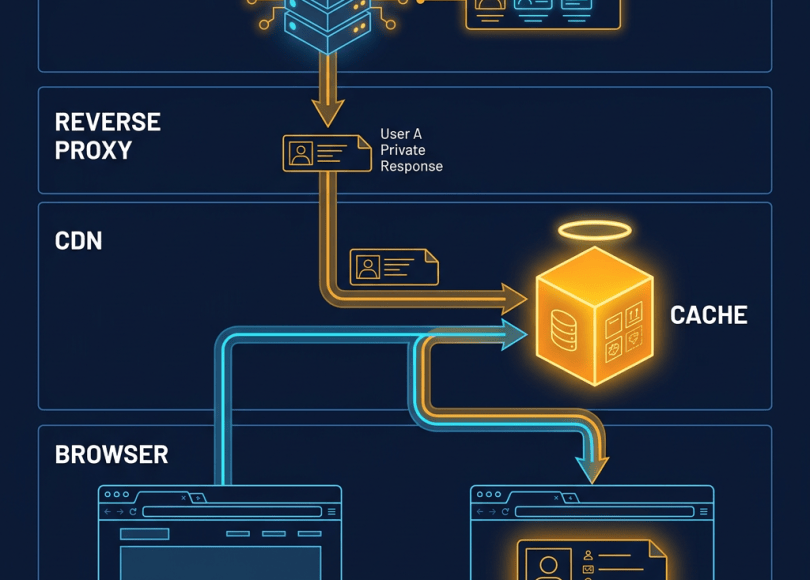
Web Cache Deception is a web security vulnerability where an attacker tricks a caching system into storing a response containing private or sensitive information.
The attack generally happens when:
- A victim is authenticated.
- The victim requests a private resource.
- The URL is manipulated so the cache considers it static/cacheable.
- The application still serves the victim’s private response.
- The cache stores that response.
- Another user requests the same URL.
- The cached private response is returned.
The dangerous part is the mismatch.
The application may understand:
/account/profile
as a dynamic authenticated page.
But the cache may interpret something like:
/account/profile/style.css
as a static resource because it ends in .css.
If the backend still maps that request to the profile page, the result can be disastrous.
The Core Problem: Two Systems Interpret the URL Differently
Modern websites rarely consist of one server.
A typical architecture may look like:
User ↓Browser ↓CDN / Reverse Proxy ↓Web Cache ↓Load Balancer ↓Application ↓Database
Each component may have slightly different rules.
The cache might decide:
.css= static → cache it.
The application might decide:
/account/profile/...= profile route → return the logged-in user’s profile.
That difference is the attack surface.
A Simple Example
Imagine a website has:
https://example.com/account/profile
The endpoint returns:
<h1>John</h1><p>Email: john@example.com</p><p>Phone: +91XXXXXXXXXX</p>
The endpoint requires authentication.
So normally:
Attacker → /account/profile
gets:
401 Unauthorized
because they aren’t logged in.
Now imagine the application also accepts:
/account/profile/random.css
and internally routes it to the same profile handler.
The application sees:
/account/profile/random.css
and says:
“This is still the profile route.”
But the cache sees:
.css
and says:
“This looks like a static asset.”
That disagreement can create a Web Cache Deception vulnerability.
Why Would a Cache Store Private Data?
Caching exists for performance.
Imagine millions of users requesting:
/logo.png
There is no reason for the server to regenerate the same image every time.
Instead:
First request ↓Origin server ↓Response ↓Cache stores response ↓Future users ↓Cache responds immediately
This dramatically reduces server load.
The problem begins when the cache incorrectly decides that a private response is safe to cache.
For example:
Public image ↓Safe to cachePrivate dashboard ↓Should NOT be cached
If the cache confuses the second category with the first, sensitive information can leak.
Web Cache Deception vs Web Cache Poisoning
These two vulnerabilities are often confused.
They are related to caching but have different goals.
Web Cache Deception
The attacker tries to get the cache to store someone else’s private response.
Conceptually:
Victim's private page ↓Cache ↓Attacker receives victim's data
The attacker wants:
private data → accidentally cached → exposed
Web Cache Poisoning
The attacker instead tries to get the cache to store a malicious response.
Conceptually:
Malicious request ↓Application ↓Malicious response ↓Cache ↓Other visitors receive poisoned response
The attacker wants:
malicious response → cached → delivered to others
The distinction is important.
Cache deception is primarily about exposing private content.
Cache poisoning is primarily about controlling cached content.
Why Web Cache Deception Can Be So Dangerous
A successful attack could potentially expose:
- Email addresses
- Phone numbers
- Usernames
- Account information
- Private profile data
- Order information
- Invoices
- Support tickets
- Internal application data
- Private documents
- Account preferences
- Sensitive API responses
The impact depends entirely on what the vulnerable endpoint returns.
A public username might be low impact.
A private financial statement could be extremely serious.
The Attack Requires an Important Condition
One of the most important things to understand is that not every URL that looks strange is vulnerable.
Several pieces usually need to line up.
The attacker generally needs:
1. A sensitive authenticated endpoint
For example:
/account/profile/dashboard/orders/settings/messages
2. A URL interpretation mismatch
The application and cache need to disagree about the resource.
3. A cacheable response
The caching layer must actually store the response.
4. A way for another request to retrieve the cached object
The cached representation must be accessible without the victim’s authentication context.
Without these conditions, the attack may fail completely.
How Security Researchers Look for Web Cache Deception
If you’re testing an application you own or are explicitly authorized to test, the goal isn’t to steal anyone else’s information.
The goal is to determine whether your own test account’s private response can become publicly cacheable.
A safe methodology looks like this.
Step 1: Map Private Endpoints
First identify authenticated functionality.
Examples:
/account/profile/dashboard/settings/orders/invoices/messages
Pay particular attention to endpoints that return sensitive information.
Step 2: Establish a Baseline
Request the normal authenticated URL.
For example:
/account/profile
Record:
- HTTP status
- Response body
- Cache headers
Content-Type- Cookies
Cache-ControlAgeETag- CDN-specific headers
You want to understand how the normal request behaves.
Step 3: Test URL Parsing Differences
In an authorized test environment, researchers may examine harmless variations that could cause the cache and application to interpret the URL differently.
For example:
/account/profile/test.css
or:
/account/profile/test.js
or another application-specific path structure.
The important question is:
Does the application still return the authenticated resource?
If the application returns the same private content while the caching layer treats the resource as a static asset, you may have discovered an interesting discrepancy.
Step 4: Inspect the Response Headers
Headers can provide important clues.
Look for:
Cache-ControlAgeETagExpiresVaryX-CacheCF-Cache-StatusX-Cache-Hit
Different CDNs and reverse proxies use different headers.
For example, a response may indicate:
X-Cache: HIT
or:
Age: 120
That can suggest the response came from a cache.
However, headers alone do not prove a vulnerability.
You need to understand the actual behavior.
Step 5: Test With Two Authorized Accounts
This is one of the most important techniques.
Create:
User AUser B
Use completely separate sessions.
For example:
User A → browser profile 1User B → browser profile 2
Now test the behavior safely.
The goal is not to access unrelated people’s accounts.
Instead:
- User A requests a controlled test endpoint.
- Determine whether a cache entry is created.
- User B requests the same URL.
- Determine whether User B receives User A’s private test response.
If that happens, you’ve demonstrated cross-user cache leakage.
A Safe Proof of Concept
Imagine User A has:
Email: alice-test@example.com
and User B has:
Email: bob-test@example.com
User A accesses a controlled private endpoint.
The response contains:
{ "email": "alice-test@example.com"}
After the cache behavior is triggered, User B requests the same URL.
If User B receives:
{ "email": "alice-test@example.com"}
instead of their own data or an authorization error, you have strong evidence of a cache isolation failure.
That is much safer than testing against real users.
Why Static File Extensions Matter
A classic source of confusion is how caching rules are written.
A simplistic configuration might say:
*.css → cache*.js → cache*.png → cache*.jpg → cache
That sounds reasonable.
But what if the application interprets:
/account/profile/avatar.css
as an application route?
Now you have:
Cache:"CSS file!"Application:"User profile!"
That’s exactly the kind of disagreement researchers investigate.
Modern Applications Make This More Complicated
Modern frameworks can introduce additional URL behavior.
Applications may use:
- React
- Next.js
- Angular
- Vue
- Express
- Django
- Laravel
- Rails
- Spring
- API gateways
- serverless functions
- CDNs
- reverse proxies
Routing can happen at multiple layers.
For example:
Browser ↓Cloud CDN ↓Reverse Proxy ↓Application Router ↓Middleware ↓Controller
Each layer may normalize URLs differently.
That creates opportunities for inconsistent interpretation.
URL Normalization Is a Major Security Concern
Two systems may normalize the same URL differently.
Differences can involve:
- trailing slashes
- URL encoding
- path parameters
- extensions
- case sensitivity
- duplicate separators
- encoded characters
- semicolon parameters
- query strings
- path normalization
For example:
/account/profile
and:
/account/profile/
might be treated identically by the application.
But a cache configuration might treat them differently.
The more components involved, the more important consistent URL normalization becomes.
The CDN Problem
Many websites rely heavily on CDNs.
A CDN can cache content close to users around the world.
That is excellent for:
- performance
- availability
- latency
- bandwidth reduction
But it also creates another security boundary.
The architecture may become:
User ↓CDN ↓Origin ↓Application
If the CDN thinks something is public while the origin thinks it is private, sensitive data can potentially cross the boundary.
This is why cache configuration should be treated as part of the application’s security architecture.
Cookies Do Not Automatically Save You
Developers sometimes assume:
“The page requires a session cookie, so caching it is safe.”
Not necessarily.
Caching behavior depends on how the cache handles:
- cookies
- authorization headers
Vary- cache keys
Cache-Control- authenticated requests
If a cache ignores authentication context when constructing its cache key, different users could potentially receive the same cached response.
For sensitive resources, the safest approach is generally to prevent shared caching entirely unless there is a very deliberate design.
Cache Keys Matter
A cache needs to determine:
“Are these two requests asking for the same resource?”
It does this using a cache key.
A simplified example might be:
GET /profile
→ cache key:
/profile
But the application may actually return different data based on:
/profile + session cookie
Now we have a problem if the cache ignores the session.
It could effectively treat:
User A → /profileUser B → /profile
as the same object.
The application sees two different users.
The cache sees one URL.
That is a dangerous architectural mismatch.
Cache-Control Is Your First Line of Defense
Sensitive responses should generally communicate their caching requirements explicitly.
For example:
Cache-Control: private, no-store
The exact directive depends on the application’s requirements, but the principle is simple:
Don’t allow shared caches to store sensitive responses accidentally.
For highly sensitive responses, no-store can be particularly important because it tells compliant caches not to store the response.
What Developers Should Avoid
One dangerous approach is relying entirely on filename extensions.
For example:
.css → cache.js → cache.png → cache
without considering how the application routes those paths.
Another mistake is assuming:
“If the frontend doesn’t link to this URL, nobody can request it.”
Security controls should never depend on the URL being difficult to discover.
Better Defense: Separate Static and Dynamic Content
A strong architecture clearly separates:
/static/ style.css app.js logo.png
from:
/api/ account profile orders
and:
/dashboard/ private content
Static resources can generally have aggressive caching.
Authenticated dynamic resources should have carefully controlled caching.
This makes security policy much easier to reason about.
Better Defense: Make Cache Rules Explicit
Instead of:
“Cache anything that looks static.”
Prefer:
“Cache these known public resources.”
For example:
/static/*/assets/*/images/*
can be safer than blindly caching every URL ending in:
.css.js.png
The exact configuration depends on your CDN and application architecture.
Better Defense: Never Cache Sensitive Responses Publicly
For private responses, carefully review:
Cache-Control
and related caching configuration.
A sensitive response should not accidentally become a shared cache object.
Developers should also review:
- CDN rules
- reverse proxy rules
- application caching
- framework middleware
- API gateways
- load balancers
Better Defense: Test the Full Stack
Testing only the application server isn’t enough.
You need to test:
Browser ↓CDN ↓WAF ↓Reverse Proxy ↓Load Balancer ↓Application
A security rule can be correct at one layer and incorrect at another.
For example:
Application:"No caching."CDN:"Cache .css responses."
The application’s intention doesn’t matter if the CDN overrides it incorrectly.
How Bug Bounty Hunters Can Approach This
If you’re participating in a bug bounty program, read the program’s scope and testing rules first.
Do not test random websites.
Do not attempt to expose another user’s information.
Do not intentionally poison shared caches.
Instead, use controlled accounts and controlled test data.
A safe workflow is:
1. Find authenticated endpoints
/profile/account/orders/settings
2. Record normal behavior
StatusHeadersResponseCache indicators
3. Test harmless URL variations
Look for differences between:
Application routing
and:
Cache classification
4. Use two test accounts
Never use random victims.
5. Check for cross-account leakage
Can User B receive User A’s controlled test data?
6. Stop once impact is proven
You don’t need to collect real data.
One controlled proof is enough.
What Makes a Strong Bug Bounty Report?
A good report should clearly explain:
Title
Web Cache Deception Allows Cross-User Exposure of Authenticated Profile Data
Summary
Explain the cache/application interpretation mismatch.
Affected Endpoint
Provide the authorized target and endpoint.
Preconditions
Explain whether authentication is required.
Reproduction
Use your controlled accounts.
For example:
Account A:alice-test@example.comAccount B:bob-test@example.com
Explain:
- Log in as Account A.
- Request the affected endpoint.
- Establish that the response is cached.
- Log in as Account B.
- Request the same cache key.
- Observe Account A’s controlled data.
Impact
Explain what information could be exposed.
Evidence
Include:
- request
- response
- relevant cache headers
- screenshots
- timestamps
- controlled test data
Remediation
Recommend correcting cache rules and ensuring authenticated responses aren’t publicly cached.
Common False Positives
Not every suspicious cache response is a vulnerability.
You may encounter:
1. Cache headers without actual caching
A header alone doesn’t necessarily mean sensitive content is exposed.
2. CDN-generated responses
A CDN may return its own generic page.
3. Authentication still enforced
If the second account receives:
401
or:
403
the suspected attack may not work.
4. Cache isolated by authentication
Some systems deliberately include authentication context in the cache key.
5. Public information only
If the cached response contains nothing private, the impact may be negligible.
Always prove the security impact before reporting.
Web Cache Deception Attack Chain
The entire concept can be visualized like this:
             ATTACKER
                 │
                 │ Creates / identifies
                 │ a deceptive URL
                 ▼
        ┌──────────────────┐
        │       CACHE      │
        │ "Looks static"   │
        └────────┬─────────┘
                 │
                 ▼
        ┌──────────────────┐
        │   APPLICATION    │
        │ "Private page"   │
        └────────┬─────────┘
                 │
                 ▼
             VICTIM DATA
                 │
                 ▼
        ┌──────────────────┐
        │      CACHE       │
        │ Stores response  │
        └────────┬─────────┘
                 │
                 ▼
             ATTACKER
The vulnerability exists because the cache and application disagree about what the URL represents.
Why Developers Often Miss This
Traditional application testing tends to focus on:
- SQL injection
- XSS
- IDOR
- CSRF
- authentication
- file uploads
- command injection
But cache behavior lives somewhere between:
application security + infrastructure + CDN configuration.
A developer might inspect the application and conclude:
“This endpoint requires authentication.”
The infrastructure engineer might inspect the CDN and conclude:
“This URL looks like a static asset.”
Both statements can be individually true.
Together, they can create a vulnerability.
Web Cache Deception Checklist
If you’re auditing an application you own or have authorization to test, use this checklist:
Application
- Identify authenticated endpoints
- Identify sensitive responses
- Understand routing behavior
- Test URL normalization
- Review dynamic/static separation
Cache
- Identify CDN
- Identify reverse proxy
- Review cache keys
- Review cache rules
- Check authentication handling
- Inspect
Cache-Control - Inspect
Vary - Inspect cache-hit indicators
Testing
- Create two test accounts
- Use unique test data
- Test harmless URL variations
- Check whether responses become cached
- Test cross-account isolation
- Stop after proving impact
Reporting
- Explain the root cause
- Include controlled reproduction
- Show cache evidence
- Explain realistic impact
- Recommend remediation
How to Think About Cache Security
The biggest lesson isn’t:
“Watch out for
.css.”
That’s too narrow.
The real lesson is:
Never assume that every layer of your web stack interprets a request the same way.
Your application may understand:
/private/profile
as a user-specific resource.
Your CDN may understand:
/private/profile/file.css
as a static resource.
Your reverse proxy may normalize the URL differently again.
Your WAF may inspect something else entirely.
Security problems often appear in those gaps.
Web Cache Deception vs Other Web Vulnerabilities
| Vulnerability | Primary Problem |
|---|---|
| IDOR | Authorization failure |
| XSS | Untrusted content executed in a browser |
| CSRF | Unauthorized action using a victim’s session |
| SSRF | Server makes unintended requests |
| Cache Poisoning | Malicious response becomes cached |
| Cache Deception | Private response becomes cached |
| SQL Injection | Input changes database queries |
| Race Condition | Concurrent requests break state logic |
This is why cache vulnerabilities deserve their own testing methodology.
How to Prevent Web Cache Deception
For developers and security teams, the defensive strategy is straightforward:
1. Don’t publicly cache authenticated responses
Use appropriate cache-control directives.
2. Explicitly identify cacheable resources
Don’t blindly classify responses by filename extension.
3. Separate static and dynamic routes
Make your architecture easier to reason about.
4. Keep URL parsing consistent
Ensure the CDN, proxy, framework, and application agree on URL normalization.
5. Review cache keys
Authentication context must be considered where appropriate.
6. Test CDN behavior
Your origin server’s configuration isn’t the entire caching architecture.
7. Use automated security testing
Include cache behavior in security regression tests.
8. Test with multiple accounts
Cross-user isolation should be explicitly tested.
The Scariest Part About Web Cache Deception
There may be no obvious “hack.”
No database dump.
No shell.
No malware.
No password cracking.
No spectacular exploit chain.
Instead:
Victim ↓Normal authenticated request ↓Misconfigured cache ↓Private response stored ↓Another request ↓Private information exposed
The victim may have done absolutely nothing wrong.
The attacker may not have bypassed authentication directly.
The problem is that the caching layer accidentally changed the security boundary.
Final Takeaway
Web Cache Deception is a perfect example of why modern web security is no longer just about finding vulnerable code.
A website can have:
- strong passwords
- MFA
- secure database queries
- proper authorization
- a WAF
- HTTPS
- secure sessions
and still have a serious vulnerability if its cache and application disagree about what should be public.
The key question for security researchers is:
“Does the cache see this resource the same way the application sees it?”
And the key question for developers is:
“Could any authenticated response ever become a shared cache object?”
If the answer is yes, investigate the architecture carefully.
Because sometimes the attack isn’t:
“Hack the server.”
It’s simply:
“Convince the cache to save something it never should have saved.”
Think like an attacker. Secure like a pro.
Discover more from Spyboy blog
Subscribe to get the latest posts sent to your email.
