
 Posted by
 Security testing often means jumping between a dozen different tools, websites, browser tabs, and terminal windows.
You might need one website for DNS information, another for WHOIS, another for VirusTotal, another for Wayback Machine results, and then switch back to the browser to inspect cookies, headers, forms, or hidden inputs.
I wanted something simpler.
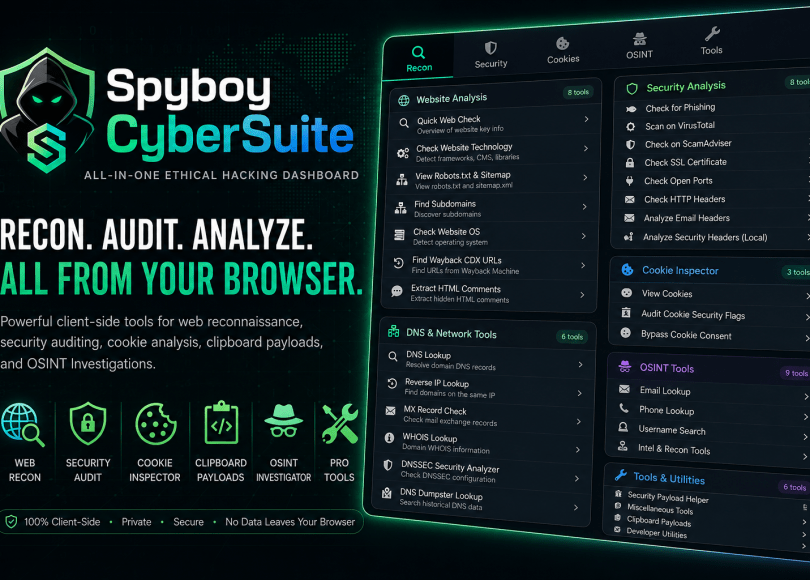
So I built Spyboy CyberSuite, a lightweight Chrome extension that brings a collection of web reconnaissance, security auditing, privacy, OSINT, and developer utilities together inside the browser.
Install Spyboy CyberSuite from the Chrome Web Store
The extension is currently available on the Chrome Web Store, with version 2.1 released on August 13, 2026.
What is Spyboy CyberSuite?
Spyboy CyberSuite is designed as a browser-based companion for developers, security analysts, penetration testers, researchers, and ethical hackers.
Instead of trying to replace dedicated security frameworks or command-line tools, the goal is to provide a convenient browser dashboard for common checks and quick access to useful security resources.
The extension currently combines:
- Web reconnaissance
- DNS and domain intelligence
- HTTP security-header analysis
- Form and hidden-input inspection
- Cookie security auditing
- OSINT resources
- Payload helpers
- Browser privacy utilities
- Developer shortcuts
One of the most important design decisions was keeping the core functionality client-side.
🔐 Built With Privacy in Mind
Spyboy CyberSuite is designed around a simple principle: security tools should not need to send everything to a backend server.
The extension’s core checks run locally in the browser, and there is no external backend server required for those core features.
The Chrome Web Store listing also states that the developer does not collect or use user data.
This makes the extension particularly useful when you’re working with development environments, local applications, test systems, or security labs where you don’t want an additional third-party backend involved.
Of course, users should still understand where individual external links or services lead when choosing to use them.
🌐 1. Web Reconnaissance & DNS
Reconnaissance is usually the first step of a security assessment.
Spyboy CyberSuite provides shortcuts and utilities for gathering basic information about a target domain.
The reconnaissance section includes access to resources for:
- DNS lookups
- Passive DNS history
- WHOIS information
- DNSSEC checks
- Web technology identification
- Web server and operating-system information
- Network lookups
- Wayback Machine CDX URL discovery
Wayback CDX URL Finder
One feature I particularly wanted was an easy way to discover historical URLs.
The Wayback Machine has archived enormous amounts of web content over the years. Its CDX API can be useful for finding previously archived endpoints, files, and URLs.
Instead of manually constructing queries every time, Spyboy CyberSuite provides a quick way to access this functionality.
This can be useful during legitimate reconnaissance, bug hunting, research, and security assessments.
🛡️ 2. Web Security Auditing
The second major part of the extension focuses on basic web security checks.
HTTP Security Headers
Security headers are an important part of modern web security.
Spyboy CyberSuite includes a local headers analyzer that checks for security-related headers and highlights areas that may deserve further investigation.
Among the checks are:
- Content Security Policy (CSP)
- HTTP Strict Transport Security (HSTS)
- CORS-related configuration
- Frame and clickjacking protection
The purpose isn’t to claim that a website is “secure” or “insecure” based on a handful of headers.
Instead, it provides a quick starting point for a deeper assessment.
Forms & Hidden Inputs
Another useful feature is the Form & Hidden Inputs Inspector.
It can inspect forms on the active page and identify hidden input fields.
During development or security testing, hidden parameters can be worth examining because applications sometimes rely on client-controlled values that should not be blindly trusted by the server.
Spyboy CyberSuite can also visually highlight hidden fields on the webpage, making them much easier to find.
After you’re finished, the highlights can be cleared.
🍪 3. Cookie Security & Privacy
Cookies are another area that deserves attention during web security testing.
Spyboy CyberSuite includes a local cookie auditor that examines cookies available to the active site and displays important security attributes.
These include:
SecureHttpOnlySameSite
For example, an authentication cookie without appropriate security attributes may deserve additional investigation depending on the application’s architecture and threat model.
Again, the extension isn’t intended to replace a complete security assessment. It’s designed to make these checks quicker.
Cleaning Browser Storage
The extension also includes utilities for clearing local browser data such as:
- Cookies
- Local Storage
- Session Storage
This can be particularly convenient when testing applications repeatedly and wanting to start with a cleaner browser state.
🔎 4. OSINT Resources
OSINT is another area where researchers frequently end up with dozens of bookmarks.
Spyboy CyberSuite brings links to several categories of OSINT resources into one interface.
For example:
Email OSINT
Resources for investigating publicly available information associated with an email address.
Phone OSINT
Links to services that can provide information such as carrier or publicly available identity-related data.
Username OSINT
Username-search resources can help determine whether a particular username appears across different online services.
The extension includes links to resources such as:
- WhatsMyName
- Namechk
- Sherlock
Image & Face Search
It also provides access to reverse-image and image-search resources.
These tools can be useful for legitimate investigations, digital-footprint research, brand protection, and security research.
As always with OSINT, the information should be used responsibly and within applicable laws and terms of service.
⚡ 5. Developer & Security Testing Helpers
The final category is focused on things that are simply useful during testing.
Payload Helpers
Spyboy CyberSuite includes commonly used testing payloads that can be copied directly to the clipboard.
The current collection includes examples related to:
- XSS
- SQL injection
- LFI
These are intended for authorized security testing and lab environments.
Having frequently used test strings immediately available saves time when working through a web application manually.
Edit Webpage
The extension also includes a design/edit mode that allows developers and testers to modify webpage elements directly in the browser.
This can be useful for quickly testing how a page behaves after changing text, attributes, or other visual elements.
Enable Copy & Right-Click
Some websites disable normal text selection or right-click functionality.
Spyboy CyberSuite provides a utility to restore those browser interactions.
This is primarily a convenience feature when researching or testing webpages.
📡 Offline-First Design
Another small feature I wanted to include was an internet connection validator.
Not every security test requires an internet connection.
For example, you might be testing a local application, working in a lab, or inspecting something offline.
Spyboy CyberSuite detects the browser’s network state and can disable network-dependent checks when there is no connection rather than allowing them to fail unexpectedly.
It’s a small feature, but it makes the extension feel more predictable during testing.
🧩 Everything in One Dashboard
The extension uses a tabbed interface instead of putting every tool into one enormous scrolling page.
The idea is straightforward:
Open the extension → choose what you’re testing → use the relevant tools.
The current categories are organized around:
- Recon
- Security
- Privacy
- OSINT
- Developer / Payload tools
This makes it easier to find a specific utility without maintaining a huge collection of bookmarks.
Who Is Spyboy CyberSuite For?
Spyboy CyberSuite is primarily aimed at:
- 👨💻 Web developers
- 🔐 Cybersecurity students
- 🕵️ Security researchers
- 🧑💻 Penetration testers
- 🛡️ Security analysts
- 🧪 CTF players
- 🔎 OSINT researchers
- ⚙️ Developers testing web applications
It can also be useful for anyone learning how different web security mechanisms work.
For beginners, it provides an approachable way to experiment with concepts such as HTTP headers, cookies, DNS, forms, and web reconnaissance without immediately having to learn a large security framework.
Is It a Replacement for Burp Suite, Nmap or Other Security Tools?
No.
And that isn’t the goal.
Dedicated tools such as Burp Suite, Nmap, OWASP ZAP, Nuclei, ffuf, and many other security utilities provide significantly deeper functionality.
Spyboy CyberSuite is better thought of as a browser companion.
It’s useful when you’re already looking at a website and want quick access to common reconnaissance, auditing, OSINT, and development utilities without leaving the browser.
For serious penetration testing, it should be used alongside proper security-testing tools and methodologies rather than as a replacement for them.
Why I Built It
Spyboy started as a cybersecurity project focused on security tools, OSINT, ethical hacking, and learning.
Over time, I kept running into the same problem:
I had too many tabs open.
A DNS tool here.
A WHOIS lookup there.
Wayback Machine in another tab.
A cookie inspector.
An OSINT website.
A payload cheat sheet.
A header scanner.
Eventually, I thought:
Why not put the most commonly used shortcuts and browser-based checks into one extension?
That became Spyboy CyberSuite.
The goal isn’t to create another massive cybersecurity framework.
It’s to create something lightweight that you can open from your browser toolbar and immediately start using.
What’s Next?
Spyboy CyberSuite is still evolving.
I plan to continue improving the extension, adding useful security-testing features, improving the interface, and making the existing tools more reliable.
The long-term goal is to turn it into a practical browser-side cybersecurity toolbox for people who work with web applications.
If you’re a developer, cybersecurity student, ethical hacker, or security researcher, I’d love to hear what features you’d want to see next.
Try Spyboy CyberSuite
Spyboy CyberSuite is available for free through the Chrome Web Store.
If you’re already using it, let me know what you think and what you’d like me to add.
Built by Spyboy — for developers, researchers, and ethical hackers.
Discover more from Spyboy blog
Subscribe to get the latest posts sent to your email.
