
 Posted by
 You finish writing an important document.
A resume.
A business proposal.
A legal contract.
A research paper.
An invoice.
A project report.
A confidential company document.
You click:
Save as PDF
Then send it to:
- Your boss
- A client
- A recruiter
- A journalist
- A government office
- A friend
Done.
Simple.
Safe.
Right?
Not always.
Because the PDF you just shared might contain information you never intended anyone to see.
Depending on how it was created, a PDF may reveal:
- Your full name
- Your company’s name
- The software you used
- The computer that created it
- Creation date
- Last modified date
- Author information
- Keywords
- Subject
- Hidden comments
- Previous revisions
- Embedded files
- Digital signatures
Most people never check.
Attackers, investigators, recruiters, journalists, and OSINT researchers often do.
Every PDF Has Two Parts
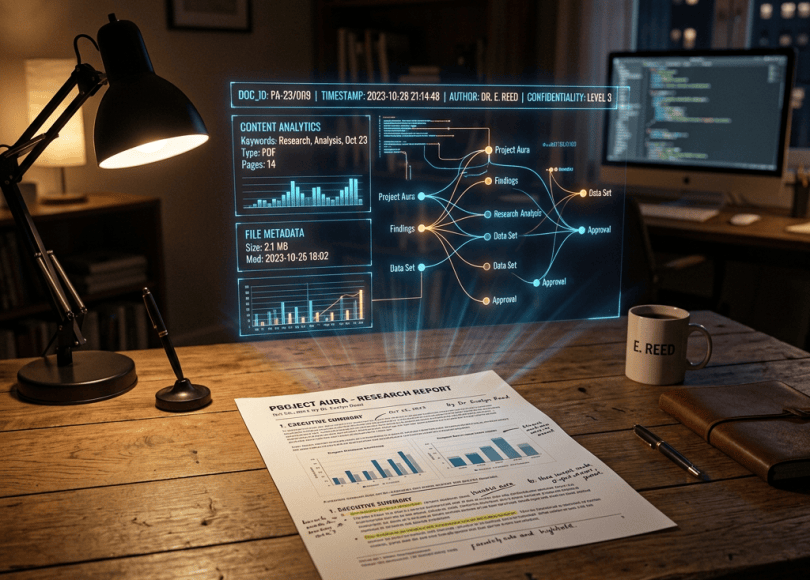
Think of a PDF like a package.
The document itself is the gift.
Metadata is the shipping label.
Most people only look at the gift.
Professionals inspect the label too.
What Is PDF Metadata?
Metadata simply means:
Data about data.
For a PDF it can include:
- Author
- Title
- Subject
- Keywords
- Producer
- Creator software
- Creation date
- Modification date
- PDF version
- Language
- Encryption status
Sometimes…
Even much more.
The Resume That Accidentally Revealed the Applicant’s Name
Imagine someone wants to apply anonymously.
They remove:
- Name
- Address
- Phone number
Everything.
They convert it to PDF.
Perfect.
Except…
The PDF metadata still says:
Author: John Smith
Anonymity destroyed.
This has happened countless times.
Microsoft Office Loves Metadata
If a PDF started life as a Word document…
Some information may come along for the ride.
Depending on how the file is created, metadata may include:
- Original author
- Company
- Office version
- Last editor
- Revision number
- Template information
Not every PDF contains all of these.
But many people never think to check.
Your Company Name May Still Be There
Imagine your company computer is configured like this:
Author:
John
Company:
ABC Technologies Ltd.
Every PDF exported from Word now quietly carries those properties.
You upload the file publicly.
Congratulations.
You may have just identified your employer.
Hidden Comments Are Even Worse
Suppose your team reviews a document.
Someone writes:
“Don’t send this version.”
Another comments:
“Legal hasn’t approved this.”
Someone else highlights:
“Need to remove customer names.”
Then…
Someone exports the wrong version.
Those comments may still be included.
Never assume “I can’t see it” means “it isn’t there.”
Tracked Changes Can Leak More Than You Think
Tracked changes have embarrassed governments, companies, universities, and journalists for years.
Imagine changing:
Salary: $120,000
to
Salary: $90,000
The visible document looks correct.
But if revision information wasn’t handled properly before sharing, previous edits may still exist in the source document or review history.
Always accept or reject tracked changes before publishing.
PDFs Can Contain Attachments
Many people don’t know this.
A PDF can actually contain embedded files.
Examples include:
- Excel sheets
- Word documents
- Images
- Source files
Sometimes these are intentional.
Sometimes they’re forgotten.
Always inspect important PDFs before distributing them.
Digital Signatures Reveal Information Too
Digital signatures improve authenticity.
But they may also display information such as:
- Certificate owner
- Organization
- Email address
That’s expected behavior—but understand what you’re sharing.
Even the Creation Time Matters
Imagine two anonymous leaks.
Investigators compare them.
Both were created:
August 4
08:32 AM
Same PDF producer.
Same Office version.
Same author initials.
Suddenly…
Two unrelated documents don’t look so unrelated anymore.
Metadata helps establish context.
Journalists Check Metadata
Investigative journalists routinely inspect:
- Photos
- PDFs
- Word documents
- Videos
Why?
Because metadata can answer questions such as:
- Who created this?
- When?
- Which software?
- Has it been edited?
It’s one more clue.
OSINT Researchers Love MetadataMetadata is a valuable OSINT source.
It can reveal:
- Company names
- Internal usernames
- Employee names
- Software versions
- File relationships
- Organizational habits
One PDF rarely solves an investigation.
One hundred PDFs can reveal patterns.
Can Police Use PDF Metadata?
If investigators lawfully obtain relevant documents during an investigation, metadata may help establish:
- Timeline
- Authorship
- Software used
- Modification history
- Relationships between files
Metadata is generally used alongside other evidence—not in isolation.
How to Check PDF Metadata Yourself
Before sharing important documents:
Open the PDF.
Many PDF viewers allow you to view Document Properties or Properties.
Look for:
- Title
- Author
- Subject
- Keywords
- Producer
- Creator
- Dates
You may discover information you forgot existed.
How to Remove PDF Metadata
There isn’t one universal method because different software behaves differently.
Good practices include:
Review document properties before sharing.
Remove unnecessary author information.
Export a clean copy if your software supports it.
Use built-in document inspection features where available.
Convert only the final reviewed version.
Businesses Leak Metadata Every Day
Search the internet.
You’ll find countless PDFs from companies containing:
- Employee names
- Internal departments
- Printer names
- Office software versions
- Company templates
Attackers can use this information for:
- Spear phishing
- Social engineering
- OSINT
- Reconnaissance
Metadata doesn’t need to contain passwords to be valuable.
Common Myths
| Myth | Reality |
|---|---|
| PDFs are just pictures of text | PDFs often contain metadata, structure, and searchable text. |
| Saving as PDF removes everything | It depends on the software and export process. |
| Metadata is only useful to hackers | Journalists, investigators, researchers, and businesses all use metadata legitimately. |
| Nobody checks document metadata | Security professionals and OSINT researchers routinely do. |
Frequently Asked Questions
Can someone see my name from a PDF?
Possibly. It depends on the metadata included when the document was created or exported.
Does converting Word to PDF remove metadata?
Not necessarily. Some information may carry over depending on the software and settings.
Can PDF metadata be removed?
Yes, many PDF editors and office suites provide ways to review or remove metadata before sharing.
Is PDF metadata dangerous?
Usually it’s harmless. The risk comes from unintentionally exposing information you didn’t realize was included.
Before You Send Your Next PDF…
Ask yourself one question.
“What information am I sharing that isn’t visible on the page?”
Most people proofread the words.
Very few inspect the metadata.
That’s why resumes reveal names.
Business reports reveal companies.
Anonymous leaks reveal authors.
And confidential documents sometimes expose much more than intended.
A PDF isn’t just text.
It’s a container.
Before sending one outside your organization, take 30 seconds to inspect what’s inside.
That small habit can prevent privacy leaks, embarrassing disclosures, and valuable information from falling into the wrong hands.
Discover more from Spyboy blog
Subscribe to get the latest posts sent to your email.

Underrated point: what you do not see is not necessarily gone. Highlight and comment layers can behave like metadata, invisible in one viewer but still present when someone else opens the same file. Before sending a reviewed document out, I now do a quick pass that extracts and reviews every annotation, then removes the ones that should not travel with the file. That habit catches far more leaks than visual checking alone.
LikeLike