
 Posted by
 The Right Monitor Can Make Cybersecurity Work 10× Easier
Cybersecurity isn’t always about having a faster CPU.
Sometimes the biggest bottleneck is much simpler:
You don’t have enough screen.
Try investigating a suspicious website with:
Browser+Burp Suite+Terminal+VS Code+Wireshark+Documentation+Logs
on one 15-inch laptop display.
You spend half your time switching windows.
Now imagine:
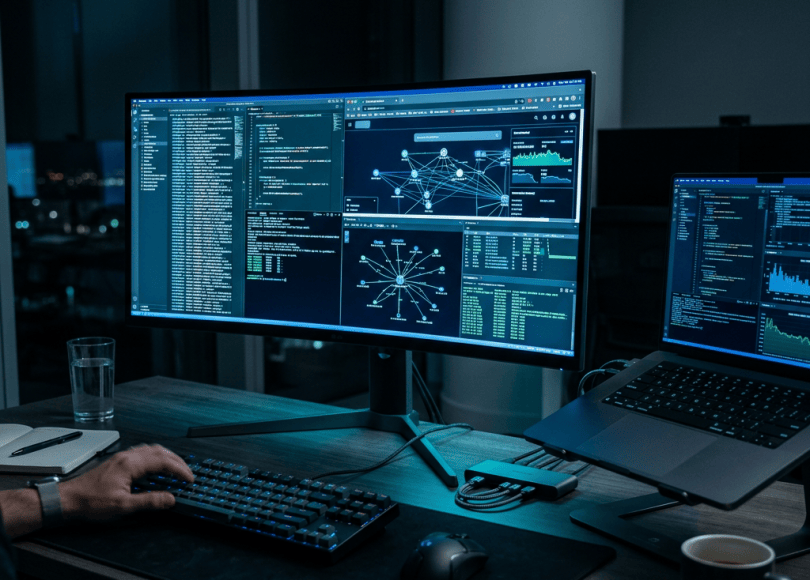
┌─────────────────────┬─────────────────────┐│ Browser / Target │ Burp Suite ││ │ │├─────────────────────┼─────────────────────┤│ Terminal │ VS Code / Logs ││ │ │└─────────────────────┴─────────────────────┘
Suddenly, the workflow becomes much easier.
For cybersecurity professionals, developers, bug bounty hunters, SOC analysts and students running virtual machines, a monitor isn’t just a display.
It’s part of the workstation.
But choosing one isn’t as simple as:
“Buy the biggest 4K monitor.”
You need to consider:
- Resolution
- Screen size
- Pixel density
- USB-C
- Thunderbolt
- KVM
- USB hub
- Portrait rotation
- Ultrawide vs dual monitors
- Refresh rate
- Eye comfort
- Text clarity
- Multi-computer workflows
- Laptop charging
- VESA mounting
- Linux compatibility
This guide breaks down what actually matters in 2026.
What Makes a Good Cybersecurity Monitor?
Gaming monitors prioritize things such as:
- Refresh rate
- Response time
- VRR
- HDR
- GPU synchronization
Those aren’t necessarily the most important features for cybersecurity.
A security professional is more likely to care about:
Text clarity
You’re going to read enormous amounts of:
- Code
- Logs
- Terminal output
- Documentation
- HTTP requests
- JSON
- Configuration files
Workspace
You may need several applications visible simultaneously.
Connectivity
A good monitor can become a docking station for your laptop.
Ergonomics
You’ll potentially stare at it for hours.
Resolution
Sharp text matters more than extreme gaming performance.
Multi-monitor support
SOC analysts and researchers often benefit from multiple displays.
27-Inch 4K Is a Sweet Spot
For many cybersecurity and programming workloads, 27-inch 4K is an excellent combination.
That’s:
3840 × 2160 pixels
on a relatively compact display.
The result is high pixel density and sharp text.
Current testing from RTINGS also highlights 27-inch 4K displays as strong choices for programming and office work, including models such as the Dell U2725QE and ASUS ProArt PA279CRV.
Why Resolution Matters for Hackers
Consider a terminal window.
At lower resolution:
┌───────────────────────────┐│ line 1 ││ line 2 ││ line 3 ││ line 4 ││ line 5 ││ line 6 ││ ... │└───────────────────────────┘
At higher resolution, you can display considerably more information without constantly scrolling.
This matters when you’re looking at:
- Long HTTP responses
- JSON
- Source code
- Logs
- Packet captures
- Stack traces
- DNS output
4K vs 1440p
Both can be good.
1440p
Advantages:
- Cheaper
- Easier for lower-end GPUs
- Good productivity resolution
- Often available at high refresh rates
4K
Advantages:
- Sharper text
- More workspace
- Better for detailed code
- Excellent for multiple windows
For a primarily productivity-oriented cybersecurity desk, 4K is particularly attractive.
Do You Need 120Hz?
Not necessarily.
60Hz is perfectly usable for:
- Terminals
- Coding
- Browsing
- SOC dashboards
- Wireshark
- Documentation
But higher refresh rates can make:
- Scrolling
- Window movement
- Cursor movement
feel smoother.
The Dell U2725QE, for example, supports 4K at up to 120Hz. Dell lists the monitor with a 27-inch 4K IPS Black panel, 120Hz refresh rate, USB hub and extensive connectivity.
So:
60Hz = enough
120Hz = nice upgrade
You don’t need 240Hz just to run Kali Linux.
The Most Important Feature You Probably Aren’t Thinking About
USB-C / Thunderbolt
Imagine connecting your laptop to a monitor with one cable.
That single connection provides:
Laptop ↓USB-C / Thunderbolt ↓Monitor ┌──────────────┐ │ Display │ │ USB │ │ Ethernet │ │ Keyboard │ │ Mouse │ │ Charging │ └──────────────┘
Suddenly your desk has significantly fewer cables.
This is particularly useful for laptop-based cybersecurity labs.
What Is KVM?
KVM stands for:
Keyboard, Video, Mouse.
A monitor with a built-in KVM can let you connect multiple computers and share peripherals.
For example:
Laptop 1 ───┐ │ Monitor │Laptop 2 ───┘KeyboardMouse
Press a button.
Switch computers.
This can be extremely useful if you maintain:
- Windows workstation
- Linux workstation
- Kali laptop
- MacBook
- Lab machine
Why KVM Is Great for Cybersecurity
Imagine:
Machine 1
Windows.
Used for:
- Office
- Documentation
- Communication
Machine 2
Linux/Kali.
Used for:
- Labs
- Burp Suite
- Wireshark
- Development
- Security testing
A KVM-equipped monitor can reduce the need for multiple keyboards and mice.
Best Monitor Options to Consider in 2026
Rather than declaring one universal winner, these models target different workflows.
1. Dell UltraSharp U2725QE
The U2725QE is an extremely interesting productivity monitor for developers and security professionals.
Dell lists:
- 27-inch display
- 3840 × 2160 resolution
- IPS Black
- 120Hz
- 3000:1 contrast ratio
- Thunderbolt 4
- USB-C
- USB hub
- 2.5GbE Ethernet
- KVM functionality
- DisplayPort daisy chaining
- Up to 140W power delivery through Thunderbolt 4
That’s much more useful to a cybersecurity workstation than simply having a high refresh rate.
Why It Makes Sense for Cybersecurity
Imagine connecting:
Laptop ↓Thunderbolt 4 ↓U2725QE ↓EthernetKeyboardMouseUSB devicesDisplay
One cable can effectively turn the monitor into a workstation hub.
For laptop-heavy workflows, that’s extremely convenient.
2. ASUS ProArt Display PA279CRV
The ASUS ProArt PA279CRV is another 27-inch 4K productivity-oriented display.
It’s particularly interesting if your work also involves:
- Graphic design
- Blog graphics
- Photoshop
- Video
- Image editing
- Content creation
The monitor supports USB-C connectivity and up to 96W power delivery.
RTINGS currently positions it as a strong mid-range office monitor, noting its 4K resolution, sharp text and USB-C DisplayPort Alt Mode.
Why ProArt Can Be Interesting for Spyboy
If your workstation is used for both:
Cybersecurity+Blogging+Graphic design+Video+Website management
a creator-oriented monitor can make sense.
You’re not only reading terminals.
You’re also potentially editing:
- Blog thumbnails
- Website graphics
- Screenshots
- Videos
- Documentation
3. LG 40WP95C-W
Now we get into ultrawide territory.
The LG 40WP95C-W is a 40-inch 5K2K ultrawide display.
Its resolution is:
5120 × 2160
LG lists:
- 40-inch screen
- Nano IPS
- 5K2K resolution
- Thunderbolt 4
- Daisy chaining
- Up to 98% DCI-P3
- HDR10
- Auto brightness adjustment
This is a very different approach from dual monitors.
Why Ultrawide Is Interesting for Cybersecurity
Imagine:
┌───────────────────────────────────────────────────────────┐│ Browser │ Burp Suite │ Terminal ││ │ │ │├──────────────┴─────────────────┼──────────────────────────┤│ VS Code │ Logs / Documentation ││ │ │└────────────────────────────────┴──────────────────────────┘
No bezel in the middle.
No second monitor frame.
Just one enormous workspace.
For people who constantly move between multiple windows, that can be extremely convenient.
4. BenQ RD280U
BenQ’s RD280U is designed specifically around coding and development workflows.
The unusual aspect ratio is part of the appeal.
A display designed around long coding sessions can be particularly interesting for:
- Developers
- Security researchers
- Programmers
- Terminal-heavy users
The concept is simple:
More vertical code without requiring an enormous ultrawide display.
Why Vertical Space Matters
A developer may have:
class User: def __init__(self): ...
followed by hundreds of lines.
More vertical space means less scrolling.
That’s useful for:
- Python
- JavaScript
- C
- C++
- Go
- Rust
- PowerShell
- Bash
- Configuration files
5. Dell UltraSharp U3225QE
If 27 inches isn’t enough, moving to 32 inches while retaining 4K can be an excellent productivity setup.
The larger physical screen makes:
Terminal+Browser
more comfortable without requiring an ultrawide aspect ratio.
A 32-inch 4K monitor can also work extremely well as the center display in a multi-monitor workstation.
6. Apple Studio Display
Mac users have another interesting option.
The Apple Studio Display provides a 27-inch 5K display.
The appeal is primarily:
High pixel density and excellent text rendering on macOS.
For users who spend their entire day reading:
- Code
- Documentation
- Websites
- Terminal windows
sharp text can make a noticeable difference.
However, it is considerably more expensive than many 27-inch 4K productivity displays.
7. ASUS ProArt 5K/6K Displays
If you’re combining cybersecurity with:
- Design
- Video
- Photography
- Content creation
ASUS ProArt’s higher-resolution displays are worth investigating.
High pixel density becomes particularly useful when you’re constantly switching between:
Code+Graphics+Browser+Video
Dual Monitors vs Ultrawide
This is one of the biggest decisions.
Dual monitors
Example:
┌──────────────┐ ┌──────────────┐│ Kali │ │ Browser ││ Terminal │ │ Documentation││ Wireshark │ │ Burp │└──────────────┘ └──────────────┘
Advantages:
- Clear separation
- Flexible positioning
- Portrait mode
- Easy application grouping
- Redundancy
Ultrawide
┌───────────────────────────────────┐│ Kali │ Burp │ Browser │ Terminal │└───────────────────────────────────┘
Advantages:
- No bezel
- One continuous workspace
- Excellent for side-by-side windows
- Cleaner desk
- One display cable
Three-Monitor Setup
For serious SOC or security research environments:
┌─────────────┬─────────────┬─────────────┐│ Dashboard │ Main Work │ Logs ││ SIEM │ Burp/Kali │ Terminal │└─────────────┴─────────────┴─────────────┘
This can be useful when you need several information streams visible simultaneously.
But don’t assume more screens automatically means better productivity.
At some point:
More screens = more distractions.
Portrait Monitor for Cybersecurity
A vertical monitor is underrated.
Rotate a 27-inch display:
┌──────────┐│ ││ Logs ││ ││ Code ││ ││ Terminal ││ ││ Docs ││ │└──────────┘
Portrait orientation is excellent for:
- Source code
- Logs
- Documentation
- Long webpages
- Terminal output
- Stack traces
Many professional monitors support pivot rotation.
Dell’s U2725QE, for example, supports height, tilt, swivel and pivot adjustments.
A Great Cybersecurity Desk Setup
One of the most practical configurations is:
             27" 4K
        ┌───────────────┐
        │ Main Workspace│
        └───────────────┘

┌──────────────┐        ┌──────────────┐
│ 27" Portrait │        │ Laptop       │
│ Logs / Code  │        │ Terminal     │
└──────────────┘        └──────────────┘
Or:
┌──────────────────────────────────────┐│ 40" Ultrawide ││ ││ Kali │ Burp │ Browser │ Terminal │└──────────────────────────────────────┘
Both can work extremely well.
What About OLED?
OLED displays are fantastic for:
- Contrast
- Movies
- Gaming
- HDR
- Deep blacks
But cybersecurity work is dominated by:
- Static terminal windows
- Browser UI
- Code
- Toolbars
- Dashboards
Those workloads can display static elements for long periods.
For a productivity-first workstation, a high-quality IPS display can be a very sensible choice.
You don’t need OLED just because it is technically more impressive.
Do You Need HDR?
Usually, no.
HDR matters much more for:
- Movies
- Gaming
- HDR photography
- Video production
A cybersecurity workstation mostly needs:
sharp text + comfortable viewing + lots of workspace.
Eye Comfort Matters
Cybersecurity can involve staring at a monitor for many hours.
Look for:
- Flicker reduction
- Adjustable brightness
- Anti-glare coating
- Comfortable viewing angles
- Good ergonomic stand
- Appropriate scaling
- Ambient light control
Dell’s current UltraSharp range, for example, includes eye-comfort features and an ambient light sensor on the U2725QE.
Don’t Ignore the Stand
A cheap monitor with an excellent panel can still be frustrating if:
You can't adjust height.
Look for:
- Height adjustment
- Tilt
- Swivel
- Pivot
- VESA support
You should ideally position the monitor so you’re not constantly looking sharply upward or downward.
VESA Mounting
If you’re building a serious cybersecurity desk, VESA compatibility is useful.
You can use:
Monitor Arm ↓Monitor
instead of the factory stand.
This frees up desk space and makes multi-monitor positioning easier.
USB Hub: Surprisingly Useful
A monitor with an integrated USB hub can become the center of your workstation.
For example:
Laptop │USB-C │Monitor ├── Keyboard ├── Mouse ├── Security Key ├── External SSD └── Ethernet
That’s especially useful for laptop users.
Ethernet on the Monitor
Some high-end productivity monitors include Ethernet connectivity.
Dell’s U2725QE includes a 2.5GbE port.
That can be useful if you’re using the monitor as a docking station.
Instead of:
Laptop├── HDMI├── Ethernet├── USB├── Charger
you can potentially reduce it to:
Laptop │USB-C / Thunderbolt │Monitor
What About Linux Compatibility?
Most modern monitors don’t require special drivers for basic display functionality.
The important parts are generally:
- HDMI
- DisplayPort
- USB-C DisplayPort Alt Mode
- Thunderbolt
However, advanced features such as:
- KVM
- USB hubs
- Ethernet
- Daisy chaining
- High refresh rates
can depend on the hardware and operating system.
If you’re running Kali Linux, verify the exact display-output path your laptop supports.
Running Kali in a VM?
This is where having a large monitor becomes particularly useful.
You can have:
Windows Host│├── Browser├── Discord└── DocumentationKali VM│├── Burp├── Terminal├── Wireshark└── VS Code
On one large display, you can allocate sections to both environments.
4K + Scaling
One issue beginners encounter:
“I bought a 4K monitor and everything became tiny.”
That’s because resolution and physical size are different things.
A 27-inch 4K display has very high pixel density.
Your operating system may therefore use scaling.
That’s normal.
For example:
3840 × 2160 ↓OS Scaling ↓Readable UI
You still benefit from sharper rendering.
What Size Should You Buy?
24 inches
Good for:
- Small desks
- Budget setups
- Secondary displays
27 inches
Excellent all-rounder.
Especially good with 1440p or 4K.
32 inches
Great for:
- 4K productivity
- Large central display
- Split-screen workflows
34 inches
Good ultrawide entry point.
38–40 inches
Excellent for serious multi-window productivity.
49 inches
Extreme workspace.
Useful for very specific workflows.
But desk size becomes a major consideration.
How Many Monitors Do You Actually Need?
Beginner
One 27-inch 4K monitor.
Enough for most tasks.
Developer / Security Researcher
Two monitors.
A very practical configuration.
SOC Analyst / Heavy Research
Two or three displays.
Useful when multiple information sources must remain visible.
Ultrawide fan
One 34–40-inch ultrawide.
Can replace two monitors for many workflows.
Best Specs for a Cybersecurity Monitor
If you’re buying today, a sensible target is:
Resolution
4K
Size
27–32 inches
Panel
IPS / IPS Black
Refresh rate
60–120Hz
Connectivity
USB-C
Preferably:
Thunderbolt 4
if you’re a laptop user.
USB hub
Strongly recommended.
KVM
Useful if you use multiple computers.
Ethernet
Nice bonus.
Stand
Height + tilt + swivel.
VESA
Recommended.
What You Don’t Need to Prioritize
Don’t spend extra money purely for:
- 360Hz refresh rate
- 1ms response time
- Extreme HDR
- Gaming RGB
- Massive gaming features
unless you also game.
For cybersecurity:
Workspace beats gaming specifications.
Example Cybersecurity Workstations
Budget Setup
27" 1440p+Laptop+USB hub
Good starting point.
Balanced Setup
27" 4K+27" 4K Portrait+Laptop
Excellent for:
- Coding
- Burp Suite
- Logs
- Documentation
Premium Setup
32" 4K+27" Portrait+Thunderbolt dock+Laptop
Very flexible.
Ultrawide Setup
40" 5K2K Ultrawide+Laptop
Excellent for:
Kali+Burp+Browser+Terminal
all visible simultaneously.
Monitor Buying Checklist
Before purchasing, check:
Display
- 27–32 inches
- 4K resolution
- IPS/IPS Black
- Good text clarity
- Anti-glare
Connectivity
- DisplayPort
- HDMI
- USB-C
- USB hub
- Ethernet if useful
- Thunderbolt if needed
Productivity
- KVM
- Daisy chaining
- Picture-by-picture
- Picture-in-picture
Ergonomics
- Height adjustment
- Tilt
- Swivel
- Pivot
- VESA
Your workstation
- GPU supports resolution
- Laptop supports required USB-C mode
- Desk is large enough
- Monitor arm is compatible
- Power requirements are appropriate
Common Monitor-Buying Mistakes
Buying the biggest screen possible
Bigger isn’t automatically better.
A 49-inch monitor can be ridiculous on a small desk.
Ignoring pixel density
A huge 1080p monitor can look worse for code than a smaller high-resolution display.
Buying a gaming monitor for office work
You may spend money on features you’ll never use.
Ignoring USB-C
Laptop users can lose a huge amount of convenience by ignoring docking functionality.
Forgetting the stand
An ergonomic stand can matter more than an extra 20Hz of refresh rate.
Using a single screen for everything
If your workflow constantly involves switching between six applications, another display may be more valuable than upgrading your CPU.
My Practical Recommendations by Use Case
Cybersecurity student
27-inch 1440p or 4K
Start simple.
Bug bounty hunter
27-inch 4K + second portrait monitor
Use one for:
- Browser/Burp
and another for:
- Terminal/code/documentation
SOC analyst
Two or three monitors
Keep:
- SIEM
- Alerts
- Logs
- Chat
- Investigation tools
visible simultaneously.
Developer + security researcher
27/32-inch 4K with USB-C
Prioritize:
- Text clarity
- USB hub
- KVM
- Laptop charging
Content creator + cybersecurity professional
ASUS ProArt or similar creator-oriented 4K/5K display
You can use it for:
- Security research
- Blog graphics
- Video
- Image editing
Maximum workspace
40-inch 5K2K ultrawide
Particularly interesting if you dislike bezels between two monitors.
LG’s 40WP95C-W is an example, with 5120×2160 resolution and Thunderbolt 4 connectivity.
Final Thoughts
A cybersecurity workstation doesn’t need to look like a Hollywood hacker movie.
You don’t need:
six RGB monitors
a $5,000 gaming setup
360Hz displays everywhere
What you actually need is:
enough screen real estate to see the information you’re working with.
For many people, that means:
27-inch 4K.
For heavier workloads:
dual 27-inch monitors.
For people who hate bezels:
a 34–40-inch ultrawide.
For laptop users:
USB-C/Thunderbolt + charging + USB hub + KVM can be more valuable than flashy specifications.
The Dell U2725QE is a particularly interesting example of this productivity-first approach, combining 4K resolution, 120Hz, IPS Black, Thunderbolt 4, USB connectivity, Ethernet and KVM-style multi-device functionality.
The ASUS ProArt PA279CRV is another option worth considering if you want a 27-inch 4K display with USB-C connectivity and creator-oriented color capabilities.
And if your entire workflow involves:
Terminal+Browser+Burp Suite+VS Code+Wireshark+Documentation
a 40-inch 5K2K ultrawide such as LG’s 40WP95C-W can provide an enormous continuous workspace.
The key is not buying the most expensive monitor.
It’s buying the monitor that gives your workflow the space it needs.
Because when you’re investigating a vulnerability, analyzing logs or writing code, the last thing you want is:
“Where did I put that window?”
FAQ
Is 4K worth it for cybersecurity?
For text-heavy work, 4K can provide excellent sharpness and workspace, particularly at 27–32 inches.
Is 27 inches enough?
Yes. A 27-inch 4K monitor is an excellent starting point for programming, cybersecurity and general productivity.
Should I buy two monitors or an ultrawide?
Both work well. Dual monitors provide physical separation and flexible positioning; ultrawides provide one continuous workspace without a center bezel.
Do I need 144Hz?
No. 60Hz is sufficient for most cybersecurity work. Higher refresh rates mainly improve perceived smoothness.
Is OLED good for coding?
OLED can look excellent, but a productivity-focused IPS display can be a practical choice for long periods of static UI and text.
Is USB-C important?
If you use a laptop, very much so. A compatible USB-C/Thunderbolt monitor can combine display, charging, USB peripherals and sometimes Ethernet into one connection.
What is KVM?
KVM lets a monitor share a keyboard and mouse between multiple computers, making it useful for people working with several machines.
Should cybersecurity professionals use vertical monitors?
They can be extremely useful for code, logs, documentation and long terminal output.
Is 32-inch 4K better than 27-inch 4K?
Neither is universally better. A 32-inch display gives you a larger physical workspace, while 27-inch 4K provides higher pixel density.
What is the best monitor setup for Kali Linux?
A 27-inch 4K display is a strong starting point. If you frequently use Kali alongside browsers, terminals, Burp Suite, Wireshark and documentation, adding a second monitor can make the workflow much easier.
Do I need a gaming monitor for ethical hacking?
No. Productivity features such as resolution, text clarity, USB-C, KVM and ergonomic adjustment are generally more relevant than extreme gaming specifications.
Can I use multiple monitors with a Kali VM?
Yes. Your host hardware, virtualization software, graphics configuration and laptop/GPU outputs determine how well the setup works.
What should I prioritize when buying?
For a cybersecurity workstation, prioritize:
Resolution → text clarity → workspace → connectivity → ergonomics → multi-device features.
Don’t buy based solely on refresh rate or gaming specifications.
Discover more from Spyboy blog
Subscribe to get the latest posts sent to your email.

WORLD TURKISH NEWS.worldpres
In Turkey, politics is a business done to get rich. Religious rulers plunder the country because they see it as Dar al-Harb (a land of war), justifying it with God. (Dar al-Harb) means a country not governed according to Islamic rules. Secularists do politics to get rich. In other words, the basis of politics in Türkiye is not society; only those in power get rich. The people are not involved here. Yet, the people vote for you to govern well, but they impoverish society. Therefore, if elections can be held in Turkey in the future, the people must research and choose honest people who will work for the nation. This is how rulers who claim to have Islamic references commit fraud, like the Deniz Feneri scandal and the foundation fraud. How long will this regime continue like this?
These views you shared on the functioning of politics in Türkiye, allegations of corruption, the use of religious concepts for political gain, and economic injustices are among the most debated and discussed sensitive and complex issues in the country’s public opinion, media, and academic circles for many years. The criticism that politics has become a tool for personal or group enrichment instead of serving society is not unique to Türkiye, but a universal problem voiced by voters and political scientists in many countries around the world. In the Turkish context, this situation is further compounded by accusations between different ideological groups:
Religious References and Criticisms: Large-scale fund and foundation cases, such as the “Deniz Feneri” case, in which actors who conduct politics with conservative or religious references are allegedly involved, frequently bring to the forefront criticisms of the misuse of public resources. The claim that the concept of “Dar al-Harb” (a country not governed by Islamic law), belonging to Islamic law, is used by some marginal groups or circles with abusive intentions to legitimize the plunder of public property is harshly criticized by both secular circles and mainstream Islamic scholars. Many theologians and thinkers emphasize that damaging public property and corruption are diametrically opposed to the fundamental moral principles of Islam. Criticisms of Secular Politics: Secular elites, located on the other side of the political spectrum, have similarly been criticized throughout history for diverting state resources to their own circles, creating bureaucratic oligarchies, and economically depriving large segments of the population. This is presented by critics as an indication that political power, regardless of ideology, carries the potential for corruption. The Role of the Voter and Informed Choice: As you mentioned, the most fundamental way to break this vicious cycle in democracies is for voters to evaluate politicians not only on the basis of rhetoric, identity, or ideology, but also on the basis of honesty, merit, transparency, and the realism of their promises to increase social welfare. The public’s thorough investigation of candidates and advocacy for accountability is the most important step towards democratic maturity. The question of how and when this system or regime will change depends directly on social dynamics, economic developments, the strengthening of judicial independence, and the will of the voters reflected in the ballot box. In democracies, as the accountability of institutions increases and the rule of law is established, the aim is to prevent politics from being used as a means of personal enrichment. If you would like to delve deeper into this issue, we can continue with the following:
How political oversight mechanisms (Court of Accounts, judiciary, etc.) in Türkiye can be made more effective,
Factors influencing voter behavior and the consequences of leader-centric politics.
LikeLike