
 Posted by
 You visit a website.
Your browser loads it normally.
You click a button.
The page makes a request to what appears to be the same website.
Nothing unusual happens.
But behind the scenes, the hostname may have changed what it resolves to.
First:
attacker-controlled-domain.com ↓PUBLIC IP
Then:
attacker-controlled-domain.com ↓PRIVATE IP
If a vulnerable application trusts the hostname instead of verifying where the connection actually goes, a browser or server may end up communicating with something that was never intended to be publicly accessible.
Potential targets could include:
127.0.0.110.x.x.x172.16.x.x192.168.x.x
or internal infrastructure.
This technique is known as:
DNS Rebinding
And it demonstrates one of the most important lessons in web security:
A hostname is not the same thing as an IP address.
What Is DNS Rebinding?
DNS normally translates a hostname into an IP address.
For example:
example.com ↓93.184.216.34
Your browser asks DNS:
“Where is example.com?”
DNS answers:
93.184.216.34
The browser connects there.
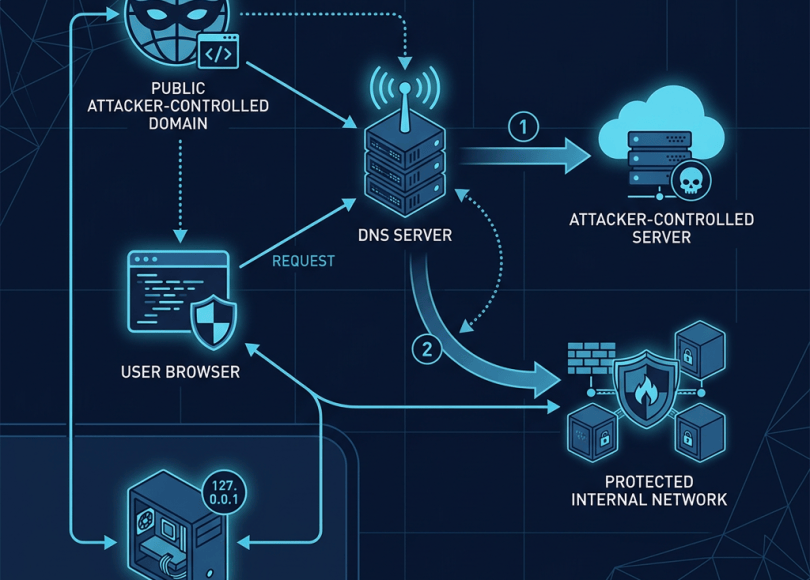
With DNS rebinding, an attacker-controlled hostname can be configured so that its DNS answer changes over time.
Conceptually:
First lookup:evil.example ↓Attacker's public server
Later:
Second lookup:evil.example ↓Internal/private address
The hostname remains the same.
The destination changes.
Why Would This Matter?
Modern applications sometimes trust hostnames.
Imagine a local application running on:
127.0.0.1:8080
It may expose an administrative interface intended only for the local machine.
A browser normally can’t simply access every internal service from every website because browsers enforce security boundaries.
But if an application has unsafe assumptions about:
- DNS
- hostnames
- origins
- network location
- redirects
- CORS
- WebSockets
those assumptions can sometimes be abused.
DNS rebinding attempts to exploit exactly this kind of trust relationship.
A Simple Analogy
Imagine a delivery company has a rule:
“Deliver packages to whoever owns the building named
Warehouse A.”
The attacker keeps the building name the same.
But changes the physical location associated with that name.
First:
Warehouse A → Public Building
Later:
Warehouse A → Private Office
The delivery system trusts the name.
It doesn’t verify the destination independently.
That’s the basic idea behind DNS rebinding.
The Basic Architecture
A simplified scenario looks like:
              ATTACKER
                 │
                 ▼
        attacker-domain.com
                 │
           DNS response
                 │
        ┌────────┴────────┐
        │                 │
        ▼                 ▼
   Public server     Internal IP
The hostname stays constant.
The DNS answer changes.
Why Browsers Are Normally a Barrier
Browsers implement a security model called the same-origin policy.
An origin is roughly:
scheme + host + port
For example:
https://example.com:443
is an origin.
JavaScript running on one origin generally cannot freely read data from another origin.
This prevents a malicious website from simply doing:
fetch("http://192.168.1.1/")
and reading whatever comes back.
Without these protections, visiting one malicious website could become extremely dangerous.
Where DNS Rebinding Gets Interesting
Suppose JavaScript runs from:
http://attacker-domain.test
The browser considers the origin to be:
attacker-domain.test
Now imagine DNS initially resolves:
attacker-domain.test ↓203.0.113.50
Later, DNS resolves the same hostname to:
192.168.1.10
The browser still sees:
attacker-domain.test
as the hostname.
But the network destination may now be completely different.
This mismatch is what DNS rebinding attacks attempt to exploit.
DNS Rebinding Isn’t a Single Vulnerability
This is important.
DNS rebinding is generally an attack technique.
It becomes dangerous when combined with another weakness.
For example:
DNS Rebinding +Weak origin validation +Internal service ↓Potential compromise
Without a vulnerable target, changing DNS answers may accomplish nothing.
What Kind of Systems Can Be Exposed?
Historically, researchers have investigated DNS rebinding against services such as:
- Local development servers
- Home routers
- IoT devices
- Administrative interfaces
- Internal dashboards
- Developer tools
- Local APIs
- Internal web applications
The common characteristic is:
A service is reachable from the victim’s network but wasn’t designed to be accessed safely by arbitrary web pages.
Why localhost Is Special
Developers frequently run applications on:
localhost127.0.0.1
Examples include:
localhost:3000localhost:5000localhost:8000localhost:8080
These are often development services.
A developer may assume:
“It’s only available locally, so authentication isn’t necessary.”
That assumption can be dangerous if a browser-accessible application can be manipulated into interacting with the service.
The Same Problem Exists With Private IPs
Private network ranges include:
10.0.0.0/8
172.16.0.0/12
192.168.0.0/16
A home network might contain:
192.168.1.1192.168.1.10192.168.1.20
A corporate network could have thousands of internal addresses.
These systems aren’t supposed to be directly exposed to the public internet.
But a user’s browser exists inside the network.
That makes browser-based attacks against local services an interesting security concern.
DNS Rebinding vs SSRF
These vulnerabilities can look similar but aren’t identical.
SSRF
Server-Side Request Forgery happens when:
Attacker ↓Application server ↓Internal resource
The server makes the request.
DNS Rebinding
The vulnerable component might be:
Victim's browser ↓DNS ↓Internal service
The browser is involved in the network request.
DNS rebinding can also be relevant to server-side systems when they resolve hostnames inconsistently.
DNS Rebinding and SSRF Can Intersect
Consider an application that accepts:
https://some-host.example
and then fetches it server-side.
Suppose it performs:
DNS lookup ↓Check IP ↓Connect
If the DNS answer changes between those operations, the application may validate one IP but connect to another.
Conceptually:
Lookup #1 ↓Public IP ↓"Looks safe" ↓DNS changes ↓Lookup #2 ↓Private IP ↓Connection
This is sometimes described as a TOCTOU-style DNS rebinding issue.
The TOCTOU Problem
TOCTOU means:
Time Of Check To Time Of Use.
The application checks something:
"Is this IP public?"
Answer:
Yes.
Then later uses the hostname:
"Connect to this hostname."
But the DNS result has changed.
Now:
Check:203.0.113.50
while:
Connection:192.168.1.10
The application checked one destination and connected to another.
Why DNS Caching Matters
DNS responses have a TTL:
Time To Live
which tells resolvers how long an answer may be cached.
DNS rebinding techniques historically manipulate DNS timing and responses to influence when different components obtain different answers.
However, modern browsers, resolvers, operating systems, and network infrastructure can make this behavior much less predictable than simple diagrams suggest.
That’s another reason:
A DNS record changing does not automatically equal an exploitable vulnerability.
Modern Browser Defenses
Browsers have introduced various defenses against attacks involving private network access and suspicious requests.
Depending on browser and context, mechanisms such as:
- Private Network Access protections
- CORS
- Same-origin enforcement
- Mixed-content restrictions
- DNS behavior
- Secure context requirements
can interfere with DNS rebinding attacks.
But browser protections aren’t a substitute for securing the underlying application.
Private Network Access
Modern browsers increasingly distinguish between public and private network destinations.
For example:
Public website ↓Private network
can trigger additional security checks.
This is important because a public website attempting to interact with a device on:
192.168.x.x
is fundamentally different from communicating with another public website.
Developers should understand these browser security mechanisms when building applications that intentionally interact with local devices.
Why IoT Devices Can Be Interesting
Home networks frequently contain devices such as:
RouterPrinterNASSmart TVCamerasHome automation hubs
Some expose web interfaces.
Historically, many devices assumed:
“Anyone who can reach this interface is already trusted.”
That’s dangerous.
A malicious website shouldn’t be able to manipulate a user’s router or smart device simply because the user visited the website.
Routers Are Especially Sensitive
A home router might have an administration interface at:
192.168.1.1
If the router has:
- weak authentication
- missing CSRF protection
- permissive CORS
- vulnerable APIs
- unsafe local administration endpoints
then browser-based attacks become more interesting.
DNS rebinding can sometimes be part of a chain used to reach such services.
CSRF Can Make the Problem Worse
Imagine an internal device has an endpoint:
POST /settings/change
and relies entirely on the assumption:
“Only local users can reach this.”
If the endpoint also lacks CSRF protection, a malicious website may potentially cause requests to be sent from a victim’s browser.
This doesn’t mean DNS rebinding automatically bypasses CSRF.
Rather:
DNS Rebinding+Weak local service+Missing CSRF protection
can create a dangerous chain.
CORS Can Also Matter
Suppose an internal application returns:
Access-Control-Allow-Origin: *
and exposes sensitive API responses.
Now a malicious web page may have a much easier time interacting with that service if other protections are absent.
Again, CORS isn’t inherently vulnerable.
The problem is inappropriate trust.
WebSockets Can Be Relevant
Modern local applications sometimes communicate through WebSockets:
ws://localhost:9000
or:
wss://device.local
If an application has weak origin validation, unexpected browser-based connections may become possible.
This is another reason local services should explicitly validate:
OriginAuthenticationAuthorization
rather than assuming:
“It’s local, so it’s safe.”
The Security Mistake: Trusting Network Location
One of the biggest lessons from DNS rebinding is:
Being on the local network is not authentication.
An application shouldn’t say:
Private IP = trusted
Instead:
Private IP+Authentication+Authorization+Origin validation
should be considered together.
Network location is not identity.
How Security Researchers Find DNS Rebinding Risks
If you’re doing authorized testing, start with asset discovery.
Look for applications that:
- Resolve user-controlled hostnames
- Fetch remote URLs
- Access local devices
- Provide browser-to-device communication
- Accept callback URLs
- Process webhooks
- Connect to user-supplied hosts
For server-side applications, pay particular attention to:
URL fetchersWebhook validatorsImage fetchersPDF generatorsPreview servicesImport systemsAPI proxies
These can overlap with SSRF testing.
Step 1: Identify Hostname Resolution
Ask:
Does the application resolve a hostname itself?
If yes, determine:
When does DNS resolution occur?How often?Is the result cached?Is the IP validated?Is the hostname resolved again before connection?
These questions are more useful than simply asking:
“Does it use DNS?”
Step 2: Look for IP Validation
A secure application should carefully consider whether resolved addresses belong to:
LoopbackPrivate networksLink-local networksMulticastReserved rangesCloud metadata endpoints
when such destinations are not required.
Step 3: Compare Validation and Connection
A particularly important security question is:
Does the application validate the same destination that it eventually connects to?
If the application:
resolves ↓validates ↓resolves again ↓connects
there may be a race between validation and use.
Step 4: Use a Controlled DNS Environment
For authorized testing, security researchers can use a domain they control.
The DNS infrastructure can provide controlled answers for testing.
The objective is to demonstrate:
Public test destination ↓Validation ↓Controlled DNS change ↓Different test destination
Use infrastructure you own.
Don’t attempt to target private systems belonging to other people.
Step 5: Use Harmless Canary Services
A controlled canary can show which destination the application contacted.
For example:
TEST-REQUEST-123
You can determine:
Which hostname was resolved?Which IP was contacted?When was it contacted?
This gives you evidence without accessing sensitive infrastructure.
What a Good Finding Looks Like
A strong report should demonstrate:
User-controlled hostname ↓Application resolves hostname ↓Application performs security validation ↓DNS answer changes ↓Application connects to unexpected destination
Then explain the security consequence.
Avoid vague reports such as:
“DNS rebinding might work.”
Show reproducible behavior.
Common False Positives
DNS rebinding testing can produce many false positives.
DNS changed
That alone isn’t a vulnerability.
Private IP resolved
That alone doesn’t prove access.
Connection failed
Failure isn’t exploitation.
Browser sent a request
That doesn’t mean the response was readable.
CORS blocked the response
This may prevent data exposure.
PNA blocked the request
Modern browser protections may stop the attack.
Local service required authentication
Authentication may prevent meaningful impact.
Always verify the complete attack chain.
How Developers Can Defend Against DNS Rebinding
The best defense depends on where the issue exists.
For server-side applications:
1. Resolve and validate carefully
If users provide hostnames, don’t assume DNS is stable.
2. Validate the actual destination
Be careful about resolving a hostname for validation and then resolving it again for use.
3. Block private destinations when unnecessary
Consider:
127.0.0.0/810.0.0.0/8172.16.0.0/12192.168.0.0/16
and other special-purpose ranges.
4. Re-check after redirects
A safe initial URL can redirect to a private address.
For example:
Public URL ↓Redirect ↓Private IP
Redirect handling must be part of the security model.
Don’t Forget IPv6
Developers sometimes block IPv4 private addresses but forget IPv6.
For example:
127.0.0.1
isn’t the only loopback representation.
IPv6 has:
::1
Likewise, IPv6 contains other special address ranges that need consideration.
A security filter that only understands IPv4 can create gaps.
Don’t Trust Hostnames Alone
A dangerous approach is:
if hostname.endswith(".example.com"): allow()
A hostname is not inherently a guarantee about the final network destination.
Applications should consider:
DNS resolutionIP addressRedirectsAuthenticationAuthorizationNetwork policy
together.
Secure Local Services Too
If you’re developing software that runs on a user’s computer, don’t assume:
“It’s localhost, so nobody can attack it.”
Protect local APIs with:
- Authentication
- Authorization
- Origin checks
- CSRF protection where applicable
- Strict request validation
- Minimal exposed functionality
- Safe binding configuration
If a service doesn’t need network access, consider whether it should listen only on the appropriate interface.
Home Router and IoT Developers Should Be Careful
Local administration interfaces should not rely solely on:
Source IP = local
Instead, require proper authentication.
Also consider:
CSRF protectionOrigin validationCORS policySecure cookiesFirmware updates
The local network should not be treated as a completely trusted environment.
DNS Rebinding Attack Chain
The concept can be summarized like this:
                ATTACKER
                    │
                    ▼
           Malicious Website
                    │
                    ▼
             Attacker DNS
                    │
           ┌────────┴────────┐
           │                 │
           ▼                 ▼
      Public IP        Private IP
           │                 │
           │                 ▼
           │          Internal Service
           │                 │
           └──── Browser ────┘
The hostname stays the same.
The destination changes.
The attack succeeds only if the surrounding security controls fail to prevent the resulting interaction.
DNS Rebinding vs Normal DNS
| Normal DNS | DNS Rebinding |
|---|---|
| Hostname resolves to expected destination | Hostname can resolve to different destinations |
| Stable application behavior | Destination can change |
| Usually predictable | Intentionally manipulated |
| No parser/security mismatch required | Relies on trust/validation weakness |
DNS Rebinding vs Subdomain Takeover
These two topics both involve DNS but are fundamentally different.
Subdomain Takeover
The attacker gains control of a subdomain because its DNS record points to an abandoned external resource.
DNS ↓Abandoned service ↓Attacker claims resource
DNS Rebinding
The attacker manipulates DNS resolution so a hostname resolves to different destinations.
DNS ↓Public destination ↓Private destination
One is primarily about dangling ownership.
The other is primarily about destination inconsistency.
Why This Matters for Bug Bounty Hunters
DNS rebinding is particularly interesting when investigating:
SSRFLocal APIsCloud servicesIoTBrowser securityWebSocketsInternal dashboardsURL fetchers
But it should be treated as an advanced technique.
Start with fundamentals:
DNSHTTPSame-Origin PolicyCORSCSRFSSRFIP addressingReverse proxies
Once you understand those pieces, DNS rebinding becomes much easier to reason about.
DNS Rebinding Testing Checklist
For authorized assessments:
DNS
- Understand DNS resolution
- Check TTL behavior
- Identify whether multiple answers are possible
- Control your own testing domain
Application
- Identify user-controlled hostnames
- Identify URL-fetching functionality
- Understand when DNS resolution happens
- Check redirect handling
- Examine IP validation
Network
- Consider IPv4
- Consider IPv6
- Consider loopback
- Consider private ranges
- Consider link-local addresses
Browser
- Understand same-origin policy
- Consider CORS
- Consider CSRF
- Consider Private Network Access
- Consider WebSocket origin validation
Safety
- Use infrastructure you own
- Use harmless canaries
- Never target random internal devices
- Never access other users’ private systems
- Stop after proving the vulnerability
The Bigger Lesson
DNS looks simple:
hostname → IP address
But modern applications often assume that relationship is permanent.
It isn’t.
DNS is a distributed naming system.
The answer can change.
And security-sensitive applications need to account for that.
The deeper lesson is:
Never confuse a name with an identity.
A hostname doesn’t prove who owns the destination.
An IP address doesn’t prove who is authorized.
A private network doesn’t automatically mean trusted.
And a successful DNS lookup doesn’t mean the destination is safe.
Final Takeaway
DNS rebinding isn’t magic.
It is a technique that becomes dangerous when an application trusts a hostname or DNS result without correctly considering that the destination can change.
The classic problem looks like:
Check:"Is this destination safe?"Answer:"Yes."Later:Connect:"Where does this hostname point now?"Answer:"Somewhere completely different."
That’s the security gap.
For developers:
Validate the actual destination, handle redirects safely, authenticate local services, and never treat private networks as automatically trusted.
For security researchers:
Understand DNS, understand the application’s network behavior, and prove the complete chain using infrastructure you control.
Because sometimes the most dangerous part of a hostname isn’t where it points.
It’s where it points next.
Think Like an Attacker. Secure Like a Pro.
Discover more from Spyboy blog
Subscribe to get the latest posts sent to your email.
