
 Posted by
 When people think about privacy…
They worry about:
Google.
Facebook.
TikTok.
Hackers.
But almost nobody thinks about the small plastic box sitting quietly in the corner of their house.
Your Wi-Fi router.
It doesn’t have a camera.
It doesn’t have a microphone.
It doesn’t display ads.
It rarely gets attention.
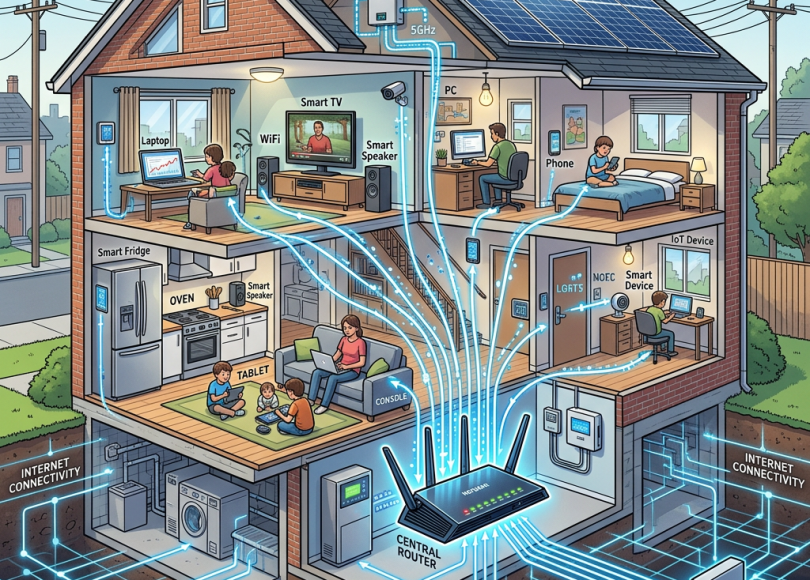
Yet every single device in your home depends on it.
Your phone.
Your laptop.
Your smart TV.
Your PlayStation.
Your Alexa.
Your CCTV cameras.
Your smart lights.
Your smart fridge.
Your smartwatch.
Even your robot vacuum.
Before any of them reach the internet…
They talk to your router first.
Your router has become the traffic controller for your digital life.
The question is:
How much does it actually know about you?
The answer surprises most people.
Your Router Is the Front Door to Your Digital Home
Imagine your house.
Every visitor enters through the front door.
Your router works much the same way.
Every internet request usually passes through it.
Every website.
Every app.
Every game.
Every software update.
Every smart device.
It doesn’t necessarily understand the encrypted contents of every connection.
But it often knows where connections are going and which device made them.
That’s incredibly useful for networking.
It’s also important for understanding privacy.
Your Router Knows Every Device in Your House
Open your router’s administration page and you’ll probably find a list of connected devices.
It may include:
- Your phone
- Your partner’s phone
- Children’s tablets
- Laptops
- Smart TVs
- Security cameras
- Game consoles
- Smart speakers
- Printers
- Streaming devices
Alongside each device you may see:
- Device name
- Local IP address
- MAC address
- Connection type (Wi-Fi/Ethernet)
- Whether it’s currently online
Many people don’t realize just how many internet-connected devices they own until they check.
It Knows When Devices Come and Go
Your router often knows:
- When your phone connected
- When it disconnected
- Which Wi-Fi band it used
- Signal strength
- How long it stayed online
Over time, this creates a picture of your household’s digital activity.
Not necessarily what everyone was doing.
But when devices were active.
It May Know Which Websites You’re Visiting
This is where myths begin.
Many people think:
“My router can read every password I type.”
Not true.
Most websites today use HTTPS, which encrypts the content exchanged between your browser and the website.
That means your router doesn’t simply display:
Username:
Password:
Bank Balance:
However…
Depending on how your network is configured, your router or associated DNS service may still know that your device connected to certain domains or internet services.
Exactly what is visible depends on technologies such as HTTPS, DNS encryption, router features, and your network setup.
Your Router Knows Which Device Asked
Suppose two people visit the same website.
The router may distinguish between:
Phone A
Laptop B
Smart TV
Game Console
Even if it doesn’t know who is physically holding the device, it usually knows which device initiated the connection.
Your Smart TV Talks More Than You Think
Most smart TVs connect to the internet regularly.
Not just when you’re watching Netflix.
They may check for:
- Firmware updates
- Streaming services
- App updates
- Voice assistant features
- Time synchronization
The router sees those devices connecting.
Many users are surprised by how “chatty” smart-home devices can be.
Your Alexa, Google Home, and Smart Speakers
Smart speakers also communicate over your home network.
Depending on the device and settings, they may contact cloud services for updates, voice processing, or synchronization.
Your router becomes the pathway for all of that traffic.
Your Security Cameras Never Really Sleep
Many internet-connected cameras periodically communicate with cloud services.
That doesn’t mean someone is constantly watching your camera feed.
It does mean these devices are active members of your home network.
Keeping their firmware updated is important.
Guest Wi-Fi Isn’t Just for Visitors
One of the most underused router features is Guest Wi-Fi.
Instead of giving visitors access to your primary network, create a guest network.
This can help separate visitors’ devices from your own computers and smart-home equipment, depending on how your router implements guest isolation.
It’s also useful for:
- Temporary visitors
- Contractors
- IoT devices in some setups
Your Router Keeps Logs (Sometimes)
Some routers maintain logs of events such as:
- Devices connecting
- Devices disconnecting
- DHCP assignments
- System events
- Reboots
- Administrative logins
The amount of information retained varies dramatically by router model.
Some keep very little.
Others offer extensive logging.
Your ISP Is Different From Your Router
Many people confuse these two.
Your router is the device in your home.
Your Internet Service Provider (ISP) connects your home to the wider internet.
If your ISP supplied the router, it may also remotely manage certain aspects of the device, depending on the service and configuration.
Who can access what depends on your equipment, your contract, and the provider’s management systems.
Can Hackers Hack My Router?
Yes—but not because routers are “always insecure.”
Common risks include:
- Weak admin passwords
- Outdated firmware
- Remote management left enabled unnecessarily
- Default credentials
- Old security vulnerabilities
That’s why routers should be treated like any other computer.
They need updates too.
Change These Router Settings Today
Your router is one of the most important devices in your house.
Here are the first things you should check:
✅ Change the Admin Password
Never leave the factory default password in place.
✅ Update the Firmware
Manufacturers regularly release security updates.
Log in occasionally and check for updates, or enable automatic updates if your router supports them.
✅ Use WPA3 (or WPA2 if WPA3 isn’t available)
Choose the strongest security mode your devices support.
Avoid outdated protocols like WEP.
✅ Disable WPS if You Don’t Need It
Wi-Fi Protected Setup (WPS) is convenient but has had security concerns over the years. If you never use it, consider disabling it.
✅ Create a Guest Network
Separate visitors from your main network whenever practical.
✅ Review Connected Devices Regularly
If you see a device you don’t recognize…
Investigate it.
✅ Rename Your Network (SSID)
Avoid using names that reveal:
- Your surname
- Apartment number
- Internet provider
- Router model
A generic network name reveals less information.
✅ Turn Off Remote Administration (If You Don’t Use It)
Unless you specifically need to manage your router from outside your home, disabling remote administration reduces unnecessary exposure.
Common Myths
| Myth | Reality |
|---|---|
| My router can read every password I type | HTTPS encrypts most modern web traffic, so routers don’t normally display your passwords in plaintext. |
| Routers don’t need updates | They run software and benefit from security updates. |
| Guest Wi-Fi is only for guests | It can also help isolate less-trusted devices in some home setups. |
| Hackers only target computers | Home routers are also targeted because they sit at the center of your network. |
Frequently Asked Questions
Can my router see my browsing history?
It may see information about network connections, but HTTPS prevents it from simply reading the contents of encrypted web pages. Exactly what is visible depends on your network configuration.
Can my Wi-Fi owner see what websites I visit?
They may have access to router information or network logs, depending on the equipment and configuration. HTTPS still protects the contents of most web traffic.
Can someone hack my router from the internet?
It’s possible if the router is vulnerable or poorly configured, which is why firmware updates and strong passwords matter.
How do I know who’s connected to my Wi-Fi?
Log into your router’s administration interface and review the list of connected devices.
Should I reboot my router regularly?
An occasional reboot can help apply updates or resolve issues, but rebooting alone is not a substitute for installing firmware updates and using secure settings.
Final Thoughts
Most people spend hundreds of dollars protecting their phones.
They install antivirus software.
They enable two-factor authentication.
They buy privacy-focused browsers.
Then they completely forget about the one device that every internet connection in their home passes through.
Your Wi-Fi router isn’t just a box that gives you internet.
It’s the central hub of your digital home.
Treat it like one.
Update it.
Secure it.
Check it regularly.
Because in today’s connected world, protecting your privacy starts long before your phone reaches Google, Facebook, or any other website.
It starts with the small blinking box sitting quietly on your shelf.
Discover more from Spyboy blog
Subscribe to get the latest posts sent to your email.

One comment