
 Posted by
 Build a Cybersecurity Lab Without Buying a Huge Server
You don’t need a giant rack server to build a serious cybersecurity lab.
You don’t even necessarily need an expensive gaming PC.
A small computer sitting quietly beside your router can become:
- A Kali Linux machine
- A Proxmox virtualization server
- An Active Directory lab
- A Windows security-testing environment
- A Wazuh server
- A Docker host
- A malware-analysis lab
- A vulnerable web-app laboratory
- A SIEM practice environment
- A network-monitoring box
- A VPN server
- A cybersecurity CTF environment
- A self-hosted development server
That’s why mini PCs have become extremely interesting for cybersecurity enthusiasts.
Modern models can combine powerful CPUs, surprisingly large amounts of RAM, fast NVMe storage and multiple Ethernet ports into machines small enough to fit in your hand.
And for cybersecurity students, bug bounty hunters, penetration testers and home-lab enthusiasts, that combination can be extremely useful.
But there’s a problem.
Not every mini PC is a good cybersecurity lab machine.
A beautiful-looking mini PC with a fast processor might be a terrible choice if it has:
- Poor Linux compatibility
- Limited RAM
- Only one storage slot
- One Ethernet port
- Soldered memory
- Weak cooling
- Poor BIOS options
- No virtualization support
- Difficult-to-replace components
So before buying one, you need to understand what actually matters.
What Makes a Mini PC Good for Cybersecurity?
If you’re buying a mini PC for cybersecurity, don’t shop purely by CPU benchmark.
Your requirements are different from those of a normal office computer.
A cybersecurity lab often needs to run several workloads simultaneously.
For example:
                 MINI PC
                    │
        ┌───────────┼───────────┐
        │           │           │
       Kali       Windows     Linux
        VM           VM          VM
        │            │           │
      Tools        AD Lab      Wazuh
        │            │           │
        └────────────┼───────────┘
                     │
               Virtual Network
You might have:
- Kali Linux
- Windows 11
- Windows Server
- Ubuntu
- Security Onion
- Wazuh
- Metasploitable
- OWASP Juice Shop
- Docker containers
- Databases
- Burp Suite
- Browser sessions
- Packet captures
running at the same time.
That changes the hardware requirements dramatically.
The Most Important Specifications
Before looking at specific machines, understand these specifications.
1. RAM
For a cybersecurity lab:
16GB
Usable for:
- One or two lightweight VMs
- Kali Linux
- Programming
- Basic Docker
- Small labs
But you’ll quickly hit the ceiling.
32GB
This is the sweet spot for many users.
You can comfortably experiment with:
- Kali
- Windows
- Linux servers
- Docker
- Active Directory
- Security tools
64GB
Excellent if you want to build a serious virtualization lab.
You can dedicate memory to several VMs without constantly shutting everything down.
96GB+
Useful for advanced homelabs, large VM environments and heavier workloads.
But don’t buy enormous RAM capacity just because the number looks impressive.
Check whether the specific mini PC actually supports upgrading to that capacity.
Some modern mini PCs use soldered memory.
2. CPU Cores and Threads
Virtual machines love CPU resources.
A dual-core system may technically run virtualization.
That doesn’t mean you will enjoy using it.
For a cybersecurity lab, look for modern CPUs with:
- Multiple cores
- Multiple threads
- Hardware virtualization
- Good sustained performance
- Reasonable power consumption
AMD Ryzen and Intel Core/Core Ultra systems can both be excellent options.
The exact CPU generation matters less than the overall platform and your workload.
3. Hardware Virtualization
This is extremely important.
For virtualization, you want CPU support for technologies such as:
Intel VT-x
or:
AMD-V
You may also encounter:
Intel VT-d
or equivalent I/O virtualization capabilities.
These technologies help hypervisors such as:
- Proxmox VE
- VMware
- VirtualBox
- Hyper-V
run virtual machines efficiently.
Always verify virtualization support for the exact processor and BIOS configuration before buying.
4. Storage
Cybersecurity labs consume storage extremely quickly.
One Windows VM can take tens of gigabytes.
Then add:
- Kali
- Ubuntu
- Windows Server
- Security Onion
- Wazuh
- Docker images
- ISO files
- PCAP files
- snapshots
- forensic images
- malware-analysis samples
Suddenly your “1TB SSD” doesn’t look so large.
For most people:
512GB
Minimum practical starting point.
1TB
Much more comfortable.
2TB
Excellent for a serious home lab.
Multiple NVMe slots
Even better.
Some mini PCs provide two or more M.2 slots, allowing you to separate operating systems, VM storage and data.
For example:
NVMe 1│├── Proxmox├── System└── ManagementNVMe 2│├── Kali VM├── Windows VM├── AD Lab└── Security Tools
That can make your lab much easier to manage.
5. Ethernet Ports
This is one of the most overlooked specifications.
A cybersecurity lab is fundamentally a networking environment.
One Ethernet port is enough for many users.
But multiple Ethernet ports can completely change what you can build.
Imagine:
                 Internet
                    │
                    ▼
              ┌───────────┐
              │ Firewall  │
              └─────┬─────┘
                    │
              ┌─────▼─────┐
              │  Mini PC  │
              └──┬────┬───┘
                 │    │
             LAB LAN  DMZ
                 │    │
          ┌──────┘    └──────┐
          ▼                  ▼
      Windows AD          Web Server
      Kali VM             Test Apps
A mini PC with dual 2.5GbE ports can therefore be particularly interesting for networking labs.
Some specialized systems go much further.
For example, Protectli’s VP4670 is designed as a small fanless appliance with six 2.5GbE Ethernet interfaces and support for up to 64GB of RAM.
That makes this class of hardware interesting for firewall and network-security labs rather than simply desktop use.
6. 2.5GbE Is Becoming More Interesting
Gigabit Ethernet is still perfectly usable.
But if you’re building a serious home lab, 2.5GbE provides much more bandwidth for:
- NAS transfers
- VM storage
- Network monitoring
- Large PCAP files
- Backups
- Virtualization
- Multi-machine labs
If you’re buying a new system today, I’d seriously consider 2.5GbE where available.
7. Cooling Matters
Mini PCs are small.
That’s their advantage.
It’s also their problem.
A powerful CPU inside a tiny enclosure generates heat.
Under a short benchmark:
Everything looks great.
Under several hours of:
- VM workloads
- compilation
- packet processing
- Docker
- Windows updates
- malware-analysis tooling
thermal behavior becomes much more important.
Don’t evaluate a mini PC only by its maximum boost clock.
Look for:
- Cooling design
- Fan configuration
- Sustained performance
- Reviews showing long workloads
- Noise levels
- Thermal throttling
8. Upgradeability
This can be more important than raw CPU performance.
Look for systems where you can upgrade:
- RAM
- NVMe storage
- Wi-Fi
- Sometimes additional storage
A machine that starts with:
32GB RAM + 1TB NVMe
and allows future upgrades can remain useful for years.
The Best Mini PCs for Cybersecurity Labs in 2026
There isn’t one universal winner.
Different machines make sense for different lab designs.
Here are several categories worth considering.
1. GMKtec EVO-X1
The GMKtec EVO-X1 is an interesting high-performance option for users who want a very powerful compact system.
It uses AMD’s Ryzen AI 9 HX 370 with:
- 12 cores
- 24 threads
- Up to 5.1GHz boost
- Radeon 890M graphics
- Up to 64GB LPDDR5X memory
- Two M.2 2280 NVMe slots
- Dual 2.5GbE Ethernet
- USB4
- OCuLink
according to GMKtec’s specifications.
The dual Ethernet ports are particularly interesting for networking experiments.
The two NVMe slots are also useful for separating the host environment from VM storage.
Good for:
- Proxmox
- Multiple VMs
- Kali Linux
- Docker
- Development
- AI experimentation
- Network labs
- Heavy multitasking
Watch out for:
The memory is onboard, so RAM upgradeability is limited compared with systems using replaceable SODIMMs.
That means:
Buy the RAM capacity you actually need.
2. Minisforum UM890 Pro
The Minisforum UM890 Pro is another interesting option for a cybersecurity workstation or virtualization lab.
Minisforum maintains dedicated support resources for the UM890 Pro, including BIOS, drivers and manuals.
That matters more than people think.
A lab computer isn’t just about today’s benchmark.
You want:
Drivers.
BIOS updates.
Documentation.
Hardware support.
Community knowledge.
Good for:
- Kali Linux
- VirtualBox
- VMware
- Proxmox experiments
- Programming
- Docker
- Multiple VMs
Before purchasing, check the exact configuration and memory/storage options available in your region.
3. Minisforum MS-A1
The Minisforum MS-A1 is particularly interesting for storage-heavy labs.
Its platform supports:
- AMD Ryzen processors
- Up to 96GB DDR5 memory
- Four M.2 PCIe 4.0 NVMe slots
according to Minisforum’s specifications.
That gives it a very different advantage from a typical tiny office PC.
Imagine:
M.2 #1Proxmox / OSM.2 #2VM storageM.2 #3PCAP / datasetsM.2 #4Backup / secondary storage
This kind of architecture can be extremely useful for advanced homelabs.
Good for:
- Large VM libraries
- Security monitoring
- PCAP storage
- Docker
- Databases
- Virtualization
- Development
If storage expansion is a major priority, this type of system deserves attention.
4. Lenovo ThinkCentre M75q Gen 5 Tiny
Not every cybersecurity lab needs an enthusiast mini PC.
Business-class Tiny systems can be excellent lab machines.
The Lenovo ThinkCentre M75q Gen 5 Tiny is one example.
Lenovo lists configurations with AMD Ryzen PRO processors, support for up to 64GB DDR5 memory and two M.2 PCIe Gen4 SSD slots. It also supports Ubuntu on listed configurations.
Its footprint is only around:
1 liter.
That’s tiny.
And because this is a business-oriented platform, you also get features such as:
- TPM 2.0
- AMD Memory Guard
- ThinkShield
- Toolless access to some components
- Multiple display outputs
according to Lenovo.
Good for:
- Linux
- Kali
- Lightweight Proxmox
- Development
- Active Directory labs
- Office + lab usage
- Low-power homelabs
Important consideration
The exact configuration matters.
A low-RAM business configuration isn’t automatically a good virtualization server.
If you buy one:
Prioritize RAM and SSD capacity.
5. Dell OptiPlex Micro
Another option is the Dell OptiPlex Micro family.
Dell’s OptiPlex 7020 Micro, for example, provides a compact chassis with:
- RJ45 Ethernet
- Multiple USB ports
- M.2 Wi-Fi
- Two M.2 SSD positions
- Wi-Fi 6E options
- Small physical dimensions
according to Dell’s current specifications.
These machines can be particularly attractive when you want a business-class computer rather than a flashy consumer mini PC.
Good for:
- Linux
- Programming
- Kali
- Lightweight VMs
- Docker
- Security tooling
- Small servers
They’re also worth considering in refurbished or enterprise hardware markets.
A used business mini PC with upgradeable RAM and SSD can sometimes make more sense than buying a brand-new low-end consumer machine.
6. GMKtec K8 Plus
If you want something less expensive than the high-end EVO-X1 class, the GMKtec K8 Plus is another model worth researching.
GMKtec lists the K8 Plus with an AMD Ryzen 7 8845HS processor, dual PCIe 4.0 SSD support and dual 2.5GbE networking.
That combination is interesting for home labs because you get:
CPU performance
Fast storage
Multiple Ethernet ports
without moving into a traditional desktop.
Good for:
- Kali Linux
- Proxmox
- Docker
- Programming
- Web security labs
- Multiple lightweight VMs
7. Protectli Vault
If your goal is not primarily:
“Run Windows and Kali”
but instead:
“Build a serious network-security appliance”
then Protectli deserves consideration.
The Protectli Vault family is designed around network appliances.
The VP4670, for example, provides six 2.5GbE ports, Intel virtualization support, dual SO-DIMM slots and NVMe/SATA storage options.
That makes this category particularly interesting for:
- OPNsense
- pfSense
- VyOS
- Network segmentation
- Firewall labs
- Routing
- IDS/IPS experiments
- VLAN testing
It’s a different type of mini PC.
Think:
Normal Mini PCDesktop │ ├── Kali ├── Windows └── LinuxProtectli-style applianceInternet │ ▼ Firewall │ ┌──┼─────────────┐ ▼ ▼ ▼LAN DMZ LAB
What About Intel NUCs?
Intel NUCs were hugely popular in homelab communities.
They’re still worth understanding because used and refurbished NUC hardware can be attractive.
However, don’t automatically assume:
“NUC = best mini PC.”
The exact generation matters.
Older NUCs can have:
- Older CPUs
- Slower networking
- Limited RAM
- Fewer storage options
- Older Wi-Fi
- Higher power consumption relative to modern hardware
A newer AMD or Intel mini PC may provide considerably more performance per watt.
Mini PC vs Gaming PC for Cybersecurity
This is an important question.
Gaming PC
Advantages:
- More CPU options
- Dedicated GPU
- More RAM capacity
- More PCIe expansion
- Better cooling
- More storage options
Disadvantages:
- Large
- More expensive
- Higher power consumption
- Noisy
- Takes more space
Mini PC
Advantages:
- Tiny
- Low power
- Quiet
- Portable
- Affordable
- Easy to leave running
- Excellent for virtualization
Disadvantages:
- Limited expansion
- Integrated graphics in many models
- Fewer PCIe slots
- Cooling constraints
- Some models use soldered RAM
If your goal is:
Cybersecurity lab + everyday computer
a powerful mini PC can be an excellent solution.
If your goal is:
Huge virtualization cluster + GPU workloads + multiple expansion cards
a traditional desktop may make more sense.
How Much RAM Do You Actually Need?
Here’s a practical guide.
| RAM | Cybersecurity Lab |
|---|---|
| 8GB | ❌ Avoid |
| 16GB | Basic |
| 32GB | Excellent starting point |
| 64GB | Advanced |
| 96GB+ | Heavy virtualization |
For a new purchase:
I’d target 32GB minimum.
If you know you’re going to run:
- Windows Server
- Windows client
- Kali
- Wazuh
- Security Onion
- Multiple Linux servers
then:
64GB becomes much more attractive.
How Much Storage?
| Storage | Recommendation |
|---|---|
| 256GB | ❌ Too restrictive |
| 512GB | Basic |
| 1TB | Recommended |
| 2TB | Excellent |
| 4TB+ | Serious lab |
Remember:
A VM snapshot isn’t free.
A few Windows VMs plus snapshots can consume hundreds of gigabytes surprisingly quickly.
Proxmox vs VirtualBox
This is another important decision.
VirtualBox
Great for:
- Beginners
- Desktop users
- Learning
- Quick testing
- Running a few VMs
You can have:
Windows │VirtualBox │├── Kali├── Ubuntu└── Windows Lab
Simple.
Proxmox
More interesting when your mini PC becomes a dedicated lab server.
Instead of:
Windows ↓VirtualBox ↓VMs
you can have:
Mini PC ↓Proxmox ├── Kali ├── Windows ├── Ubuntu ├── Wazuh ├── Docker └── Security Lab
Proxmox gives you a proper virtualization platform and makes the machine behave more like a small server.
A Cybersecurity Home Lab You Can Build With One Mini PC
Here’s a realistic example.
Hardware
Mini PC32–64GB RAM1–2TB NVMe2.5GbE Ethernet
Hypervisor
Proxmox
Virtual Machines
Kali LinuxWindows 11Windows ServerUbuntu
Security systems
WazuhSecurity Onion
Vulnerable applications
Use intentionally vulnerable applications inside your isolated lab, such as:
OWASP Juice ShopDVWAMetasploitableWebGoat
Now you have a miniature cybersecurity environment.
Build an Active Directory Lab
This is one of the best uses for a mini PC.
You could create:
              Proxmox
                 │
       ┌─────────┼─────────┐
       │         │         │
 Windows Server Windows  Kali
     DC          Client
       │
       └──── AD Domain
You can then study:
- Active Directory
- Group Policy
- Authentication
- Windows logging
- Kerberos concepts
- PowerShell security
- Windows Defender
- Event logs
- Detection engineering
All without touching a real organization.
Build a SOC Lab
A stronger configuration could look like:
             Proxmox
                │
 ┌──────────────┼─────────────────┐
 │              │                 │
 ▼              ▼                 ▼
Windows       Ubuntu            Kali
 │              │                 │
 │              │                 │
 └──────────────┼─────────────────┘
                ▼
              Wazuh
                │
                ▼
             Alerts
You can generate benign activity inside your lab and learn how security monitoring detects it.
This is much more useful than simply running Kali and randomly launching tools.
Build a Network-Security Lab
If your mini PC has multiple Ethernet ports, things get even more interesting.
You can build:
                 INTERNET
                    │
                    ▼
              Firewall VM
                    │
          ┌─────────┴─────────┐
          ▼                   ▼
       Trusted               Lab
        LAN                   LAN
          │                   │
       Laptop               Kali
                             │
                         Test Servers
Add VLAN-capable switches and you can create separate:
- Management
- User
- Attack
- Server
- IoT
- DMZ
networks.
Now your mini PC isn’t just a computer.
It’s the foundation of a real networking lab.
Why Multiple Ethernet Ports Matter
Suppose a mini PC has:
NIC 1Internet/WANNIC 2LANNIC 3LabNIC 4DMZ
You can experiment with network architecture without buying a huge server.
This is where specialized systems such as Protectli become particularly attractive.
Can You Run Kali Linux Directly?
Absolutely.
You have several options.
Option 1
Install Kali directly.
Mini PC ↓Kali Linux
Option 2
Install Windows/Linux and use VirtualBox.
Host OS ↓VirtualBox ↓Kali
Option 3
Install Proxmox.
Mini PC ↓Proxmox ↓Kali VM
For learning cybersecurity, virtualization is often more flexible because you can isolate different environments.
Don’t Buy a Mini PC Based Only on CPU Benchmark Scores
This is one of the biggest mistakes.
Suppose:
Mini PC A = faster CPU
but:
Mini PC B = upgradeable RAM + 2.5GbE + dual NVMe + better Linux support.
For a cybersecurity lab, the second machine may fit your workload better.
Your priority should generally look more like:
RAM ↓Virtualization ↓Storage ↓Networking ↓CPU ↓Cooling ↓Upgradeability
The exact order depends on your workload.
What About a GPU?
For normal cybersecurity work:
You don’t need a powerful GPU.
Kali Linux doesn’t require an expensive graphics card.
Neither does:
- Burp Suite
- Nmap
- Wireshark
- Python
- Docker
- Linux administration
- Most web-security labs
A GPU becomes more relevant for workloads such as:
- Local AI
- GPU-accelerated password auditing in authorized labs
- Machine learning
- Computer vision
- GPU computing
If you’re primarily learning web security, network security and Linux:
Spend the money on RAM and SSD instead.
What About Wi-Fi Hacking?
A mini PC’s built-in Wi-Fi isn’t necessarily what you want for wireless security research.
Wireless testing often requires hardware with the appropriate capabilities for your authorized lab environment.
A dedicated USB Wi-Fi adapter can provide greater flexibility.
And remember:
Don’t test networks you don’t own or don’t have explicit authorization to assess.
Your mini PC can be the lab server while a compatible external adapter handles the wireless-testing side.
Mini PC Buying Checklist
Before purchasing, check all of these.
CPU
- Modern AMD Ryzen or Intel Core
- Multiple cores
- Hardware virtualization
- Good sustained performance
RAM
- 32GB recommended
- 64GB for serious virtualization
- Check maximum supported capacity
- Check whether RAM is replaceable
Storage
- 1TB recommended
- 2TB for heavier labs
- Prefer NVMe
- Check number of M.2 slots
Networking
- 2.5GbE preferred for new builds
- Two Ethernet ports are useful
- Four or more can be excellent for network labs
Linux
Check:
- Wi-Fi support
- Ethernet support
- GPU support
- BIOS behavior
- Suspend/resume
- Audio/display compatibility
BIOS
Look for:
- Virtualization settings
- Secure Boot
- TPM
- Boot options
- BIOS updates
Cooling
Check long-term reviews rather than five-minute benchmarks.
Power
A mini PC can consume considerably less power than a desktop, which matters if your lab runs 24/7.
Best Mini PC Configurations by Use Case
| Use Case | Suggested Configuration |
|---|---|
| Basic Kali | 16GB / 512GB |
| Cybersecurity student | 32GB / 1TB |
| Bug bounty lab | 32GB / 1TB |
| Multiple VMs | 32–64GB / 1–2TB |
| Active Directory lab | 32–64GB / 1TB+ |
| Wazuh/SOC lab | 32–64GB / 1–2TB |
| Proxmox server | 32–64GB / 1–2TB |
| Network lab | 32GB+ / 1TB + multiple NICs |
| Storage-heavy lab | 64GB+ / multiple NVMe |
| Firewall appliance | 8–32GB / SSD + multiple Ethernet |
New Mini PC or Used Business PC?
This is a surprisingly difficult decision.
A used:
Lenovo ThinkCentre Tiny
or:
Dell OptiPlex Micro
can be an excellent lab machine.
Why?
Because businesses replace computers long before they’re useless.
You may find machines with:
- 16GB RAM
- NVMe SSD
- Modern-ish CPUs
- Gigabit Ethernet
- Tiny form factors
for substantially less than a brand-new enthusiast mini PC.
But inspect carefully.
Check:
- Exact CPU
- RAM configuration
- SSD health
- BIOS status
- Power adapter
- Warranty
- Physical condition
- Manufacturer support
And don’t assume every refurbished listing is identical.
A Two-Mini-PC Cybersecurity Lab
Here’s where things get really interesting.
Instead of buying one expensive machine, you can eventually buy two.
          MINI PC #1
             │
          Proxmox
             │
     ┌───────┼────────┐
     │       │        │
    Kali   Windows   Wazuh


          MINI PC #2
             │
          Proxmox
             │
     ┌───────┼────────┐
     │       │        │
    AD     Linux     Apps
Now you have:
A miniature virtual enterprise.
You can simulate:
- Users
- Servers
- Security monitoring
- Authentication
- Network segmentation
- Logging
- Incident response
without needing enterprise hardware.
Three Mini PCs Can Become a Homelab Cluster
If you’re serious:
        ┌─────────────┐
        │   Switch    │
        └──────┬──────┘
               │
      ┌────────┼────────┐
      │        │        │
      ▼        ▼        ▼
    Node 1   Node 2   Node 3
   Proxmox   Proxmox  Proxmox
You can then experiment with:
- Clustering
- High availability concepts
- Distributed workloads
- Virtual networking
- Storage
- Backups
- Monitoring
This is one reason tiny business PCs and mini PCs have become popular among homelab enthusiasts.
Don’t Forget the Network Switch
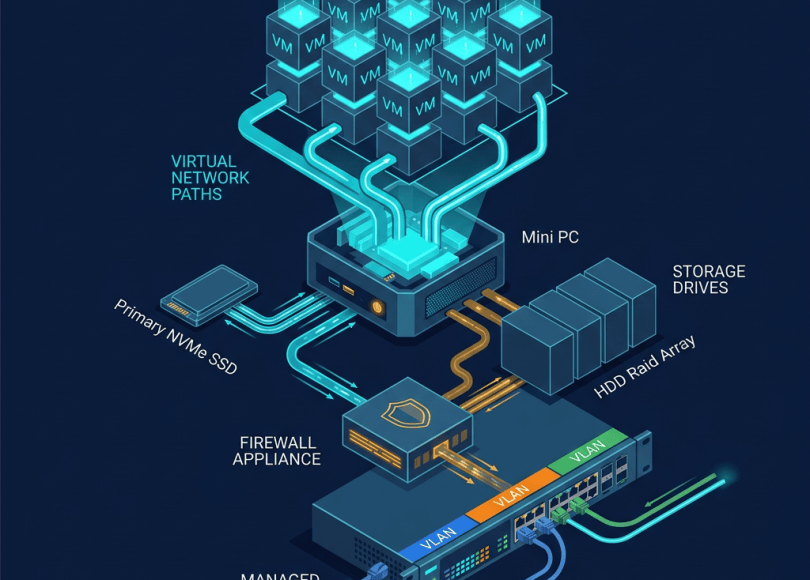
If you’re building a serious cybersecurity lab, your mini PC isn’t the only hardware you should think about.
A managed switch can give you:
- VLANs
- Port isolation
- Multiple networks
- Traffic separation
- Trunking
- Lab segmentation
A simple architecture might be:
                 Router
                   │
                   ▼
            Managed Switch
             │     │     │
             │     │     │
           Main   Lab    IoT
           VLAN   VLAN   VLAN
             │     │     │
          Laptop  VMs   Devices
This lets you practice network segmentation without touching production devices.
Don’t Put Your Cybersecurity Lab on Your Main Network Without Thinking
This is extremely important.
If you’re intentionally running:
- Vulnerable applications
- Exploit-development labs
- Malware-analysis environments
- Security testing tools
- Unknown code
don’t casually expose those environments to your everyday network.
Use:
- VLANs
- Separate virtual networks
- Host-only networking
- NAT
- Dedicated lab networks
- Firewall rules
depending on the lab.
Your goal is:
LAB │ ├── Can communicate where necessary │ └── Cannot accidentally reach everything else
Isolation is part of the lab.
Mini PC + Proxmox + Kali: Example Architecture
A simple setup could look like:
                    INTERNET
                       │
                       ▼
                    ROUTER
                       │
                       ▼
                ┌─────────────┐
                │ Mini PC     │
                │ Proxmox     │
                └──────┬──────┘
                       │
          ┌────────────┼────────────┐
          │            │            │
          ▼            ▼            ▼
        Kali        Windows      Ubuntu
          │            │            │
          └────────────┼────────────┘
                       ▼
                  Lab Network
From there you can expand into:
ADWazuhDockerJuice ShopWebGoatDVWACTF targetsLogging serverDNS server
All inside your own controlled environment.
Mini PC vs Laptop for Cybersecurity
Another common question:
Laptop
Better if you need:
- Battery
- Keyboard
- Screen
- Mobility
- Built-in Wi-Fi
- Travel
Mini PC
Better if you want:
- 24/7 operation
- Multiple VMs
- Low power
- Dedicated lab
- External monitor
- Network infrastructure
- Server-like operation
For a permanent cybersecurity lab:
Mini PC makes a lot of sense.
For a machine you carry around:
Laptop makes more sense.
My Practical Buying Strategy
If I were designing a cybersecurity home lab from scratch, I wouldn’t start by asking:
“What is the fastest mini PC?”
I’d ask:
“What do I want this machine to become?”
If it’s a Kali workstation
Look for:
16–32GB RAM1TB NVMeModern CPUGood Linux support
If it’s a VM server
Look for:
32–64GB RAM1–2TB NVMeStrong multi-core CPUVirtualization support
If it’s a network-security appliance
Look for:
Multiple Ethernet ports2.5GbEUpgradeable RAMNVMeLinux/OPNsense/pfSense compatibility
If it’s a serious homelab
Look for:
64GB+ RAMMultiple NVMe slots2.5GbEMultiple NICsGood coolingReliable BIOS/support
The Best Mini PC Isn’t Necessarily the Most Expensive One
This is probably the most important lesson.
A ₹40,000–₹60,000 mini PC with:
32GB RAM + 1TB NVMe + multiple Ethernet ports
can be more useful to a cybersecurity student than a much more expensive gaming PC with:
16GB RAM + 1TB SSD + huge GPU.
Why?
Because cybersecurity labs are often:
CPU + RAM + storage + networking problems.
Not GPU problems.
Final Recommendations by Type
Instead of calling one machine “the best,” think in categories.
For a high-performance compact lab
Look at systems such as:
GMKtec EVO-X1
Powerful CPU, dual 2.5GbE and multiple NVMe positions make it interesting for demanding workloads.
For storage-heavy experimentation
Look at:
Minisforum MS-A1
Its multi-NVMe design makes it particularly interesting when storage is a major requirement.
For a business-class tiny PC
Look at:
Lenovo ThinkCentre M75q Gen 5 Tiny
It offers a compact 1L platform with up to 64GB memory and two M.2 SSD positions on listed configurations.
For a compact business alternative
Look at:
Dell OptiPlex Micro
The current OptiPlex 7020 Micro provides a small chassis, Ethernet and two M.2 storage positions.
For network-security appliances
Look at:
Protectli Vault
The VP4670 is built around multiple Ethernet interfaces and is a very different proposition from a normal desktop mini PC.
For a value-oriented enthusiast system
Look at:
GMKtec K8 Plus
Its combination of Ryzen 7 8845HS, dual NVMe and dual 2.5GbE makes it worth investigating for homelab workloads.
The Ultimate Cybersecurity Mini PC Checklist
Before pressing Buy, check:
CPU
☐ Modern processor
☐ Multiple cores
☐ Hardware virtualization
☐ Good sustained performance
RAM
☐ 32GB minimum for serious labs
☐ 64GB if running many VMs
☐ Upgradeable if possible
Storage
☐ 1TB minimum for serious use
☐ 2TB preferred for large labs
☐ NVMe
☐ Multiple M.2 slots if possible
Networking
☐ Gigabit minimum
☐ 2.5GbE preferred
☐ Multiple Ethernet ports for network labs
Software
☐ Linux compatibility
☐ Virtualization support
☐ Proxmox compatibility if required
☐ BIOS configuration options
Hardware
☐ Good cooling
☐ Replaceable RAM if possible
☐ Replaceable SSD
☐ Accessible internals
☐ Reliable power adapter
Security
☐ TPM
☐ Secure Boot support
☐ BIOS updates
☐ Firmware support
Final Thoughts
A cybersecurity home lab doesn’t need to look like a data center.
You can build an impressive environment with a computer smaller than a paperback book.
One mini PC can become:
             YOUR CYBER LAB

                  Mini PC
                     │
                 Proxmox
                     │
       ┌─────────────┼─────────────┐
       │             │             │
      Kali        Windows        Ubuntu
       │             │             │
       ├─────────────┼─────────────┤
       │             │             │
     Wazuh           AD          Docker
       │             │             │
       └─────────────┼─────────────┘
                     │
                Lab Network
Add a managed switch.
Add another mini PC.
Add a NAS.
Add a firewall appliance.
Suddenly you’ve created a small cybersecurity environment where you can safely learn:
- Linux
- Networking
- Active Directory
- Web security
- Detection engineering
- SIEM
- Digital forensics
- Incident response
- Vulnerability management
- Virtualization
- Cloud security concepts
And perhaps the biggest advantage is this:
You control the entire environment.
You can break it.
Rebuild it.
Snapshot it.
Attack it.
Monitor it.
Destroy the VM.
Restore it.
And learn again.
That’s much better than experimenting against systems you don’t own.
The goal of a cybersecurity lab isn’t to own the most powerful hardware.
It’s to create an environment where you can repeatedly make mistakes without making them on someone else’s network.
Start small. Build safely. Learn deeply.
Think Like an Attacker. Secure Like a Pro.
Discover more from Spyboy blog
Subscribe to get the latest posts sent to your email.
